Manual Check-In Slows Front Desk Workflow
Paper sign-in sheets, verbal updates, and manual status tracking can slow down front desk teams and create confusion during busy clinic hours.
EMR-EHRs Patient Check-In & Check-Out Feature helps healthcare practices manage patient arrivals, front desk check-in, intake readiness, waiting room visibility, visit status tracking, checkout tasks, follow-up scheduling, reports, and secure patient flow records inside one connected EMR workflow.
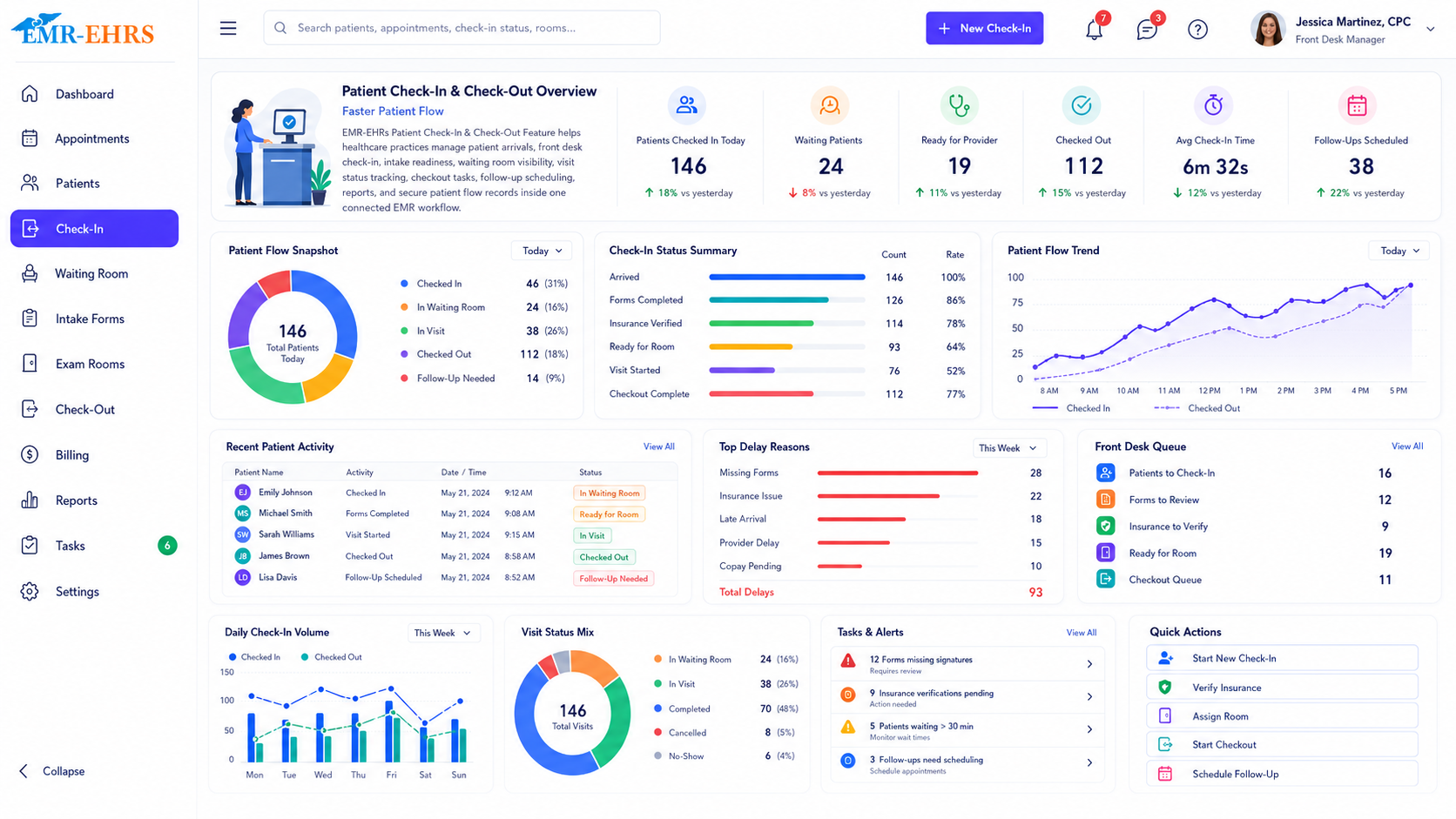
EMR patient check-in and check-out Feature helps healthcare practices manage patient arrival, front desk check-in, intake readiness, visit status tracking, patient flow, checkout tasks, follow-up scheduling, payment workflow if supported, and secure visit documentation inside the EMR.
EMR-EHRs Patient Check-In & Check-Out Feature helps front desk teams, clinical staff, providers, checkout teams, billing teams, and administrators track patient arrivals, update visit status, review intake details, manage checkout tasks, schedule follow-ups, and monitor patient flow in one connected EMR workflow.
Healthcare practices need more than manual front desk tracking. They need a connected patient flow workflow that links appointment schedules, patient arrival, check-in status, intake readiness, waiting room visibility, rooming if supported, provider readiness if supported, checkout tasks, follow-up scheduling, reports, and secure patient access history.
Paper sign-in sheets, verbal updates, and manual status tracking can slow down front desk teams and create confusion during busy clinic hours.
Without a connected check-in workflow, staff may not know who arrived, who is waiting, who is roomed, or who is ready for checkout.
Demographics, contact details, insurance information, intake forms, consent forms, and visit notes may need review before the visit starts.
When insurance and eligibility steps are disconnected, staff may miss missing insurance details, authorization notes, referral needs, or billing readiness issues.
Front desk and checkout teams may miss co-pay alerts, patient balances, payment tasks, or billing notes when payment workflows are separate.
Teams need to see which patients are scheduled, arrived, checked in, waiting, ready for rooming, in visit, ready for checkout, or completed.
Clinical staff need visibility into who is waiting, who is ready for rooming, which room is assigned, and who needs provider attention.
Providers need to know whether the patient is checked in, roomed, ready, missing forms, waiting, or in another visit stage.
Checkout may include follow-up scheduling, patient instructions, referral tasks, lab/test follow-ups, prescription follow-ups, payments, and visit completion.
Patients may leave without scheduling return visits, recall tasks, referrals, tests, or follow-up instructions.
Patient instructions, printed summaries, portal messages, referral instructions, medication instructions, and communication history should be documented where supported.
Practices need clear status tracking for late arrivals, no-shows, cancellations, reschedule tasks, patient callbacks, and appointment history.
Administrators need visibility into check-ins, checkouts, waiting room flow, no-shows if supported, wait times if supported, rooming if supported, and staff workload.
Multi-provider teams need consistent status labels, check-in queues, provider queues, rooming workflows, and checkout processes.
Multi-location practices need location-specific queues, check-in status, patient flow reports, checkout tracking, and operational visibility.
Patient arrival, check-in history, checkout history, forms, payment notes if supported, and staff actions should stay connected to secure patient records.
The workflow starts with scheduled appointments, provider schedules, location schedules if supported, and walk-in workflows where supported.
Front desk staff identify the patient from the schedule or patient lookup workflow.
The patient status is updated so staff can see that the patient has arrived or completed check-in.
Staff review patient name, contact details, address, phone number, email, and other demographic details where supported.
Staff review primary insurance, secondary insurance if supported, insurance card details if supported, and missing insurance alerts.
Staff review whether required forms, new patient forms, returning patient updates, and medical history forms are complete.
Staff review consent forms, HIPAA acknowledgments if supported, signature status if supported, and required document completion.
Staff review eligibility status, authorization status, referral status, coverage notes, or visit readiness where supported.
Staff review co-pay alerts, patient balance alerts, payment tasks, and billing notes where supported.
The patient appears in the waiting queue so front desk and clinical staff can track patient flow.
Teams can view checked-in patients, waiting patients, arrival time, assigned provider, visit type, and queue status.
Clinical staff can see which patients are ready for rooming and update rooming status where supported.
The patient is assigned to a room, clinical staff, or provider workflow where supported.
Providers can see whether a patient is waiting, roomed, provider-ready, in visit, or ready for checkout where supported.
The patient status is updated as waiting, roomed, provider-ready, in visit, ready for checkout, checked out, or completed where supported.
After the visit, staff move the patient to checkout for next-step tasks.
Checkout tasks may include follow-up scheduling, patient instructions, referral tasks, lab/test follow-ups, prescription follow-ups, payment tasks, or visit summaries where supported.
Staff schedule return visits, recall reminders, procedure follow-ups, preventive follow-ups, or patient callback tasks where supported.
Staff provide printed instructions, visit summaries, portal messages, medication instructions, referral instructions, or lab/test instructions where supported.
Staff complete co-pay, balance, payment posting, receipt, or checkout payment workflow where supported.
The visit status is closed, and check-in/check-out history is saved.
Administrators review check-in volume, checkout completion, patient flow, no-shows if supported, wait times if supported, and staff workload.
Only claim digital intake, online forms, portal forms, automated chart updates, or e-signatures when EMR-EHRs verifies support.
Only claim real-time eligibility, insurance verification, authorization checks, payer integrations, or automated eligibility workflows when EMR-EHRs verifies support.
Only claim payment processing, online payments, card-on-file, receipt generation, payment posting, or payment integrations when EMR-EHRs verifies support.
Only claim SMS, email, portal messaging, automated reminders, or digital instruction delivery when EMR-EHRs verifies support.
HIPAA-focused patient access workflow, designed to support secure patient check-in records, audit-friendly patient flow history, and secure check-in and checkout documentation.
Only list specific integrations, payment processors, eligibility vendors, portals, APIs, lab systems, or messaging tools when EMR-EHRs verifies support.
AI-powered tools should support workflow efficiency while staff and providers remain responsible for final review, patient communication, billing review, clinical decisions, task completion, and documentation.
Summarize missing intake, forms, eligibility, balance, and visit readiness items for staff review.
Help surface open checkout tasks, follow-up scheduling needs, and unresolved patient next steps.
Summarize queue status, waiting areas, delayed stages, and operational trends where available.
Suggest checkout, callback, follow-up, or patient instruction tasks for human review.
Help front desk and checkout staff sort urgent, overdue, and high-priority patient flow work.
Summarize check-in, checkout, patient flow, staff workload, and location reports.
Manage patient arrivals, check-in status, intake readiness, demographics review, insurance review, co-pay alerts if supported, and front desk queues.
Track waiting patients, rooming readiness, room assignment if supported, clinical handoff, provider-ready status, and patient flow.
View patient readiness, rooming status if supported, missing forms if supported, patient alerts, visit status, and checkout readiness.
Manage follow-up appointments, patient instructions, referrals, recall tasks, payment tasks if supported, and checkout completion.
Review insurance readiness, co-pay alerts, patient balances, payment notes, and billing-related patient access tasks.
Monitor check-in volume, waiting room flow, checkout completion, no-shows if supported, wait times if supported, and staff workload.
Standardize patient status, check-in queues, rooming workflow, provider readiness, checkout tasks, and follow-up scheduling across providers.
Track check-in queues, patient status, checkout tasks, patient flow reports, and front desk workload by location where supported.
| Workflow Area | Manual Front Desk Workflow | EMR-EHRs Patient Check-In & Check-Out |
|---|---|---|
| Patient arrival | Paper sign-in or verbal update | Appointment-connected arrival status |
| Check-in status | Manual tracking | Real-time check-in status where supported |
| Intake readiness | Paper forms | Intake and form status where supported |
| Insurance review | Separate workflow | Insurance readiness workflow where supported |
| Patient queue | Staff memory | Waiting room and queue visibility |
| Rooming | Verbal handoff | Rooming status and clinical handoff where supported |
| Checkout | Manual task list | Checkout workflow and next-step tracking |
| Follow-up scheduling | Easy to miss | Follow-up scheduling and recall tasks |
| Reports | Limited visibility | Check-in, checkout and patient flow reports |
| Security | Decentralized records | Role-based and audit-friendly records where supported |
EMR-EHRs connects patient arrivals with appointment schedules, patient records, provider views, and visit status workflows.
EMR-EHRs helps teams track arrived, waiting, roomed if supported, in-visit, ready-for-checkout, and completed patient statuses.
EMR-EHRs supports check-in tasks, intake readiness, checkout tasks, follow-up scheduling, and patient communication where supported.
EMR-EHRs helps practices review forms, insurance details, eligibility status if supported, co-pay alerts if supported, and payment tasks if supported.
EMR-EHRs helps staff manage follow-up appointments, recall tasks if supported, instructions, and next-step workflows.
EMR-EHRs helps administrators review check-in volume, checkout completion, patient flow, no-shows if supported, wait times if supported, and staff workload.
EMR-EHRs supports secure patient access records, patient flow history, staff actions, and audit-friendly check-in/checkout documentation where supported.
EMR-EHRs helps configure check-in workflows, checkout workflows, status rules, front desk roles, reports, and staff training. Phone: (480) 782-1116. Email: info@emr-ehrs.com.
Review current check-in, appointment arrival, patient intake, insurance review, co-pay, patient flow, checkout, and follow-up workflows.
Configure arrival statuses, check-in queues, appointment schedule connection, patient lookup, forms review if supported, eligibility readiness if supported, and staff worklists.
Configure visit statuses such as arrived, checked in, waiting, roomed if supported, provider-ready if supported, in visit, ready for checkout, checked out, and completed.
Configure checkout tasks, follow-up scheduling, patient instructions if supported, payment tasks if supported, referrals if supported, recall tasks if supported, and completion status.
Configure front desk, clinical staff, providers, checkout staff, billing teams, administrators, reports, and role-based access.
Train front desk teams, clinical staff, providers, checkout teams, billing teams, and administrators.
Monitor check-in volume, waiting room flow, checkout completion, missing intake items, staff adoption, patient flow reports, and workflow performance.
Simplify patient arrivals, check-in, intake readiness, waiting room visibility, rooming if supported, checkout tasks, follow-up scheduling, reports, and secure patient flow records with EMR-EHRs Patient Check-In & Check-Out Feature.
Phone: (480) 782-1116 Email: info@emr-ehrs.com