Providers Do Not Always Work at a Desk
Providers may move between exam rooms, nursing stations, procedure rooms, front desk areas, and patient care spaces.
EMR-EHRs iPad EMR Software helps providers access patient charts, review schedules, document visits, manage tasks, review documents, check lab results, support prescriptions, and complete supported EMR workflows securely from an iPad.
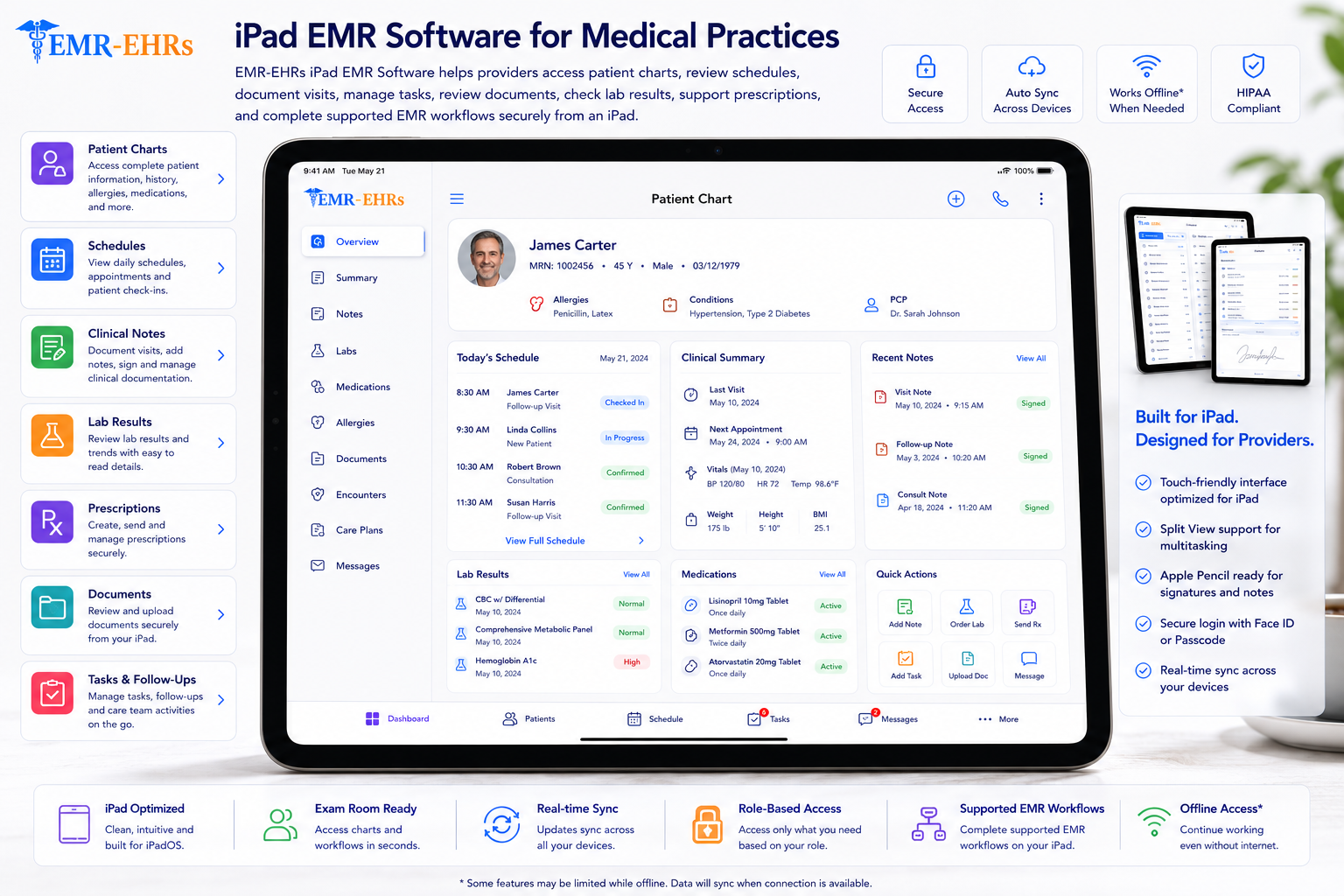
iPad EMR software allows healthcare providers to access patient charts, review schedules, document visits, manage tasks, review documents, check lab results, support prescriptions, and complete supported EMR workflows from an iPad.
EMR-EHRs iPad EMR Software helps providers use mobile-friendly charting, patient lookup, visit notes, templates, schedule review, task access, document review, secure access, and supported clinical or billing workflow visibility from an iPad.
| Area | Desktop EMR | Generic Mobile App | EMR-EHRs iPad EMR Software |
|---|---|---|---|
| Main use | Full workstation workflow | Basic mobile access | iPad-friendly clinical workflow where supported |
| Charting | Keyboard and mouse | Often limited | Touch-friendly charting where supported |
| Schedule access | Desk-based | Basic calendar | Provider schedule view where supported |
| Patient lookup | Full desktop search | Limited lookup | Patient lookup and chart access where supported |
| Templates/forms | Desktop templates | Limited forms | Mobile-friendly templates and forms where supported |
| Prescriptions/labs | Desktop review | May be limited | eRx, orders and lab review where supported |
| Tasks/documents | Desktop workflow | Limited access | Tasks, documents and messages where supported |
| Check-in/check-out | Front desk or desktop view | Usually limited | Patient flow visibility where supported |
| Billing visibility | Full billing workflow | Often limited | Superbill or billing readiness where supported |
| Best use case | Desk-based admin and charting | Quick reference | Exam-room, mobile provider and point-of-care workflow where supported |
Providers may move between exam rooms, nursing stations, procedure rooms, front desk areas, and patient care spaces.
If providers must return to a workstation for charting, visit notes and documentation may be delayed.
Some mobile tools only show basic data. Providers need iPad-friendly access to patient charts, notes, tasks, schedules, and supported workflows.
Providers need quick access to demographics, allergies, medications, diagnoses, problems, vitals, notes, documents, and history where supported.
iPad charting should support fast documentation with templates, SOAP notes, forms, signatures, dictation, or AI-assisted notes where available.
A provider may need to review appointment details, patient status, location, visit reason, and daily schedule from an iPad where supported.
Tasks, documents, messages, refill requests, lab results, and follow-up items should be easy to review where supported.
Providers may need to review medication lists, refills, pharmacy information, lab orders, imaging results, or clinical tasks from an iPad.
Providers may need to complete notes, review superbills, confirm diagnoses, or support billing readiness before the visit moves forward.
Specialties may require different note layouts, forms, procedure documentation, follow-up workflows, or patient history views.
Providers may start a note on an iPad and continue on a desktop, or review charts on a desktop and complete tasks on an iPad where supported.
iPad use should include secure login, user permissions, privacy-focused workflows, and role-based access where supported.
AI-assisted summaries may help with note drafts, chart summaries, and documentation gap review where available, but final clinical judgment and documentation approval must remain with providers.
The provider signs into the EMR workflow from an iPad using secure access where supported.
The provider reviews appointments, visit times, patient status, visit reason, location, and schedule updates where supported.
The provider uses patient lookup or selects the patient directly from the schedule where supported.
The provider opens patient demographics, history, allergies, medications, diagnoses, documents, vitals, past notes, and visit details where supported.
The provider starts a mobile-friendly visit note using SOAP notes, templates, forms, or specialty-specific layouts where supported.
The provider uses touch-friendly templates, custom forms, specialty templates, progress notes, or structured documentation where available.
The provider documents history, exam details, assessment, plan, procedures, orders, follow-up needs, attachments, and signatures where supported.
The provider reviews medications, refill requests, ePrescribing workflows, lab results, lab orders, imaging results, and clinical orders where supported.
The provider reviews tasks, reminders, documents, faxes, assigned files, patient messages, portal messages, and follow-up items where supported.
The provider reviews patient flow, check-in status, check-out status, rooming status, forms, consent status, or visit status where supported.
The provider reviews superbill items, charge capture, procedure codes, diagnosis codes, missing documentation, provider sign-off, or claim readiness where supported.
The provider saves, signs, routes, closes, or finalizes the note based on practice workflow where supported.
AI-assisted tools may summarize visit notes, patient chart details, documentation gaps, billing readiness, tasks, or follow-up needs where available.
The provider can continue compatible workflows between iPad and desktop where supported.
HIPAA-focused mobile workflow, designed to support secure patient access, privacy-focused iPad EMR workflow, and audit-friendly activity tracking where supported.
Only include native app, App Store app, offline access, real-time sync, no-install browser workflow, cross-device sync, or iPadOS compatibility claims when EMR-EHRs verifies support.
Patient chart access, preventive care notes, history, medications, labs, orders, follow-ups, and billing readiness where supported.
Chronic condition tracking, medication review, lab review, visit notes, care plans, and follow-up workflows where supported.
Growth chart review where supported, vaccines where supported, family history, visit notes, forms, and follow-up workflows.
Patient history, visit notes, labs, ultrasound or imaging review where supported, forms, and follow-up planning.
Visual documentation where supported, procedure notes, templates, patient history, images, and billing readiness.
Musculoskeletal templates, procedure notes, imaging review where supported, treatment plans, and follow-up workflows.
Pain assessment notes, procedure documentation, medication review, follow-up plans, and billing readiness where supported.
Progress notes, treatment plans, follow-ups, patient history, forms, and secure documentation workflows.
Therapy notes, treatment plans, progress tracking, exercises where supported, and visit documentation.
Quick chart access, visit notes, orders, labs, prescriptions, discharge instructions, and billing readiness where supported.
Specialty templates, provider schedules, patient charts, shared documents, reports, and location workflows where supported.
AI-assisted documentation tools should support note drafting, summaries, and workflow visibility while EMR-EHRs users and providers remain responsible for final review, edits, clinical judgment, billing decisions, and documentation approval.
Need fast iPad access to patient charts, schedules, visit notes, templates, labs, prescriptions, tasks, documents, and billing readiness where supported.
Need iPad-friendly support for rooming, vitals, patient history, forms, documents, care updates, and clinical workflow updates where supported.
Need visibility into scheduling, check-in/check-out status, forms, patient flow, documents, and appointment updates where supported.
Need complete visit notes, superbill details, charge capture, diagnosis details, provider sign-off, and billing readiness where supported.
Need mobile visibility into schedules, reports, provider activity, patient flow, documentation status, and workflow bottlenecks where supported.
Need location schedules, provider schedules, patient charts, shared documents, and cross-location workflows where supported.
| Workflow Area | Desktop-Only EMR | EMR-EHRs iPad EMR Software |
|---|---|---|
| Mobility | Limited to workstation | Access from iPad where supported |
| Charting | Desk-based | iPad-friendly charting where supported |
| Patient room use | Less flexible | Point-of-care use where supported |
| Schedule review | Workstation-based | Mobile schedule review where supported |
| Tasks | Desk-based task review | Task access from iPad where supported |
| Documents | Workstation access | Document access from iPad where supported |
| eRx/labs | Desktop review | Mobile review where supported |
| Check-in/check-out | Front desk or desktop view | Patient flow visibility where supported |
| Billing readiness | May require later review | Visit-to-billing workflow where supported |
| Provider experience | More tied to desk | More flexible provider workflow where supported |
This conceptual workflow preview illustrates how schedules, charts, visit notes, clinical actions and tasks can be organized for tablet-based access.
SOAP notes, templates and mobile forms.
Prescriptions, labs, orders and tasks.
Check-in/check-out status where supported.
AI note summary where available.
Review device compatibility, mobile workflow coverage, access controls, connectivity needs and support before selecting an iPad EMR configuration.
EMR-EHRs helps providers access charts, schedules, notes, tasks, documents, and supported practice workflows from an iPad.
EMR-EHRs supports mobile-friendly visit documentation, SOAP notes, templates, forms, and specialty workflows where available.
EMR-EHRs supports provider schedules, appointment details, check-in/check-out visibility, rooming status, and patient flow workflows where supported.
EMR-EHRs helps providers review patient history, past notes, demographics, allergies, medications, documents, attachments, and forms where supported.
EMR-EHRs supports prescriptions, refills, labs, orders, tasks, patient messages, documents, and provider action items where available.
EMR-EHRs helps connect visit documentation, superbills, charge capture, provider sign-off, diagnosis details, and billing readiness where supported.
EMR-EHRs supports secure patient access, role-based access, permissions, and privacy-focused iPad workflows where available.
EMR-EHRs supports workflows that help providers move between desktop and iPad where available.
EMR-EHRs supports specialty templates, forms, documentation workflows, procedure notes, follow-up workflows, and billing readiness where supported.
EMR-EHRs can support AI-assisted visit summaries, documentation gap summaries, chart summaries, task summaries, and note drafts where available.
Provider opens secure iPad access and reviews the daily schedule where supported.
Provider reviews appointments, patient status, visit reason, location, rooming status, and schedule updates where supported.
Provider opens patient chart, history, allergies, medications, diagnoses, documents, vitals, labs, and prior notes where supported.
Provider documents the visit using mobile-friendly notes, templates, forms, SOAP notes, progress notes, or specialty workflows where supported.
Provider reviews prescriptions, refills, lab results, orders, messages, documents, tasks, and follow-up needs where supported.
Provider reviews superbills, charges, diagnosis details, missing documentation, provider sign-off, or billing readiness where supported.
Provider saves, signs, routes, or finalizes the visit note based on practice workflow where supported.
Provider or manager reviews tasks, documentation status, reports, action items, and workflow summaries where supported.
iPad EMR software lets providers access patient charts, schedules, visit notes, templates, documents, tasks, prescriptions, labs, orders, and supported EMR workflows from an iPad. EMR-EHRs iPad EMR Software helps medical practices support mobile charting, patient lookup, secure access, and point-of-care documentation where available.
Yes. EMR-EHRs can support iPad-friendly charting, SOAP notes, progress notes, clinical templates, specialty forms, patient history, exam documentation, assessment and plan, signatures, dictation, and AI-assisted note summaries where available.
Medical practices should look for patient chart access, schedule review, mobile charting, templates, forms, ePrescribing where supported, lab result review where supported, task access, document review, secure login, role-based access, billing readiness where supported, cloud or browser access where supported, and support.
iPad EMR software should support secure login, authorized user access, role-based permissions where supported, session controls where supported, secure patient chart access, privacy-focused mobile workflows, and audit-friendly activity notes where supported. EMR-EHRs supports HIPAA-focused mobile workflow planning without making unsupported compliance guarantees.
EMR-EHRs can support provider schedule review, appointment details, prescriptions, refill requests, lab results, orders, documents, tasks, superbills, charge capture, provider sign-off, and billing readiness from an iPad where supported.
Access patient charts, schedules, visit notes, tasks, documents, prescriptions, labs, check-in/check-out visibility, billing readiness, and supported EMR workflows from an iPad with EMR-EHRs iPad EMR Software.
Phone: (480) 782-1116 | Email: jason@1stproviderschoice.com
