Dermatology EHR Software

Dermatology EHR Software Built for Skin Exams, Images, Procedures, and Billing

EMR-EHRs Dermatology EHR Software helps dermatology practices manage skin exams, body maps, lesion tracking, images, biopsies, pathology results, procedures, prescriptions, billing, scheduling, and reporting in one connected system.
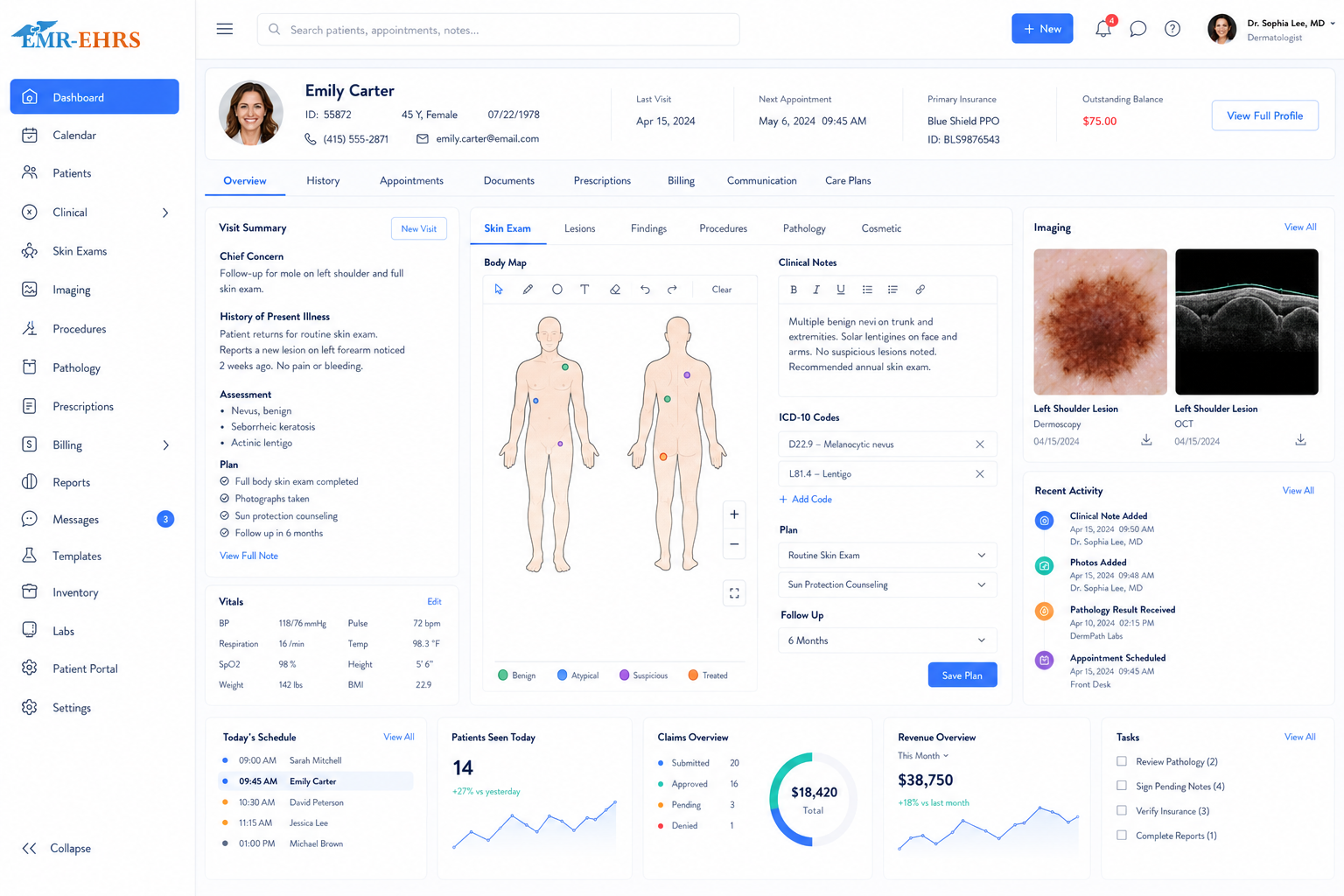
Dermatology EHR dashboard preview
Dermatology workflow-focused EHRSkin exam and lesion documentationBody map and image workflow supportBiopsy and pathology tracking supportScheduling and billing integrationPatient portal supportPowered by EHR-EHRs
Quick answer

What Is Dermatology EHR Software?

Dermatology EHR software is a digital record system designed for dermatology practices. EHR-EHRs helps dermatologists document skin exams, lesions, rashes, acne, eczema, psoriasis, biopsies, pathology results, procedures, prescriptions, images, treatment plans, scheduling, billing, patient communication, and secure patient records.

Dermatology EHR Software for Every Skin Care Practice Type

Medical Dermatology Practices

EHR-EHRs supports skin exams, diagnosis documentation, prescriptions, chronic skin condition follow-up, biopsies, pathology results, and treatment plans.

Surgical Dermatology Practices

EHR-EHRs supports lesion documentation, biopsy notes, excision procedures, pathology review, wound care instructions, post-procedure instructions, and follow-up tracking.

Cosmetic Dermatology Clinics

EHR-EHRs supports aesthetic consultations, procedure notes, before-and-after images, consent forms, payments, treatment plans, and follow-up reminders.

Mohs / Skin Cancer Clinics

EHR-EHRs supports skin cancer documentation, lesion tracking, pathology review, procedure notes, image attachments, follow-up reminders, and reporting.

Pediatric Dermatology Clinics

EHR-EHRs supports rash templates, acne care, eczema follow-up, medication records, parent communication, age-specific documentation, and secure forms.

Multi-Provider Dermatology Groups

EHR-EHRs supports provider schedules, standardized templates, role-based permissions, billing workflows, reporting, and centralized patient records.

Multi-Location Dermatology Practices

EHR-EHRs supports location-level scheduling, reporting, staff access control, provider productivity, patient communication, and consistent documentation.

Why Dermatology Practices Need Specialty-Specific EHR Software

EHR-EHRs is positioned as a complete dermatology workflow solution, not just a general EHR system with dermatology templates.

Dermatology care is visual and documentation-heavy
Skin exams require body maps, lesion details, photos, and follow-up tracking
Biopsy and pathology workflows must be organized and reviewed on time
Dermatology procedures need accurate notes, consents, supplies, and post-procedure instructions
Medical dermatology needs templates for acne, eczema, psoriasis, rashes, dermatitis, moles, warts, cysts, and skin cancer screening
Cosmetic dermatology needs before-and-after images, consent forms, treatment records, products, payments, and follow-up reminders
Dermatology billing depends on complete procedure notes, diagnosis codes, modifiers, eligibility, and claim readiness
Patient follow-up is important for biopsy results, skin checks, chronic conditions, prescription refills, and cosmetic visits
Generic EHR systems often do not match dermatology image, lesion, biopsy, procedure, and recall workflows

Manage the Complete Dermatology Workflow From Intake to Follow-Up

Step 1: Appointment Scheduling

  • Provider calendar
  • Visit type selection
  • New patient visits
  • Follow-up visits
  • Procedure visits
  • Cosmetic consultations
  • Skin check visits
  • Waitlist management
  • Appointment reminders
  • Same-day schedule view

Step 2: Digital Intake and Check-In

  • New patient forms
  • Medical history
  • Skin concern forms
  • Medication and allergy review
  • Insurance information
  • Consent forms
  • Cosmetic procedure forms
  • Patient check-in status
  • Form completion alerts
  • Document upload

Step 3: Skin Exam Documentation

  • Chief complaint
  • Skin concern location
  • Rash / lesion description
  • Skin type
  • Body map / anatomical location
  • Photo attachment
  • Diagnosis documentation
  • Treatment plan
  • Follow-up instructions
  • Patient education notes

Step 4: Body Maps, Lesion Tracking, and Images

  • Lesion location
  • Size, shape, color, border, and change history
  • Skin image attachment
  • Before-and-after image comparison
  • Follow-up comparison
  • Patient education notes
  • Secure image storage
  • Chart completion status

Step 5: Biopsy, Pathology, and Lab Workflow

  • Biopsy documentation
  • Specimen site and details
  • Pathology order tracking
  • Lab/pathology result attachment
  • Result review workflow
  • Abnormal result alerts
  • Follow-up task assignment
  • Patient notification tracking
  • Pathology-to-treatment-plan documentation

Step 6: Procedure Documentation

  • Cryotherapy notes
  • Shave biopsy notes
  • Punch biopsy notes
  • Excision notes
  • Injection documentation
  • Laser treatment notes
  • Chemical peel documentation
  • Cosmetic procedure notes
  • Consent confirmation
  • Supplies/products used
  • Provider signature
  • Post-procedure instructions

Step 7: Prescriptions and Medication Management

  • E-prescribing workflow
  • Refill request management
  • Medication history
  • Allergy review
  • Prior authorization tracking
  • Patient medication instructions
  • Pharmacy communication
  • Prescription task reminders

Step 8: Billing and Claim Readiness

  • CPT coding support
  • ICD coding support
  • Procedure coding
  • Modifier support
  • Superbill creation
  • Insurance eligibility
  • Prior authorization tracking
  • Claim submission support
  • Payment posting
  • Denial tracking
  • Billing reports
  • Documentation-to-claim workflow

Step 9: Follow-Up and Patient Communication

  • Follow-up reminders
  • Portal messages
  • Lab/pathology result communication
  • Post-procedure instructions
  • Prescription refill updates
  • Patient education
  • Cosmetic treatment follow-up
  • Recall reminders for skin checks

Dermatology Templates for Skin Exams, Conditions, and Follow-Up

EHR-EHRs supports dermatology-specific charting, condition-based documentation, and follow-up workflows for daily dermatology visits.

Acne documentation templates
Eczema documentation templates
Psoriasis documentation templates
Rash and dermatitis templates
Mole and lesion documentation
Skin cancer screening notes
Wart and cyst documentation
Hair and nail condition templates
Allergic reaction documentation
Chronic skin condition follow-up templates
Cosmetic consultation templates
Follow-up visit templates
Custom dermatology templates

Body Maps, Lesion Tracking, and Dermatology Image Management

Support visual dermatology workflows with body map documentation, image attachments, lesion monitoring, and follow-up comparisons.

Anatomical body map documentation
Lesion location tracking
Skin image attachment
Dermoscopy image support where available
Before-and-after photo tracking
Lesion change history
Size, color, border, and symptom tracking
Follow-up comparison
Image-based patient education
Secure image storage

Biopsy, Pathology, and Lab Result Workflow for Dermatology

Organize biopsy documentation, pathology results, patient notifications, and follow-up tasks in one connected workflow.

Biopsy order documentation
Specimen site and details
Pathology order tracking
Lab result attachment
Abnormal result alerts
Result review workflow
Follow-up task creation
Patient notification tracking
Pathology-to-treatment-plan documentation
Skin cancer follow-up reminders

Dermatology Procedure Documentation for Medical, Surgical, and Cosmetic Care

Cryotherapy documentation
Shave biopsy notes
Punch biopsy notes
Excision notes
Lesion removal notes
Injection documentation
Laser treatment notes
Chemical peel documentation
Cosmetic treatment notes
Wound care instructions
Consent forms
Supplies and products used
Post-procedure instructions
Provider signature

Cosmetic Dermatology Workflow for Consultations, Images, and Follow-Up

Cosmetic consultation forms
Before-and-after photo documentation
Treatment plan recommendations
Consent forms
Product and supply documentation
Laser treatment notes
Injectable treatment notes
Self-pay payment workflow support
Treatment series tracking if supported
Follow-up reminders
Patient education

Dermatology E-Prescribing and Medication Management

E-prescribing workflow
Refill request management
Medication history
Allergy review
Common dermatology prescription workflows
Prior authorization tracking
Patient medication instructions
Pharmacy communication
Prescription task reminders

Dermatology Scheduling Software for Busy Clinics

Appointment calendar
Provider scheduling
Visit type scheduling
New patient scheduling
Follow-up visit scheduling
Procedure appointment scheduling
Cosmetic consultation scheduling
Skin check scheduling
Room/resource scheduling
Appointment reminders
Waitlist support
Same-day schedule view

Digital Intake and Dermatology Patient Check-In

Online intake forms
New patient forms
Medical history forms
Skin concern forms
Medication and allergy forms
Consent forms
Cosmetic procedure forms
Insurance forms
Patient check-in status
Form completion alerts
Document upload

Dermatology Billing and Coding Software for Cleaner Claims

Connect skin exam notes, procedure documentation, biopsy workflows, diagnosis codes, modifiers, eligibility, and claim readiness.

CPT coding support
ICD coding support
Procedure coding
Modifier support
Superbill creation
Insurance eligibility verification
Prior authorization tracking
Claim submission support
Claim status tracking
Payment posting
Denial management
Patient responsibility tracking
Documentation-to-claim workflow
Billing reports

Patient Portal for Forms, Results, Messages, Refills, and Follow-Up

A patient portal helps dermatology practices reduce front-desk workload by allowing patients to complete forms, request appointments, send messages, request prescription refills, receive post-procedure instructions, review follow-up reminders, access care information, and stay connected with their care plan.

Online appointment requests
Intake form completion
Demographic updates
Insurance updates
Secure messaging
Prescription refill requests
Lab/pathology result communication
Post-procedure instructions
Follow-up reminders
Patient education
Payment access

Recall, Follow-Up, and Skin Check Reminder Tools

Follow-up reminders
Annual skin check recalls
Biopsy follow-up tasks
Lab/pathology result follow-up
Medication refill reminders
Chronic skin condition follow-up
Cosmetic treatment follow-up
Missed appointment follow-up
Post-procedure follow-up
Patient education messages

Dermatology Reporting, Dashboards, and Practice Analytics

Visit volume reports
Procedure volume reports
Biopsy tracking reports
Provider productivity reports
Claim and denial reports
Revenue reports
Patient recall reports
No-show reports
Prescription/refill task reports
Operational dashboards
Financial dashboards

AI-Powered Features That Help Dermatology Teams Document Faster

AI-powered features are designed to support documentation efficiency and workflow review. Final clinical decisions, diagnosis, treatment, and documentation remain under provider control.

AI-assisted documentation suggestions
Smart patient history summaries
Skin exam note prompts
Missing documentation alerts
Biopsy follow-up task suggestions
Coding-support prompts
Patient message assistance
Chart review support
Follow-up reminder suggestions

Generic EHR vs Dermatology-Specific EHR Software

AreaGeneric EHREHR-EHRs Dermatology EHR
Main workflowGeneral medical visitsSkin exams, lesions, biopsies, procedures, follow-up
DocumentationGeneral clinical notesDermatology templates, skin exams, body maps, lesion notes
ImagesBasic attachmentsSkin photos, before-and-after images, lesion comparison
Biopsy workflowLimitedSpecimen details, pathology tracking, follow-up tasks
ProceduresGeneral notesCryotherapy, biopsy, excision, lesion removal, laser, injection notes
BillingStandard claimsDermatology CPT/ICD, modifiers, procedure claim readiness
Patient engagementBasic portalRefills, results, recalls, skin check reminders, instructions
ReportingGeneral reportsProcedure volume, biopsy tracking, recalls, productivity, billing

What to Look for in Dermatology EHR Software

Dermatology-specific templates
Skin exam documentation
Body maps and lesion tracking
Image attachment and comparison
Biopsy and pathology workflow support
Procedure documentation templates
Cosmetic dermatology workflow support
E-prescribing and refill management
Digital intake and patient forms
Scheduling and visit type support
Patient portal and secure messaging
Recall and follow-up reminders
Dermatology billing and coding support
Documentation-to-claim workflow
Reporting dashboards
Role-based access and audit trails
Secure image and record storage
Data conversion support
Staff training and implementation support

Dermatology EHR Implementation, Training, and Support

1

Dermatology Workflow Review

Review scheduling, intake, documentation, image handling, biopsy tracking, billing, reporting, and follow-up workflows.

2

Template and Form Setup

Set up skin exam templates, condition templates, procedure templates, consent forms, cosmetic forms, and patient intake forms.

3

Image and Lesion Documentation Setup

Configure image attachment workflows, body map documentation, lesion tracking, secure image storage, and follow-up comparison needs.

4

Biopsy and Pathology Workflow Setup

Configure biopsy documentation, specimen details, pathology result review, follow-up tasks, and patient notification workflows.

5

Scheduling Configuration

Configure providers, visit types, procedure visits, skin checks, cosmetic consults, reminders, and same-day views.

6

Billing Workflow Setup

Configure eligibility, CPT/ICD workflow, modifiers, superbills, claims, payment posting, denial tracking, and billing reports.

7

Patient Portal Setup

Configure online forms, secure messaging, refill requests, follow-up reminders, post-procedure instructions, and payment access.

8

Data Conversion Planning

Plan migration of patient records, documents, images, billing data, and historical notes.

9

Staff Training

Train providers, front desk, clinical staff, billing staff, and administrators.

10

Go-Live Support

Support the practice during launch and workflow adoption.

11

Ongoing Optimization

Improve templates, image workflows, biopsy tracking, reports, forms, and staff usage after launch.

Why Choose EHR-EHRs for Dermatology EHR Software?

Talk to an EHR-EHRs specialist to see how our dermatology EHR software can support your practice workflow.
Dermatology workflow-focused EHR structure
Skin exam, lesion, image, biopsy, pathology, and procedure documentation support
Scheduling, billing, reporting, and patient portal support
Custom dermatology templates and forms
E-prescribing and refill workflow support
Recall, follow-up, and patient communication support
Implementation and training assistance
Support for medical, surgical, cosmetic, pediatric, and multi-provider dermatology practices
Healthcare software experience
Real support contact information

HIPAA-Compliant, Secure, and Built for Healthcare Trust

Dermatology EHR Software FAQs

Dermatology EHR software is a digital record system built for dermatology practices. EHR-EHRs helps dermatologists manage skin exams, lesion tracking, image documentation, biopsies, pathology results, procedures, prescriptions, treatment plans, scheduling, billing, patient communication, and secure patient records.
Dermatology EHR software is designed around skin-focused workflows, while regular EHR software is usually built for general medical visits. EHR-EHRs supports skin exam templates, body maps, lesion tracking, image attachments, biopsy workflows, pathology review, procedure documentation, e-prescribing, dermatology billing, and follow-up reminders.
Dermatologists should look for EHR software with dermatology templates, skin exam documentation, body maps, lesion tracking, image management, biopsy and pathology workflows, procedure notes, e-prescribing, digital intake, patient portal tools, refill requests, recall reminders, billing and coding support, reporting dashboards, role-based access, and audit trails.
Yes. EHR-EHRs dermatology EHR software supports skin image attachment, body map documentation, lesion location tracking, lesion change history, biopsy notes, specimen details, pathology result review, follow-up tasks, patient notification tracking, secure image storage, and comparison of lesion changes over time.
Yes. EHR-EHRs dermatology EHR software can help connect clinical documentation with billing workflows by supporting CPT and ICD coding, procedure coding, modifiers, superbill creation, eligibility verification, prior authorization tracking, claim submission support, payment posting, denial tracking, billing reports, and documentation-to-claim readiness.

Ready to Improve Your Dermatology Workflow With EHR-EHRs?

See how EHR-EHRs can help your dermatology practice manage skin exams, body maps, lesion tracking, image documentation, biopsies, pathology results, procedures, prescriptions, scheduling, billing, reporting, patient communication, and secure records from one connected system.

Email: info@emr-ehrs.com