Paper Lab Orders Can Delay Care
Paper, fax-based, or disconnected lab orders can create missing details, callbacks, manual tracking, delayed processing, and incomplete lab documentation.
EMR-EHRs Lab Orders & Tracking Feature helps healthcare practices create lab orders, track order status, receive or upload lab results, match results to the patient chart, route results for provider review, manage abnormal follow-up if supported, and maintain secure lab documentation in one connected EMR workflow.
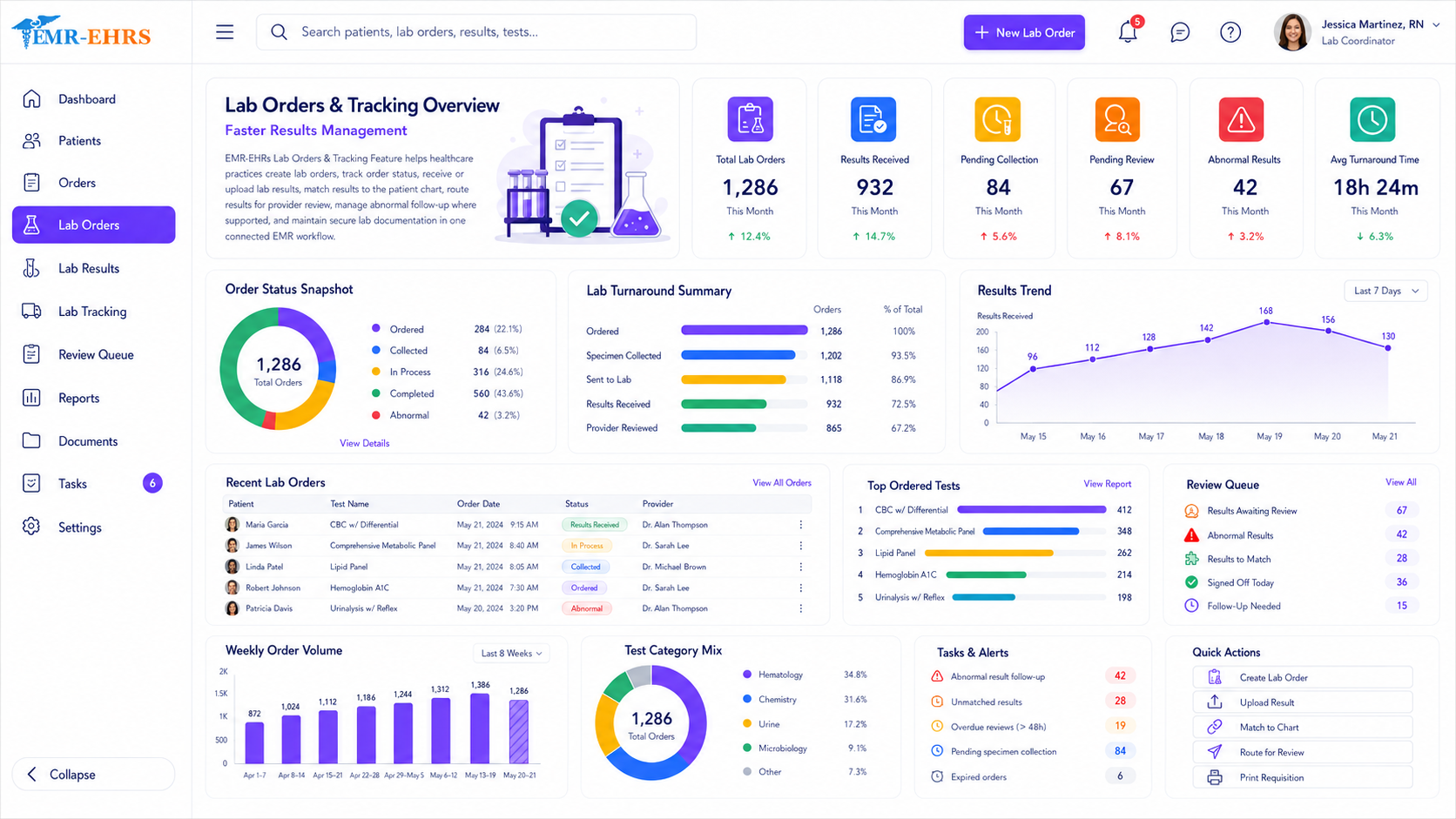
EMR lab orders and tracking Feature is a clinical workflow module that helps healthcare practices create lab orders, track lab order status, receive or upload lab results, attach results to the patient chart, route results for provider review, manage abnormal result follow-up if supported, and maintain secure lab documentation inside the EMR.
EMR-EHRs Lab Orders & Tracking Feature helps providers and staff create lab orders, retrieve patient lab results, upload or receive results where supported, connect results to patient records, track pending labs, and manage lab follow-up workflows in one connected EMR system.
Healthcare practices need more than basic lab order entry. They need a connected workflow that links lab orders, patient charts, order status, result receipt, result upload, patient matching, provider review, abnormal follow-up if supported, patient communication if supported, reporting, and secure lab records.
Paper, fax-based, or disconnected lab orders can create missing details, callbacks, manual tracking, delayed processing, and incomplete lab documentation.
When orders, results, provider review, and patient follow-up are handled in separate places, staff must copy, scan, upload, and track more manually.
Without a centralized result queue, practices may lose visibility into ordered labs that have not returned yet.
Staff may need to download, scan, upload, rename, and attach lab results manually when workflows are not connected.
Results should be linked to the correct patient chart, lab order, visit, ordering provider, and clinical context where supported.
Providers need worklists for new results, pending review items, abnormal results, repeat labs, and completed lab documentation.
Abnormal lab results need clear visibility, provider attention, follow-up tasks, patient communication, and closure documentation where supported.
Critical results may need priority flags, staff escalation, provider alerts, patient callback tasks, and documented action where supported.
Patient notifications, portal result sharing, phone call notes, follow-up instructions, and patient communication history should be tracked where supported.
Teams need reminders for pending labs, repeat tests, overdue results, abnormal result follow-up, and patient callbacks.
Practice leaders need visibility into order volume, pending results, abnormal results, provider review, follow-up tasks, turnaround time if supported, and staff worklists.
Lab orders, results, provider reviews, uploads, follow-up notes, and patient communication should be stored in secure, audit-friendly records.
Multi-provider teams need consistent order creation, review queues, result tracking, patient notification, and reporting workflows.
Multi-location practices need location-specific lab order status, pending result queues, result reports, and follow-up visibility where supported.
The lab workflow begins from the patient record so lab orders stay connected to patient demographics, visit details, diagnosis information if supported, and provider documentation.
Provider or staff selects the required lab test, diagnostic test, lab panel, common order set, or provider favorite where supported.
Order details can include test name, ordering provider, diagnosis if supported, order priority, clinical reason, collection instructions, lab location if supported, and notes.
Diagnosis codes, clinical indication, medical necessity details, or visit-related context can be added where supported.
Priority, STAT flag if supported, fasting instructions, collection instructions, specimen notes, or patient instructions can be added where supported.
Electronic lab orders can be sent to a connected lab partner or interface where supported.
For manual workflows, the order can be printed, faxed if supported, saved, or prepared as a lab requisition where supported.
Order status can be tracked as draft, ordered, sent, collected, in process, pending, received, reviewed, completed, canceled, failed, or overdue where supported.
Results can be received electronically where supported or uploaded manually as scanned files, PDFs, or result documents.
The lab result is attached to the correct patient chart after patient matching, staff verification, or automated matching where supported.
The result can be linked to the original order, visit, provider, or lab workflow where supported.
The provider reviews new results, adds notes, creates follow-up tasks if needed, and marks the result reviewed where supported.
Reviewed status, sign-off, reviewer name, review date, and result notes can be saved where supported.
Abnormal, critical, high/low, or out-of-range values can be flagged for provider attention where supported.
Staff can create patient callback tasks, repeat lab reminders, follow-up appointments, provider review tasks, or escalation tasks where supported.
Patient communication, portal release, phone call notes, SMS/email notification if supported, instructions, and acknowledgment can be documented where supported.
Lab order history, result history, provider review, upload history, follow-up tasks, and communication notes are stored with the patient record where supported.
Teams review pending labs, overdue results, abnormal results, reviewed results, completed labs, provider worklists, follow-up tasks, and lab analytics.
Confirm support for electronic lab ordering, lab partner connections, coded transmission, order confirmation, HL7/FHIR, or specific lab integrations, including configuration and implementation requirements, during evaluation.
Lab result alerts should support provider review and follow-up workflows, but providers remain responsible for final clinical interpretation, patient communication, diagnosis, treatment decisions, and documentation.
Confirm support for patient portal result sharing, automated notifications, SMS, email, or result release workflows, including configuration and implementation requirements, during evaluation.
HIPAA-focused lab order workflows, designed to support secure lab result documentation, audit-friendly lab result records, and secure patient lab records.
Confirm support for specific labs, lab networks, HL7, FHIR, APIs, interface engines, portals, vendors, or integrations, including connection method and implementation scope, during evaluation.
AI-powered tools should support lab workflow efficiency while providers remain responsible for final lab interpretation, diagnosis, treatment decisions, patient communication, and clinical documentation.
Help surface missing order details, diagnosis context, patient information, or result routing gaps where available.
Summarize abnormal result context for provider review while keeping final interpretation with the provider.
Help prioritize pending labs, overdue results, missing results, and follow-up tasks where available.
Suggest patient callback, repeat lab, provider review, or escalation tasks for staff review.
Support draft patient result messages while keeping final communication decisions with staff and providers.
Summarize lab order reports, result queues, pending labs, and follow-up visibility.
Create lab orders, review results, sign off where supported, document interpretation, and create follow-up tasks.
Prepare lab orders, upload results, route results, manage pending labs, and support patient follow-up.
Track pending results, order status, result queues, unmatched results if supported, and follow-up tasks.
Print lab requisitions, schedule follow-up appointments, and contact patients where supported.
Monitor order volume, result queues, abnormal result follow-up, provider worklists, staff tasks, and reports.
Manage specialty-specific panels, chronic care labs, pre-op labs, medication monitoring labs, and follow-up workflows.
Standardize lab ordering, result review, patient notification, and reporting across providers.
Track orders, results, pending labs, and reports by location where supported.
| Workflow Area | Manual Lab Workflow | EMR-EHRs Lab Orders & Tracking |
|---|---|---|
| Lab order creation | Paper or separate system | Patient chart-connected order workflow |
| Lab requisitions | Manual print/fax | Print or electronic workflow if supported |
| Result receipt | Fax, scan, manual upload | Electronic result receipt or upload where supported |
| Patient matching | Manual matching | Patient/order matching workflow where supported |
| Pending results | Spreadsheet or staff memory | Pending lab worklists where supported |
| Abnormal results | Manual review | Abnormal result flagging if supported |
| Provider review | Manual routing | Provider result review workflow |
| Patient notification | Separate call notes | Patient communication tracking if supported |
| Reports | Manual reporting | Lab order, result, and follow-up reports |
| Security | Decentralized files | Role-based and audit-friendly lab records where supported |
EMR-EHRs connects lab orders with patient records, provider workflows, results, follow-up tasks, and lab history.
EMR-EHRs helps practices track pending results, received results, reviewed results, and completed lab workflows.
EMR-EHRs supports electronic lab result receipt where available and manual upload workflows when needed.
EMR-EHRs supports provider review, sign-off where supported, abnormal result follow-up if supported, and patient notification tasks if supported.
EMR-EHRs helps teams track pending lab results, missing results, overdue results if supported, and follow-up tasks.
EMR-EHRs helps practices review lab order reports, result queues, pending labs, abnormal results if supported, follow-up tasks, and provider worklists.
EMR-EHRs supports secure lab records, lab order history, result history, provider review history, and audit-friendly lab documentation where supported.
EMR-EHRs helps configure lab order workflows, result upload steps, review queues, reports, user roles, and staff training. Phone: (480) 782-1116. Email: jason@1stproviderschoice.com.
Review current lab ordering, result receipt, result upload, provider review, patient notification, follow-up reminders, and reporting workflows.
Configure test lists, lab panels if supported, order forms, requisition workflows, providers, locations, and status fields.
Configure result upload, electronic result receipt if supported, patient matching, order matching, provider review queues, and result storage.
Configure pending result tracking, abnormal result follow-up if supported, patient notification tasks if supported, repeat lab tasks, and lab follow-up reminders.
Configure pending lab lists, result queues, provider review worklists, abnormal result reports if supported, overdue result reports if supported, and lab analytics.
Configure provider, clinical staff, lab coordinator, front desk, and administrator permissions.
Train providers, clinical staff, lab coordinators, front desk teams, administrators, and managers.
Monitor order creation, result upload, review completion, pending labs, abnormal result follow-up, report usage, staff adoption, and workflow performance.
Simplify lab order creation, result tracking, pending lab follow-up, provider review, abnormal result workflows if supported, patient notifications if supported, reports, and secure lab records with EMR-EHRs Lab Orders & Tracking Feature.
Phone:(480) 782-1116 Email:jason@1stproviderschoice.com
