Practice Data Is Often Scattered
Patient records, appointments, billing, claims, payments, tasks, portal activity, labs, and provider work may sit in separate workflows without one clear reporting view.
EMR-EHRs Reports Management Feature helps healthcare practices review clinical activity, appointment trends, patient volume, provider productivity, staff workload, billing performance, financial reports, operational reports, custom reports, secure dashboards, and AI-powered report summaries where supported.
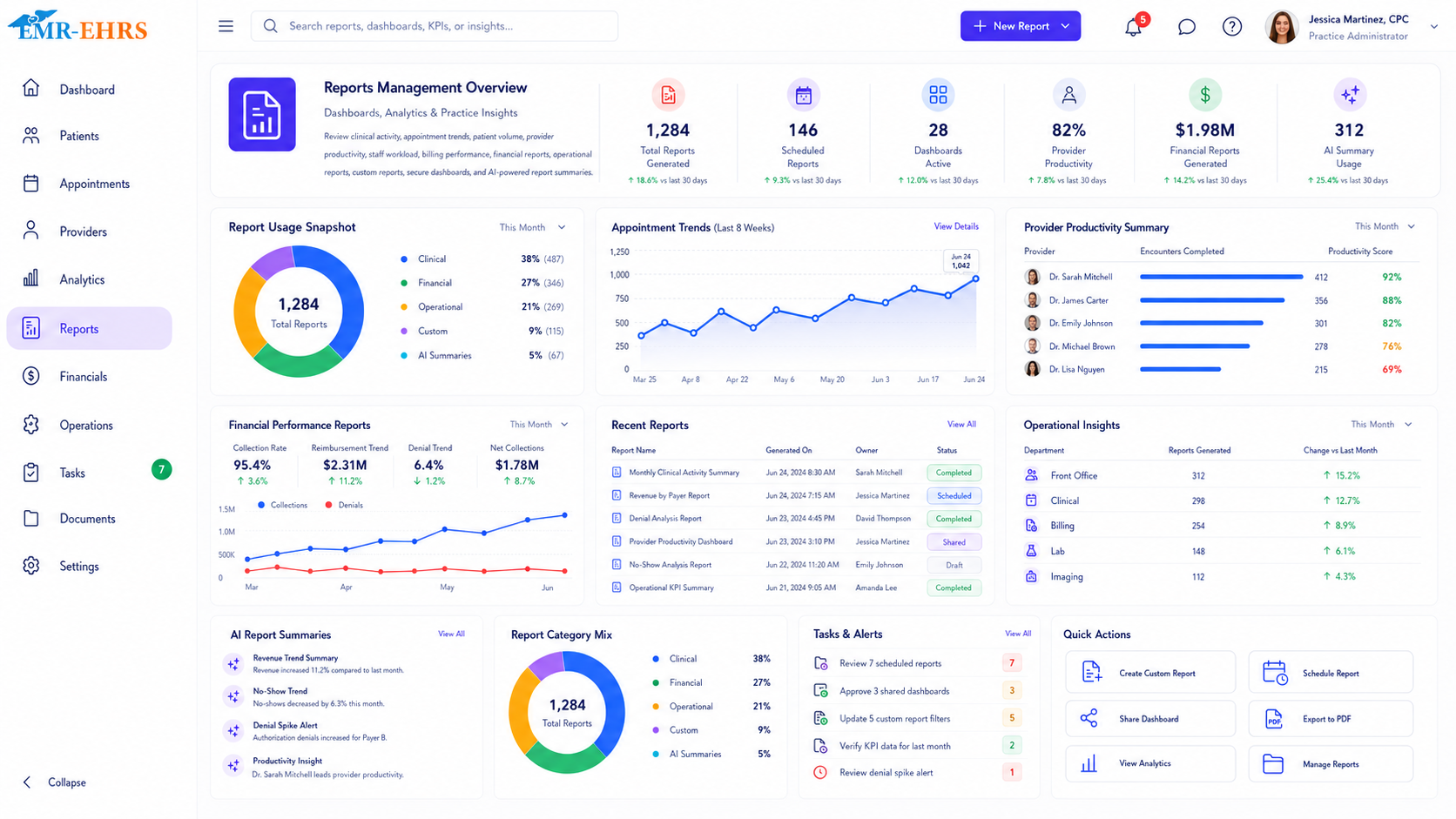
EMR reports management Feature helps healthcare practices create, organize, filter, view, export, and analyze reports from patient, appointment, clinical, billing, provider, staff, and operational data inside the EMR.
EMR-EHRs Reports Management Feature helps practices turn EMR data into clinical, operational, financial, patient, provider, staff, appointment, billing, and performance reports with dashboards, filters, exports, secure access, and analytics workflows where supported.
Healthcare practices need more than static report lists. They need connected reporting workflows that turn EMR data into clinical, operational, financial, provider, staff, appointment, and patient insights.
Patient records, appointments, billing, claims, payments, tasks, portal activity, labs, and provider work may sit in separate workflows without one clear reporting view.
Manual spreadsheets, downloaded files, copied data, and separate report lists can slow down administrators and increase reporting inconsistency.
When different users build reports manually, numbers, filters, date ranges, and report formats can become inconsistent.
Practice owners and administrators need quick visibility into patient volume, appointment trends, provider activity, staff workload, and operational performance.
Providers and managers may need reports for visits, encounters, diagnoses, procedures, follow-ups, labs, medications, referrals, and documentation where supported.
Practices need reports for scheduled visits, completed visits, cancellations, no-shows, reschedules, provider schedules, and location trends where supported.
Billing teams need visibility into charges, payments, adjustments, patient balances, insurance balances, collections, and revenue trends where supported.
Revenue teams need reports for submitted claims, rejected claims, denied claims, payer issues, unpaid claims, appeals, and A/R aging where supported.
Practices need provider-level visibility into appointments, encounters, completed visits, patient volume, documentation activity, and follow-up activity where supported.
Managers need reporting for staff task volume, open items, overdue tasks, completed work, and team workload where supported.
Practices need visibility into check-in, check-out, waiting room flow, rooming, no-shows, late arrivals, and daily operations where supported.
Multi-provider practices need shared report categories, filters, dashboards, and provider-level performance visibility.
Multi-location practices need reports by location for patient volume, appointments, revenue, staff workload, patient flow, and operational trends where supported.
Users need date filters, provider filters, location filters, payer filters, drill-down views, exports, saved reports, and scheduled delivery where supported.
Clinical, financial, provider, staff, and patient reports should be protected with user permissions and secure access controls.
Reports should help identify trends, bottlenecks, revenue gaps, workload issues, follow-up needs, and improvement opportunities.
Data comes from patient records, appointments, encounters, billing, claims, payments, tasks, forms, labs, prescriptions, documents, portal activity, and practice management workflows where supported.
Practice owners, administrators, providers, billing teams, managers, or authorized staff access the reporting module based on permissions.
The user selects clinical, appointment, patient, provider, staff, billing, financial, claims, operational, portal, lab, medication, referral, or custom reports where supported.
The user applies daily, weekly, monthly, quarterly, annual, or custom date range filters where supported.
The user filters by provider, staff member, location, patient group, payer, insurance, claim status, payment status, appointment status, task status, or report type where supported.
The selected report is generated using connected EMR-EHRs workflow data where supported.
The user reviews high-level cards for patient volume, appointment volume, revenue if supported, claims if supported, A/R if supported, no-shows if supported, provider productivity, staff workload, and open tasks where supported.
The report can display details in tables, charts, trend views, summary cards, or dashboards where supported.
The user can drill into patient lists, appointment details, provider activity, claim details, payment records, task lists, or location data where supported.
The user compares performance by provider, location, payer, staff member, visit type, report category, or date range where supported.
Reports may be exported to PDF, Excel, CSV, printed, saved, or shared with authorized users where supported.
Practice leaders can schedule daily, weekly, monthly, or recurring reports where supported.
Teams identify follow-up needs such as denials, no-shows, unpaid balances, overdue tasks, recalls, missing forms, pending labs, or workflow bottlenecks where supported.
Billing teams, front desk teams, clinical staff, providers, or administrators act on report findings.
Sensitive report categories are protected by role-based access and user permissions.
Report access, exports, sharing, and user activity can be stored for audit-friendly reporting history where supported.
Confirm support for outcomes reporting, care gap analytics, diagnosis reports, medication reports, lab analytics, referral analytics, or specialty clinical reporting, including configuration and implementation requirements, during evaluation.
Confirm support for billing reports, financial reports, revenue reports, payment posting reports, payer reports, collection reports, or revenue analytics, including configuration and implementation requirements, during evaluation.
Confirm support for claims reporting, denial analytics, A/R aging, payer analytics, appeals tracking, or clean claim analytics, including configuration and implementation requirements, during evaluation.
Confirm support for custom report builder, saved templates, dashboard widgets, custom analytics, or custom calculated metrics, including configuration and implementation requirements, during evaluation.
Confirm support for PDF, Excel, CSV, scheduled email reports, downloads, sharing tools, or specific export formats, including configuration and implementation requirements, during evaluation.
HIPAA-focused reporting workflow, designed to support secure report access, audit-friendly reporting records, and role-based reporting permissions.
Confirm support for specific integrations, APIs, claims systems, lab systems, payment tools, dashboards, BI tools, or interface standards, including connection method and implementation scope, during evaluation.
AI-powered reporting tools should support faster review and workflow insight while practice leaders, providers, billing teams, and staff remain responsible for final review, decisions, compliance, patient communication, and documentation.
Summarize report findings, trends, totals, and operational context for faster review.
Summarize dashboard cards, KPI movement, and high-level practice activity where available.
Help surface patient volume, appointment, billing, denial, no-show, or workload trends where available.
Highlight unusual report changes for staff or administrator review where available.
Suggest report-driven follow-up items such as overdue tasks, unpaid claims, recalls, or missing forms for human review.
Explain report sections and filters while keeping decisions with authorized staff.
Review revenue, patient volume, provider activity, location performance, growth trends, financial reports, and operational reports where supported.
Monitor appointments, staff workload, patient flow, dashboards, reports, open tasks, and daily operations.
Review clinical activity, patient visits, documentation, follow-ups, labs, medications, and provider-specific reports where supported.
Review claims, denials, payments, patient balances, A/R, collections, and payer performance where supported.
Track appointment reports, no-shows, cancellations, check-in activity, portal requests, and patient communication where supported.
Review task reports, follow-up reports, lab reports, refill requests, patient reminders, and clinical workflow reports where supported.
Compare provider activity, appointment trends, patient volume, productivity, and workload where supported.
Monitor location-level reports, patient flow, revenue, staff workload, and performance where supported.
| Reporting Area | Manual Reporting | EMR-EHRs Reports Management |
|---|---|---|
| Data source | Separate spreadsheets | Connected EMR workflow data |
| Report creation | Manual data pulling | Report generation where supported |
| Dashboards | Limited or unavailable | KPI dashboards where supported |
| Clinical reports | Manual chart review | Clinical reports where supported |
| Financial reports | Separate billing exports | Billing and financial reports where supported |
| Appointment reports | Manual schedule review | Appointment and no-show reports where supported |
| Provider reports | Manual calculations | Provider productivity reports where supported |
| Staff reports | Manual tracking | Staff workload reports where supported |
| Custom filters | Spreadsheet formulas | Report filters and drill-downs where supported |
| Exports | Manual formatting | PDF, Excel, or CSV export where supported |
| Security | File-level control | Role-based report access where supported |
| Audit history | Hard to track | Audit-friendly report activity where supported |
EMR-EHRs helps practices connect clinical, appointment, patient, provider, staff, billing, and operational data into reporting workflows where supported.
EMR-EHRs helps leaders review patient volume, provider activity, staff workload, appointment trends, financial activity, and operational performance where supported.
EMR-EHRs supports dashboard views, KPI summaries, trend reports, and drill-down reporting where supported.
EMR-EHRs helps practices review patient visits, appointments, provider activity, staff workload, patient lists, follow-ups, and workflow data where supported.
EMR-EHRs helps teams review charges, payments, claims, denials, A/R, collections, and revenue trends where supported.
EMR-EHRs helps users apply filters, save views, export reports, and review custom report data where supported.
EMR-EHRs supports role-based reporting access, user permissions, and audit-friendly reporting workflows where supported.
EMR-EHRs can support report summaries, trend explanations, workload summaries, and practice insight review where available.
EMR-EHRs helps configure report categories, dashboards, user roles, filters, exports, scheduled reports, and staff training. Phone: (480) 782-1116. Email: jason@1stproviderschoice.com.
Review current clinical reports, appointment reports, patient reports, provider reports, staff reports, billing reports, financial reports, and operational reporting needs.
Configure report categories such as clinical, appointment, patient, provider, staff, billing, claims, financial, operational, portal, lab, medication, referral, and custom reports where supported.
Configure dashboard cards, KPI summaries, filters, date ranges, provider views, location views, report layouts, and trend views where supported.
Configure date filters, provider filters, staff filters, location filters, payer filters, appointment filters, claim filters, payment filters, and drill-down views where supported.
Configure PDF, Excel, CSV, print, saved reports, scheduled reports, report templates, and authorized recipients where supported.
Configure role-based access for practice owners, administrators, providers, billing teams, clinical staff, front desk teams, and managers.
Train practice leaders, administrators, providers, billing teams, clinical staff, front desk teams, and managers.
Monitor report usage, dashboard adoption, report accuracy review, staff feedback, and reporting workflow improvements.
Turn clinical, appointment, patient, provider, staff, billing, financial, and operational data into secure reports, dashboards, filters, exports, and practice insights with EMR-EHRs Reports Management Feature.
Phone:(480) 782-1116 Email:jason@1stproviderschoice.com
