Device-Specific EMR Feature

Mobile EMR Software for iPhone, iPad, Android and Tablets

Access patient charts, schedules, notes, lab results, prescriptions, tasks, and practice workflows securely from supported mobile devices. EMR-EHRs helps providers stay connected in exam rooms, between locations, and during supported after-hours workflows.
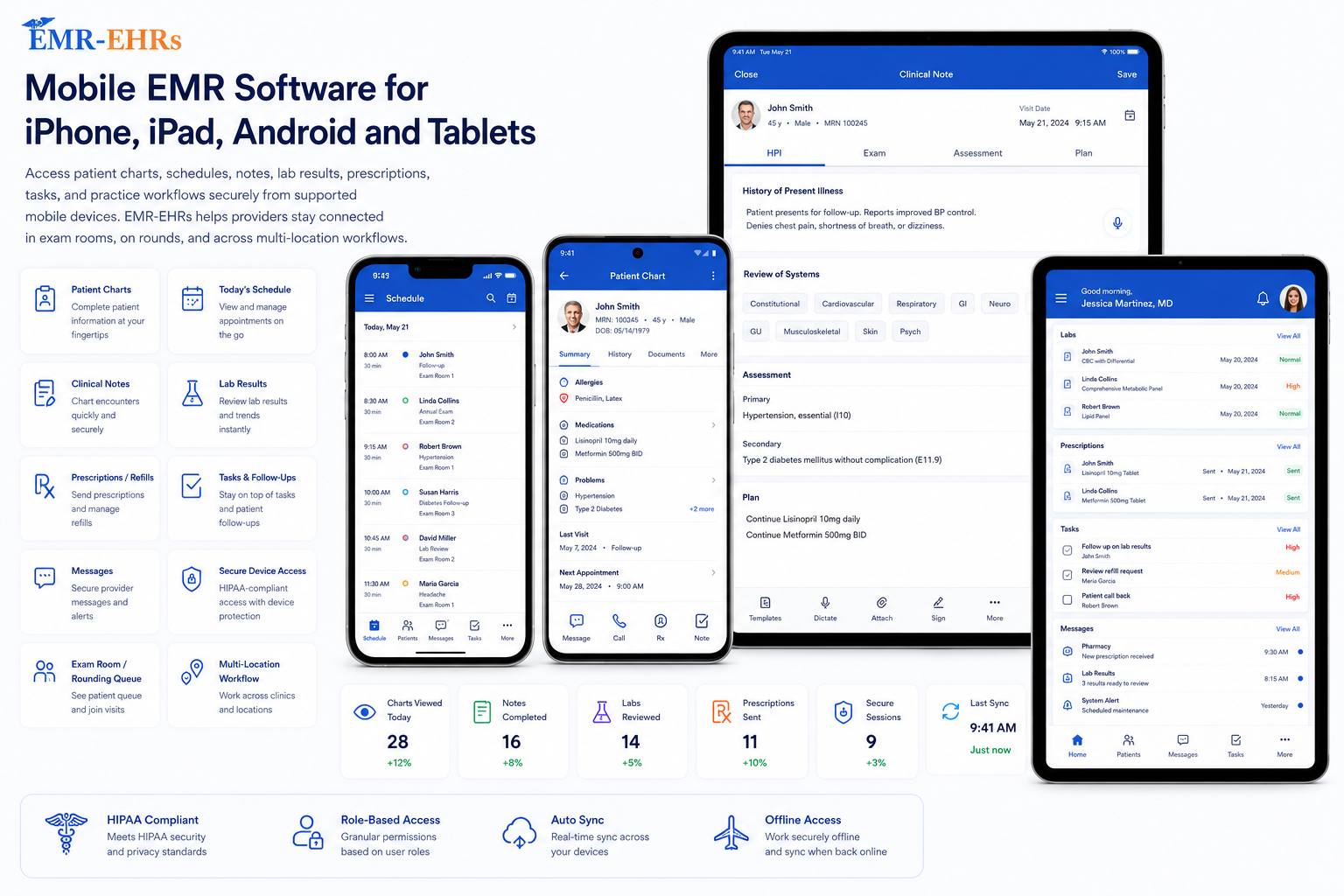
Mobile EMR DashboardProvider workflow visibility

Chart

Patient summary and notes.

Schedule

Appointments and patient flow.

Alerts

Labs, tasks and follow-up.

Images

Clinical capture where supported.

AI Notes

Documentation assistance where available.

Mobile ChartsSchedulesNotesLab ResultsPrescriptionsTasksImagesSecure Access
Quick answer

What Is Mobile EMR Software?

Mobile EMR software allows healthcare providers to securely access electronic medical records from supported smartphones and tablets. It can help providers view patient charts, update notes, check schedules, review labs, manage prescription workflows, capture images, complete tasks, and communicate with staff away from a desktop workstation.

Access EMR-EHRs From the Devices Your Practice Already Uses

iPhone EMR Access

Use supported iPhone workflows for quick chart reviews, appointment checks, urgent tasks, refill-related workflows, and provider communication.

iPad EMR Access

Use supported iPad workflows for exam-room charting, mobile documentation, patient education, clinical image capture, and visit review.

Android EMR Access

Use supported Android phone and tablet workflows for flexible access across clinical and administrative tasks.

Tablet EMR Access

Use supported tablets for point-of-care documentation, rounding, chart review, clinical photos, and provider mobility.

Desktop and Mobile Workflow

Use desktop EMR for full workflows and supported mobile access for fast review, updates, communication, and care coordination.

Mobile EMR Features for Busy Healthcare Providers

Patient chart access
Appointment schedule view
Mobile note updates
Lab result review
Prescription and refill workflow support
Secure communication
Task management
Clinical image capture where supported
Patient flow visibility
Voice and transcription support where available
AI-assisted documentation where available
Practice management visibility

View and Update Patient Charts From Mobile Devices

Patient demographics
Medical history
Allergies where supported
Medications where supported
Diagnoses where supported
Previous encounters
Visit notes
Lab results where supported
Attached images where supported
Follow-up details
Clinical summaries where supported

Manage Schedules and Patient Flow From Your Phone or Tablet

Daily appointment schedule
Provider schedule view
Appointment status
Patient arrival status where supported
Rooming status where supported
Check-in and check-out visibility where supported
Multi-provider schedule coordination
Front-desk and clinical team communication

Document Visits Faster With Mobile and AI-Assisted Tools

Mobile clinical notes where supported
Voice input where available
Transcription support where available
AI-assisted note organization where available
Visit summary support where available
Structured documentation
Provider review before saving
Reduced documentation delay

Capture and Attach Clinical Images to the Patient Record

Mobile camera capture where supported
Clinical image documentation where supported
Image attachment to patient chart where supported
Visual record support where supported
Point-of-care workflow

Keep Providers and Staff Connected From Anywhere

Internal staff communication where supported
Provider-to-staff coordination
Patient communication support where available
Task assignment where supported
Task tracking where supported
Urgent follow-up reminders where supported
Team accountability

Secure Mobile EMR Access for Protected Patient Information

Secure login
Role-based access where supported
Permission-based workflows
Encrypted access where supported
User controls
Audit-friendly activity where supported
Session timeout where supported
Device access management where supported
HIPAA-focused workflow design
PHI protection awareness

Connect Mobile EMR Access With Practice Management Workflows

Encounter visibility where supported
Superbill review where supported
ICD and CPT code support where supported
Billing workflow visibility where supported
Task handoff to billing staff
Appointment-to-encounter connection where supported
Claims-ready documentation support where supported
Practice management coordination

Where Mobile EMR Access Helps Most

In the Exam Room

Providers can use supported tablet workflows to review charts, document visits, capture images, and educate patients.

Between Patient Visits

Providers can check schedules, update tasks, review lab results, and prepare for the next patient.

During Rounds

Providers can access patient information and update documentation while moving between care locations where supported.

After Hours

Providers can review urgent messages, lab results, tasks, and follow-up needs where supported.

Across Multiple Locations

Multi-location practices can use supported mobile access to stay connected across providers, staff, and locations.

Mobile EMR vs Desktop EMR: When Should Providers Use Each?

Mobile EMR should extend desktop access for point-of-care workflows, not replace complete desktop workflows.

WorkflowMobile EMRDesktop EMR
Chart reviewQuick access from supported phone or tabletDetailed chart review
Appointment viewOn-the-go schedule checksFull schedule management
DocumentationQuick notes, voice, images, and AI support where availableComplex documentation
Billing visibilityQuick review and handoff where supportedFull billing workflow
Patient flowUpdates where supportedFull operational control
Best useMobility and point-of-care accessComplete administrative and clinical workflows

Benefits of Using EMR-EHRs on Mobile Devices

Faster access to patient records
Better point-of-care documentation
Improved provider mobility
Faster lab and prescription review
Better staff communication
Easier clinical image capture where supported
Less dependency on desktop workstations
Reduced documentation delays
Better patient flow visibility
More flexible practice workflows
Improved provider productivity
Stronger care coordination

What to Look for in Mobile EMR Software

Verified iPhone, iPad, Android phone, and tablet support
Secure patient chart access
Schedule and patient flow review
Mobile documentation
Clinical image capture where supported
Secure communication and tasks
Voice input or transcription where available
AI-assisted documentation tools where available
Practice management connection
Permissions and audit-friendly activity where supported
Specialty-specific workflow support
Clinical and administrative team support

Why Practices Choose EMR-EHRs for Mobile EMR Workflows

EMR-EHRs helps healthcare practices extend EMR access beyond the desktop with supported mobile workflows for chart review, appointments, documentation, images, tasks, communication, and practice management visibility.

Mobile EMR Software FAQs

What is mobile EMR software and how does it help healthcare providers?

Mobile EMR software allows healthcare providers to securely access patient charts, schedules, clinical notes, lab results, prescriptions, tasks, and communication tools from supported smartphones and tablets. EMR-EHRs helps providers stay connected to practice workflows without depending only on a desktop workstation.

Can doctors use EMR-EHRs on iPhone, iPad, Android phones, and tablets?

EMR-EHRs can support mobile EMR access across verified devices and workflows. Providers can review device compatibility during a demo before relying on specific iPhone, iPad, Android phone, or tablet capabilities.

What features should mobile EMR software include for clinical workflows?

Mobile EMR software should include secure patient chart access, schedule review, mobile documentation, lab result review, prescription workflow support, communication, tasks, image capture where supported, patient flow visibility, and practice management connectivity.

Is mobile EMR access secure for protected patient information?

Mobile EMR access should be designed with secure login, role-based permissions, access controls, session timeout, audit-friendly activity where supported, and privacy-focused workflows. EMR-EHRs uses careful security wording without making unsupported compliance guarantees.

How can mobile EMR software reduce documentation delays for providers?

Mobile EMR software can help providers update notes at the point of care, review chart data quickly, capture clinical images where supported, and use voice, transcription, or AI-assisted documentation tools where available.

See EMR-EHRs Mobile EMR Software in Action

Give your providers secure access to patient charts, schedules, notes, images, tasks, lab results, prescriptions, and practice workflows from supported mobile devices.

Phone: (480) 782-1116 | Email: info@emr-ehrs.com
