Scheduling Gaps Create Lost Revenue
Manual calendars, double-booking, missed appointments, cancellations, and weak reminder workflows can reduce provider productivity.
EMR-EHRs Medical Practice Management Software helps healthcare practices manage scheduling, registration, eligibility verification, check-in, check-out, billing, claims, payment posting, patient collections, reports, and connected EMR workflows where supported.
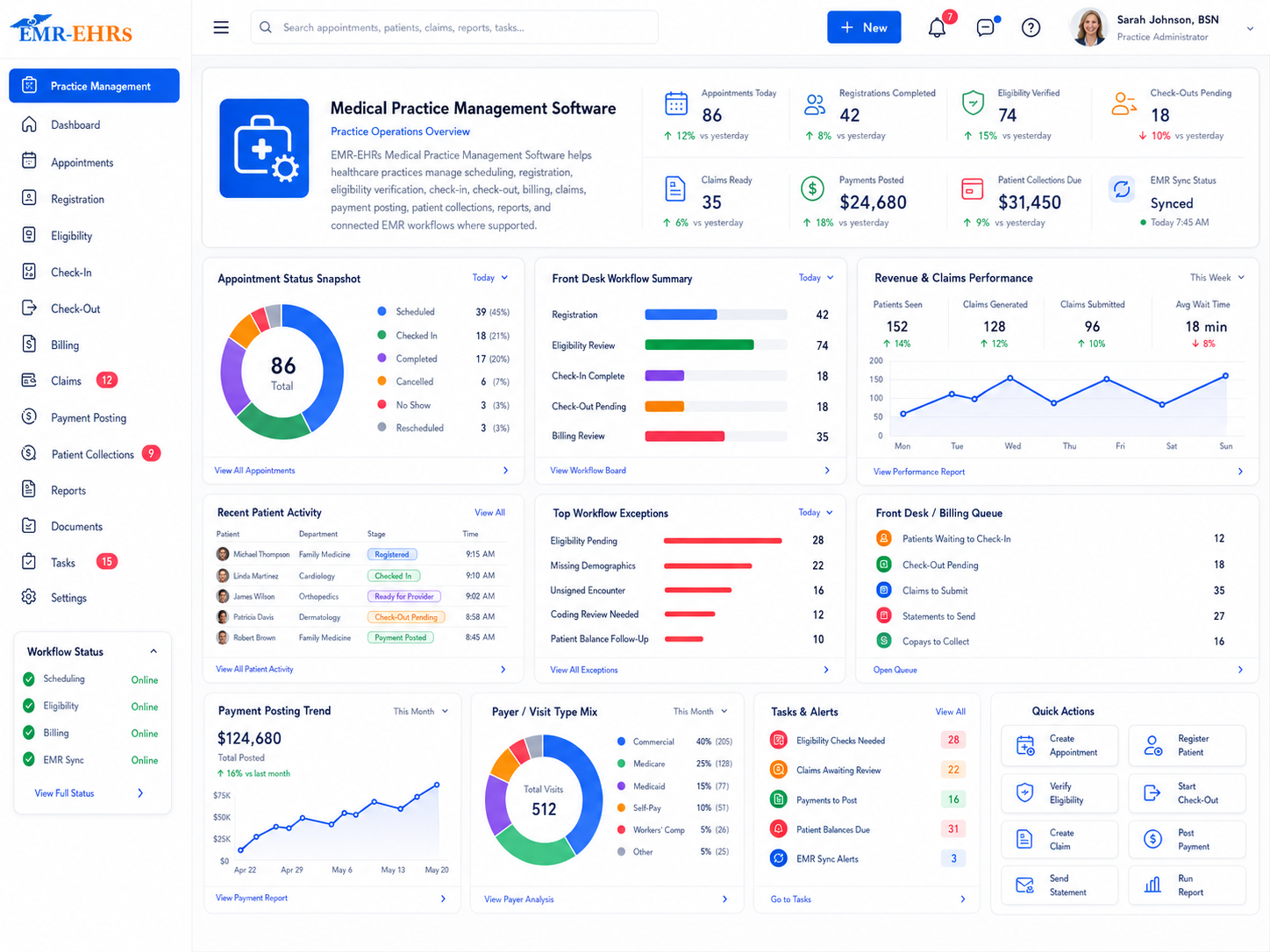
Medical practice management software helps healthcare practices manage administrative and financial workflows such as appointment scheduling, patient registration, insurance verification, check-in, check-out, billing, claims, payment posting, patient collections, reports, and daily practice operations.
EMR-EHRs Medical Practice Management Software helps practices connect patient flow, front desk tasks, insurance workflows, billing, claims, payments, collections, reporting, and EMR/EHR workflows where supported.
| Area | Practice Management Software | EMR/EHR Software | EMR-EHRs Connected Workflow |
|---|---|---|---|
| Main purpose | Administrative and financial workflows | Clinical records and documentation | Connected clinical, billing, and operational workflow |
| Scheduling | Core workflow | May connect | Scheduling connected with visit workflow where supported |
| Registration | Core workflow | May store patient data | Patient demographics connected where supported |
| Eligibility | Core workflow where supported | Not usually clinical | Eligibility connected to front desk and billing where supported |
| Check-in/check-out | Core front desk workflow | May update visit status | Patient flow connected to visit and billing where supported |
| Clinical notes | Not primary | Core workflow | Documentation supports billing readiness where supported |
| Charge capture | Billing workflow | May connect to encounter | Charges connected with visit and documentation where supported |
| Claims | Core workflow where supported | Not primary | Claims connected with charges and documentation where supported |
| Payments | Core workflow where supported | Not primary | Payment activity connected to accounts where supported |
| Reports | Operational and financial reports | Clinical reports | Practice-wide reporting where supported |
Medical practices need better practice management software because disconnected administrative workflows can affect scheduling, registration, billing readiness, claims, payments, collections, reporting, and staff productivity.
Manual calendars, double-booking, missed appointments, cancellations, and weak reminder workflows can reduce provider productivity.
Incorrect demographics, missing insurance details, outdated contact information, and incomplete forms can create billing delays.
Missing eligibility checks can lead to coverage issues, copay confusion, deductible surprises, and claim problems where verification is supported.
Front desk teams need connected workflows for arrival status, forms, insurance review, balances, follow-up scheduling, and patient communication.
If visit status, documentation, diagnosis, and procedure details do not connect, billing teams may wait for missing information.
Missed charge capture, incorrect codes, missing modifiers, or incomplete visit details can affect billing readiness where supported.
Claims may fail when demographics, insurance, diagnosis, procedure codes, modifiers, provider details, or payer requirements are incomplete.
Manual posting, adjustment review, denial posting, underpayment review, and account balance updates can slow revenue workflows.
Practices need clear visibility into copays, deductibles, statements, payment plans, patient payments, and outstanding balances.
Without a structured collections workflow, staff may miss follow-up tasks, patient balance reminders, and payment communication.
Practice leaders need dashboards for scheduling, no-shows, claims, payments, denials, A/R, collections, productivity, and operational bottlenecks.
Practices need consistent scheduling, reporting, billing workflows, access control, and operational standards across providers and locations.
Front desk tasks, billing queues, claim follow-up, collections, and reporting need clear ownership and visibility.
AI can support summaries, alerts, task review, and reports where available, but staff remain responsible for final billing, claims, collections, scheduling, and patient communication decisions.
Staff schedule appointments, assign providers, select locations, choose visit types, and manage availability where supported.
Patient demographics, contact details, responsible party, guarantor, insurance information, and patient account details are updated where supported.
Front desk staff review payer details, member ID, group number, policy information, referral needs, and patient coverage details where supported.
Eligibility, benefits, copay, deductible, coinsurance, plan status, and payer response details are checked where available.
Staff confirm demographics, forms, insurance information, copay, balance details, arrival status, and visit readiness where supported.
Forms, consent, ID card capture, insurance card capture, referral details, prior authorization tasks, and communication notes are completed where supported.
The appointment moves through scheduled, arrived, checked in, in progress, checked out, completed, or other visit statuses where supported.
Visit status, encounter information, documentation status, diagnosis details, and procedure workflows support billing readiness where available.
Charges, CPT/HCPCS, procedure codes, diagnosis codes, modifiers, units, providers, locations, and payer details are reviewed where supported.
Diagnosis and procedure details are connected with charge review, claim preparation, and billing workflow where available.
Pre-claim checks, payer rule checks, missing field review, claim readiness, and claim scrubbing are completed where supported.
Claims are prepared, submitted, tracked, rejected, corrected, or resubmitted where supported.
Insurance payments, adjustments, denials, underpayments, overpayments, and account balances are posted or reviewed where supported.
Patient payments, copays, deductibles, patient balances, payment plans, and account history are tracked where supported.
Statements, reminders, collection notes, outstanding balance tasks, patient communication, and collections reports are managed where supported.
Rejected claims, denied claims, aging balances, payer follow-up, patient balance follow-up, and rework queues are reviewed where supported.
Managers review appointment activity, front desk productivity, billing productivity, claims, payments, collections, A/R, and practice performance.
AI-assisted summaries can help review schedules, eligibility issues, billing readiness, claims, denials, collections, and reports where available.
HIPAA-focused practice management workflow, designed to support secure patient and billing data access, role-based access for front desk, billing, provider, manager, and admin users, and audit-friendly administrative workflow history where supported.
Manage appointments, registration, check-in, check-out, eligibility, forms, balances, follow-up scheduling, and patient communication where supported.
Review charges, claims, rejections, denials, payments, adjustments, A/R, patient balances, and collections where supported.
Benefit from connected scheduling, visit status, documentation-to-billing support, and fewer manual administrative handoffs where supported.
Track productivity, scheduling, patient flow, billing performance, collections, A/R, reports, and operational bottlenecks.
Manage users, permissions, reports, locations, workflow rules, access levels, and practice settings where supported.
Standardize scheduling, billing, reporting, permissions, patient workflow, and staff accountability across locations where supported.
AI-powered practice management tools should support administrative review and workflow efficiency while EMR-EHRs users, billers, managers, and providers remain responsible for final billing, claims, collections, scheduling, and patient communication decisions.
| Workflow Area | Manual Admin Work | EMR-EHRs Practice Management Software |
|---|---|---|
| Scheduling | Paper or disconnected calendar | Connected scheduling workflow |
| Registration | Manual data entry | Digital registration support where available |
| Eligibility | Manual payer checks | Eligibility workflow where supported |
| Check-in | Verbal/manual process | Check-in status and front desk workflow where supported |
| Visit handoff | Manual staff communication | Visit status and billing readiness where supported |
| Charges | Manual handoff | Charge review and billing readiness where supported |
| Claims | Manual claim preparation | Claims workflow and pre-claim checks where supported |
| Payments | Manual tracking | Payment posting workflow where supported |
| Collections | Spreadsheet follow-up | Patient balance and collections workflow where supported |
| Reports | Manual reports | Practice analytics and dashboards |
| Security | Shared access risk | Role-based access and audit-friendly history |
This conceptual workflow preview illustrates a practice management workflow mockup.
Scheduling, registration, eligibility and visit status.
Charges, claims, payments and denials.
Patient balances, A/R and follow-up tasks.
AI workflow summary where available.
Compare practice management options by scheduling, eligibility, claims, payment, reporting, integration and implementation requirements—not by a feature checklist alone.
EMR-EHRs helps practices manage scheduling, registration, eligibility, check-in, check-out, and patient communication where supported.
EMR-EHRs supports appointment workflows, provider calendars, visit status, patient forms, and front desk tasks where available.
EMR-EHRs helps practices review insurance details, eligibility status, copays, deductibles, and billing readiness where supported.
EMR-EHRs can support charge review, billing readiness, claims, pre-claim checks, rejections, denials, and resubmissions where available.
EMR-EHRs helps track payments, adjustments, patient balances, statements, collections, and A/R where supported.
EMR-EHRs helps managers review scheduling, billing, payments, collections, A/R, productivity, and operational reports.
EMR-EHRs connects administrative workflows with patient charts, clinical documentation, visit status, and billing workflows where supported.
EMR-EHRs supports permissions for front desk, billing, providers, managers, and administrators where supported.
EMR-EHRs can support administrative summaries, claim readiness summaries, patient balance summaries, and report summaries where available.
EMR-EHRs supports setup, onboarding, workflow training, and optimization for medical practices.
Review scheduling, registration, eligibility, check-in, check-out, billing, claims, payments, collections, reporting, roles, and locations.
Configure providers, locations, users, permissions, appointment types, visit types, billing settings, reports, and workflows where supported.
Set up provider calendars, appointment types, visit types, availability, resources, reminders, and scheduling rules where supported.
Configure demographic fields, patient forms, insurance fields, guarantor fields, ID capture, insurance card capture, and duplicate review where supported.
Configure eligibility checks, payer details, coverage review, copay review, deductible review, front desk alerts, and billing readiness workflow.
Set up check-in, check-out, visit status, forms, copay collection, patient communication, follow-up scheduling, and front desk tasks where supported.
Set up charge review, diagnosis workflows, CPT/HCPCS workflows, modifiers, fee schedules, billing tasks, and charge readiness.
Configure pre-claim checks, electronic claims, claim readiness, rejection workflow, denial workflow, resubmission, and claims reports.
Set up insurance payment posting, patient payment posting, adjustments, denials, reconciliation, balance updates, and payment reports.
Configure statements, patient balances, reminders, payment plans, collections notes, collections tasks, and patient balance reports.
Configure scheduling reports, billing reports, collection reports, A/R reports, productivity reports, and practice dashboards.
Train front desk teams, billing users, providers, managers, administrators, and multi-location teams based on roles.
Support launch, issue tracking, workflow questions, staff adoption, report review, and operational troubleshooting.
Review workflow refinements, reporting gaps, permissions, templates, billing workflows, training needs, and optimization opportunities.
Medical practice management software helps healthcare practices manage daily administrative and financial workflows, including appointment scheduling, patient registration, insurance verification, check-in, billing, claims, payment posting, patient collections, reports, and practice operations. EMR-EHRs Medical Practice Management Software also helps connect these workflows with EMR/EHR documentation where supported.
EMR-EHRs helps practices manage scheduling, billing, and claims by supporting appointment calendars, patient registration, eligibility workflows, check-in, charge readiness, procedure code billing, pre-claim checks, electronic claims, payment posting, patient collections, and reporting where supported. This helps front desk teams, billers, providers, and managers work from a more connected workflow.
Medical practices should look for scheduling, patient registration, insurance eligibility verification, check-in/check-out workflows, charge capture, claims management, pre-claim checks, payment posting, patient billing, collections, A/R reports, patient communication, role-based access, EMR/EHR connection, reporting dashboards, and implementation support.
Yes. EMR-EHRs can connect practice management workflows with EMR/EHR documentation where supported, including patient charts, visit status, encounter details, diagnosis codes, procedure workflows, billing readiness, claims, reports, and secure role-based access. This helps reduce manual handoffs between front desk, providers, and billing teams.
Manual administrative workflows can create scheduling gaps, registration errors, missed eligibility checks, delayed charges, claim errors, slow payment posting, inconsistent collections, weak reporting, and security risks. EMR-EHRs Practice Management Software helps practices organize scheduling, billing, claims, payments, collections, reports, and administrative workflows in one connected system where supported.
Manage scheduling, registration, eligibility, check-in, billing, claims, payments, collections, reports, and connected EMR workflows with EMR-EHRs Medical Practice Management Software where supported.
Phone: (480) 782-1116 | Email: jason@1stproviderschoice.com
