Patients Repeatedly Enter the Same Information
Patients often repeat demographics, contact details, insurance information, medical history, medication lists, allergies, and consent details.
EMR-EHRs Automatic Patient Forms Filler helps practices reduce repetitive entry by pre-filling available patient details, collecting updates, and routing digital intake forms for staff review.
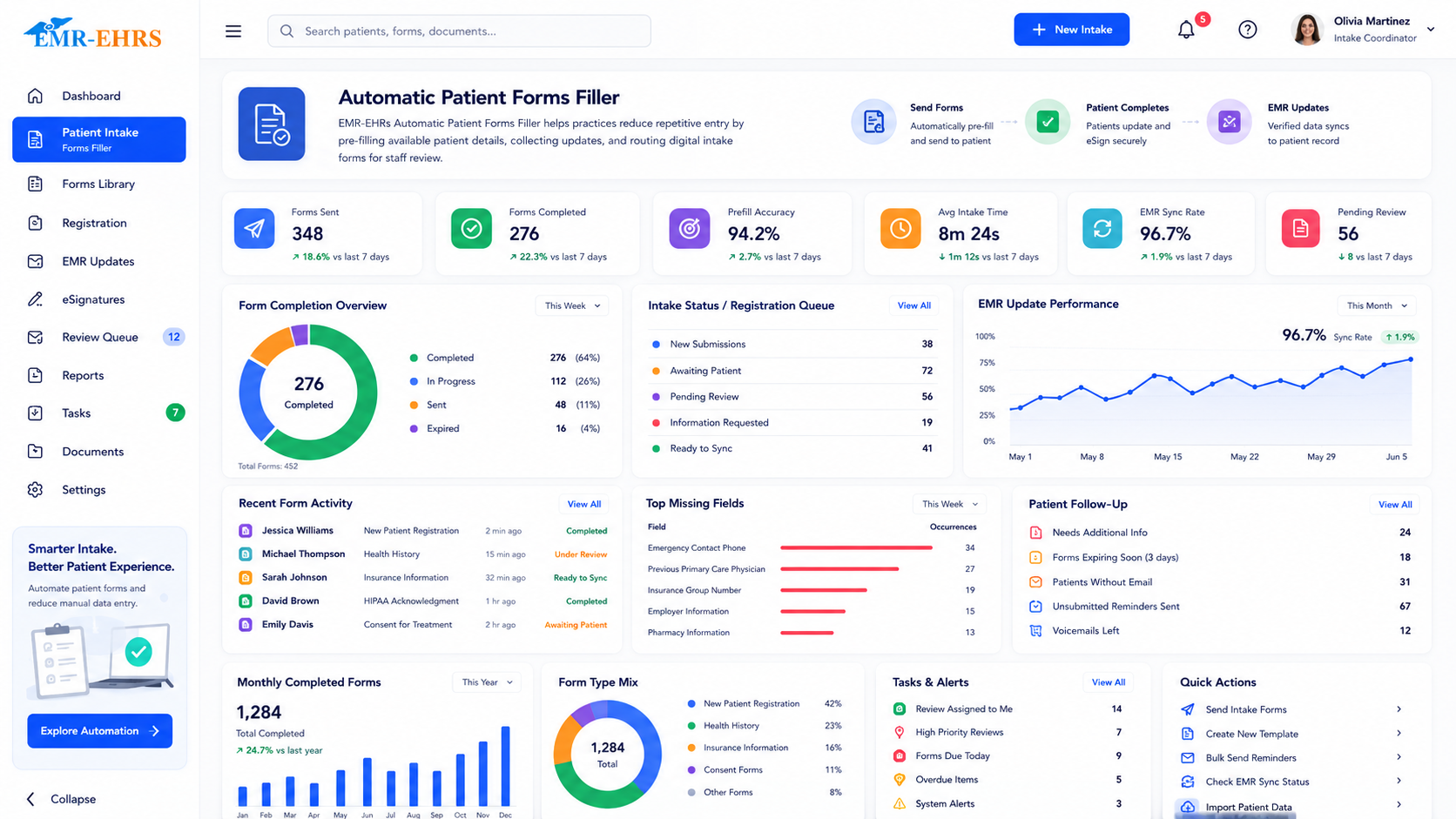
An automatic patient forms filler is an EMR feature that uses existing patient information to pre-fill registration, insurance, medical history, consent, and visit-specific forms. It helps reduce repetitive data entry, supports digital patient intake, collects updated patient details, routes submitted forms to staff review, and keeps intake information connected to patient records where supported.
EMR-EHRs Automatic Patient Forms Filler helps healthcare practices pre-fill patient forms from available EMR data, reduce manual entry, improve registration workflows, support staff review, and keep intake information connected to patient records where supported.
Healthcare practices need more than paper forms or basic PDFs. They need a connected workflow that reduces repeated entry, supports digital intake, keeps staff in control of submitted information, and helps prepare check-in, billing, and provider review.
Patients often repeat demographics, contact details, insurance information, medical history, medication lists, allergies, and consent details.
Staff may manually transfer form data into EMR, billing, scheduling, or chart workflows.
Paper forms can cause unreadable handwriting, missing fields, scanning delays, filing work, and duplicate entry.
Returning patients should update changed information instead of completing the same full form again.
Missing demographics, insurance details, consent forms, signatures, or medical history can slow the visit.
Without digital tracking, staff may need to manually confirm signed documents, consent status, and completed forms.
Patient-submitted data should be reviewed before it updates important patient records.
Updated insurance, policyholder details, financial acknowledgments, and patient responsibility forms support billing readiness.
Chief complaint, visit reason, medical history, medication updates, allergies, and symptom updates help prepare the visit.
Practice leaders need visibility into incomplete forms, pending reviews, missing signatures, and intake bottlenecks.
Different specialties and visit types need different registration, consent, medical history, and questionnaire workflows.
Patient form workflows must protect sensitive patient information and support secure record handling.
Staff start with a patient record, scheduled appointment, provider, location, specialty, or visit type.
Select registration forms, insurance forms, medical history forms, consent forms if supported, or specialty-specific intake forms.
The module uses available EMR data such as demographics, contact information, insurance details, provider details, appointment details, or other mapped fields where supported.
Existing patient information is added to the correct fields to reduce repeated typing and duplicate entry.
Patients may complete forms before the visit through portal, online forms, tablet, kiosk, or in-office digital intake where available.
Missing or outdated information can be completed or updated before the appointment or during check-in.
Consent forms, privacy acknowledgments, financial policy forms, release forms, or procedure consent forms can be completed where supported.
Staff can view incomplete forms, missing required fields, pending signatures, and forms pending review.
Submitted information goes to front desk, clinical, or administrative review before chart or workflow updates.
Staff can review new details, approve changes, request corrections, or route the information to the correct workflow where supported.
Reviewed information can support chart updates, demographic updates, insurance updates, document storage, or patient record attachments.
Completed forms help staff prepare check-in, billing tasks, provider review, and documentation readiness.
Reports show form completion, pending forms, missing fields, review status, and intake readiness.
Confirm support for automatic population of specific clinical fields, including configuration and implementation requirements, during evaluation.
Confirm support for digital signature, timestamping, PDF generation, or consent automation, including configuration and implementation requirements, during evaluation.
Patient-submitted form data should support visit preparation and documentation while providers remain responsible for final clinical review, assessment, diagnosis, treatment decisions, medication decisions, and signed records.
Confirm support for specific EHRs, labs, payment tools, document systems, portals, APIs, or integrations, including connection method and implementation scope, during evaluation.
HIPAA-focused workflows, designed to support secure intake documentation, audit-friendly form records, and secure patient form handling.
AI-powered tools should support administrative efficiency while keeping staff and providers responsible for reviewing patient-submitted information before it is used for clinical, billing, or record updates.
Support intake completion assistance where available.
Help identify incomplete answers or missing required fields if available.
Summarize submitted form details for staff review if available.
Help staff review patient-submitted information if available.
Create patient instruction summaries for staff review if available.
Flag duplicate or repeated data for staff review if available.
Suggest next-step tasks for intake, billing, or chart workflows if available.
Surface billing readiness gaps where available.
Reduce repeated data entry, track missing forms, review patient updates, and prepare appointments faster.
Review patient-reported information, medications, allergies, history updates, and visit reason before rooming.
View updated patient intake details, reason for visit, symptom updates, and form responses before the encounter.
Use updated insurance, policyholder details, financial forms, and billing acknowledgments to support claim readiness.
Track form completion, staff workload, intake bottlenecks, and paperless workflow adoption.
Use specialty-specific form packets for different providers, services, departments, and visit types.
Standardize registration, intake, consent, billing forms, and staff review workflows across locations.
Streamline initial registration, insurance collection, history capture, consent, and appointment preparation.
Allow patients to update changed details instead of completing the same information repeatedly.
| Workflow Area | Manual Paper Forms | EMR-EHRs Automatic Patient Forms Filler |
|---|---|---|
| Patient demographics | Rewritten repeatedly | Pre-filled from available EMR data |
| Returning patients | Repeat full forms | Update only changed information where supported |
| Staff data entry | Manual typing | Reduced duplicate entry |
| Missing fields | Found late | Missing field alerts if supported |
| Consent forms | Paper signatures and scanning | Digital consent/signature workflow if supported |
| Chart updates | Manual review and entry | Staff review before chart update |
| Form storage | Scanning and filing | Attach completed forms to patient record if supported |
| Appointment readiness | Manual checking | Form status and readiness tracking |
| Billing readiness | Separate review | Insurance and financial form visibility |
| Reporting | Limited visibility | Completion, pending, and review reports |
EMR-EHRs helps reduce repeated form filling by using available patient information already stored in the EMR.
EMR-EHRs helps staff track missing forms, review submitted details, and prepare patient records before the visit.
EMR-EHRs patient forms can support registration, chart updates, billing readiness, document storage, and visit preparation where supported.
EMR-EHRs helps practices support easier intake workflows for new and returning patients through pre-filled and digital form workflows where available.
EMR-EHRs supports privacy-focused and audit-friendly form handling workflows.
EMR-EHRs helps practices configure forms, form packets, staff review workflows, and reporting. Phone: (480) 782-1116. Email: jason@1stproviderschoice.com.
Review current paper forms, registration forms, patient intake forms, consent forms, insurance forms, billing forms, and specialty-specific forms.
Map EMR fields to form fields where supported, configure required fields, form sections, form packets, and patient update workflows.
Set up review queues, approval steps, missing field alerts, document storage, and chart update workflows if supported.
Configure patient portal forms, pre-visit forms, appointment-linked forms, reminders if supported, and completion tracking.
Train front desk, clinical staff, providers, billing teams, and administrators.
Monitor form completion, missing fields, staff review volume, reporting, and workflow adoption.
Simplify patient registration, digital intake forms, demographic updates, insurance forms, medical history forms, consent forms if supported, staff review, chart updates if supported, billing readiness, check-in readiness, and secure form storage with EMR-EHRs Automatic Patient Forms Filler.
Phone:(480) 782-1116 Email:jason@1stproviderschoice.com
