Manual Claims Slow Down Reimbursement
Manual claim workflows can create delays, duplicate work, missed submissions, and slower follow-up.
EMR-EHRs Electronic Claims Medical Software helps healthcare practices create claims, review patient and insurance details, validate coding and modifiers, submit claims electronically, correct rejections, manage denials where supported, post payments where supported, and track A/R follow-up from one connected workflow.
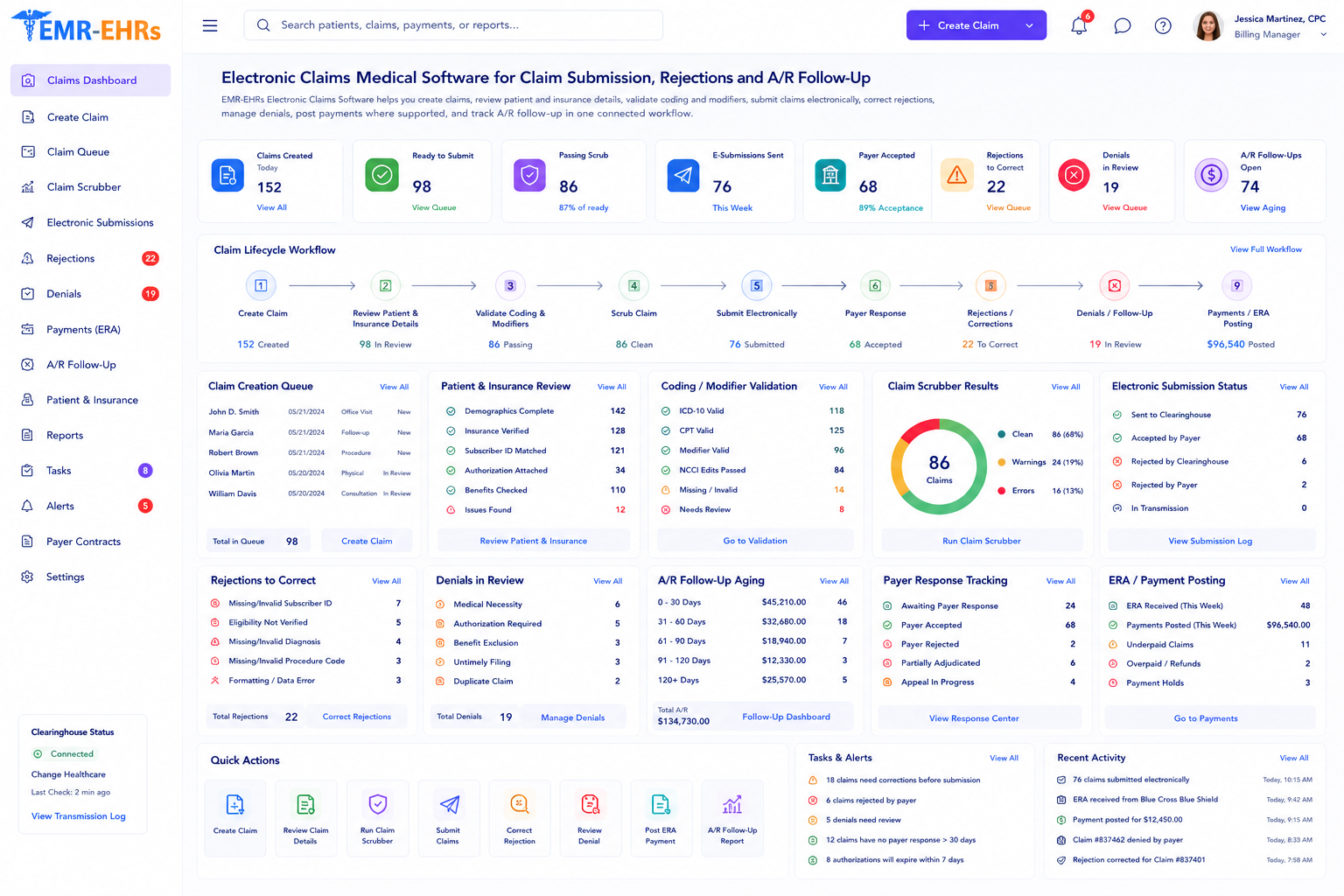
Electronic claims medical software helps healthcare practices create, review, submit, track, correct, and follow up on insurance claims electronically. It can support claim creation, claim validation, claim scrubbing, electronic submission, rejection correction, denial tracking, ERA/EOB review, payment posting, A/R worklists, reporting, and secure claim history where supported.
EMR-EHRs Electronic Claims Medical Software helps practices manage claims from charge capture and claim review through electronic submission, rejection correction, denial follow-up, payment posting, reporting, and secure claim history where supported.
Healthcare practices need more than a basic claim submission tool. They need a connected claims processing workflow that supports charge capture, patient and insurance review, coding validation, claim scrubbing, submission tracking, rejection correction, denial follow-up, payment posting, A/R worklists, and reports.
Manual claim workflows can create delays, duplicate work, missed submissions, and slower follow-up.
When claim creation, coding review, submission, denial tracking, and payment posting happen in separate places, billing teams spend more time reconciling information.
Incorrect patient name, date of birth, subscriber details, address, insurance information, or payer details can create preventable claim issues.
Payer name, payer ID, policy number, group number, subscriber relationship, primary insurance, secondary insurance, eligibility, and authorization details need review where supported.
Coding errors, missing modifiers, incorrect units, diagnosis pointer issues, or missing provider details can affect claim acceptance and payment.
Pre-submission checks help billing teams identify missing fields, invalid data, payer issues, coding problems, duplicate claim risks, and authorization gaps where supported.
Teams need to see whether claims are draft, ready, submitted, accepted, rejected, denied, paid, corrected, resubmitted, pending, or closed where supported.
Rejected claims should be reviewed, corrected, and resubmitted quickly to reduce avoidable billing delays.
Denied claims may require denial reason review, adjustment code review, corrected claim workflow, documentation, appeal tasks, payer follow-up, and notes.
Payer responses may include allowed amounts, paid amounts, adjustments, denials, patient responsibility, deductible, copay, coinsurance, and remark codes.
Payment posting should help billing teams update claim balances, account balances, adjustments, write-offs, patient responsibility, and remaining balances.
Billing teams need clear worklists for unpaid claims, aging claims, payer follow-ups, no-response claims, underpayments, and timely filing risks where supported.
Charges are captured from an encounter, superbill, procedure, billing entry, or manual charge entry where supported.
Billing staff reviews patient name, date of birth, address, subscriber details, and required demographic fields.
Billing staff reviews insurance plan, payer details, payer ID, policy information, group number, and payer sequencing.
Eligibility status, authorization number, referral requirement, coverage dates, copay, deductible, and patient responsibility may be reviewed where supported.
The claim is created with patient, provider, payer, diagnosis, procedure, modifier, units, charges, place of service, and billing details.
Billing staff reviews CPT, HCPCS, ICD-10, modifiers, diagnosis pointers, rendering provider, billing provider, NPI, taxonomy, location, and payer requirements.
Required fields, payer details, duplicate claim risks, demographic errors, coding issues, and missing information are reviewed before submission.
Claim scrubbing or pre-submission edits check the claim for errors, missing fields, payer issues, coding issues, or other warnings where supported.
Billing staff corrects missing fields, invalid data, payer errors, coding issues, modifier issues, authorization gaps, or documentation issues where supported.
The claim is submitted electronically through the supported clearinghouse or payer workflow where available.
Claim status may show draft, ready, submitted, accepted, rejected, denied, paid, corrected, resubmitted, pending, or closed where supported.
Rejected claims are reviewed, corrected, documented, and resubmitted through the correction workflow.
Denied claims are reviewed by denial reason, payer response, adjustment code, remark code, documentation need, appeal option, or follow-up status where supported.
ERA/EOB details are reviewed for paid amount, allowed amount, adjustment, denial, deductible, copay, coinsurance, and patient responsibility where supported.
Insurance payments, patient payments, adjustments, write-offs, patient responsibility, secondary balances, and remaining balances are posted where supported.
Teams review unpaid claims, aging claims, payer follow-up tasks, underpayments, no-response claims, timely filing risks, rejections, denials, payments, and billing performance.
Confirm support for direct encounter-to-claim, superbill automation, charge capture automation, or coding automation, including configuration and implementation requirements, during evaluation.
Confirm support for real-time eligibility, payer verification, deductible details, copay details, or insurance discovery, including configuration and implementation requirements, during evaluation.
Confirm support for specific scrubber rules, NCCI edits, payer-specific edits, or clean claim scoring, including configuration and implementation requirements, during evaluation.
Confirm support for clearinghouse connection, direct payer submission, EDI 837, real-time payer response, or batch submission, including configuration and implementation requirements, during evaluation.
Confirm support for ERA import, auto-posting, claim matching, or EDI 835 support, including configuration and implementation requirements, during evaluation.
Confirm support for electronic claim attachments, EDI attachments, payer attachment submission, or automatic document matching, including configuration and implementation requirements, during evaluation.
HIPAA-focused claims workflow, designed to support secure billing access, audit-friendly claim activity records, and role-based billing permissions.
Confirm support for specific clearinghouses, payer networks, EDI files, APIs, HL7/FHIR, ERA/835, claim/837, eligibility/270/271, or attachment standards, including connection method and implementation scope, during evaluation.
AI-powered claims tools should support billing review and staff efficiency while billing teams remain responsible for final claim review, coding verification, payer submission, denial follow-up, payment posting, and compliance decisions.
Summarize claim details, status, missing fields, and follow-up items for billing review.
Summarize payer response, rejection reasons, denial reasons, and next-step tasks where available.
Help prioritize unpaid claims, underpayments, no-response claims, timely filing risks, and follow-up queues.
Create claims, review billing details, correct rejections, track claim status, manage denials, post payments, and work A/R queues where supported.
Monitor claim volume, rejection trends, denial trends, payer performance, payment posting, A/R aging, and billing team performance.
Review documentation, diagnoses, procedure codes, medical necessity notes, and claim-related corrections where supported.
Support patient demographics, insurance capture, eligibility review, authorizations, referrals, and billing readiness where supported.
Manage claim submission, payer follow-up, denial tasks, appeals, payment posting, and unpaid claims where supported.
Manage provider-specific claims, billing rules, worklists, and reporting where supported.
Track claims, payer activity, A/R, and billing performance across locations where supported.
Support specialty-specific billing, authorizations, procedures, modifiers, documentation, and payer follow-up where supported.
| Workflow Area | Manual Claims Processing | EMR-EHRs Electronic Claims |
|---|---|---|
| Claim creation | Manual forms or disconnected systems | Claim creation from billing workflow where supported |
| Claim review | Manual checks | Claim detail review and validation |
| Scrubbing | Manual error spotting | Claim scrubbing where supported |
| Submission | Paper or payer portal entry | Electronic submission where supported |
| Rejections | Hard to track | Rejection queue and correction workflow |
| Denials | Spreadsheet follow-up | Denial tracking where supported |
| Payment posting | Manual EOB entry | ERA/EOB and payment posting workflow where supported |
| A/R follow-up | Manual lists | A/R aging and unpaid claim worklists |
| Reports | Spreadsheet tracking | Claims, denial, payment and A/R reports |
| Security | Paper and shared files | Role-based access and audit-friendly history |
This conceptual workflow preview illustrates a claims processing dashboard mockup.
CPT, ICD, modifier and provider review.
Claim scrubber status where supported.
Electronic submission queue where supported.
Payment posting panel where supported.
EMR-EHRs helps practices manage claims from charge review to submission, correction, payment posting, and A/R follow-up where supported.
EMR-EHRs supports patient, payer, provider, coding, modifier, and claim detail review before submission.
EMR-EHRs can support claim scrubbing, pre-submission edits, error warnings, and correction workflows where available.
EMR-EHRs helps teams track rejected claims, denied claims, correction tasks, resubmission workflows, and follow-up notes where supported.
EMR-EHRs supports ERA/EOB review, payment posting, adjustments, patient responsibility, and balance updates where supported.
EMR-EHRs helps billing teams review unpaid claims, payer aging, claim volume, denial trends, payment activity, and team worklists where supported.
EMR-EHRs supports role-based billing access, secure claim history, and audit-friendly billing activity where supported.
EMR-EHRs can support claim summaries, missing field suggestions, rejection summaries, denial summaries, and A/R worklist prioritization where available.
EMR-EHRs helps configure claim workflows, billing rules, payer details, reports, permissions, and staff training.
Review charge capture, claim creation, payer submission, rejection handling, denial follow-up, payment posting, A/R worklists, reports, and user roles.
Configure billing providers, rendering providers, locations, payer details, insurance fields, CPT/ICD/modifier workflows, claim formats, and submission rules where supported.
Configure patient demographics, subscriber fields, primary/secondary/tertiary insurance, payer details, policy fields, and payer ID fields where supported.
Configure CPT, HCPCS, ICD-10, modifiers, units, diagnosis pointers, required fields, provider details, and claim validation workflows.
Configure pre-submission edits, missing field checks, payer edits, duplicate claim warnings, authorization warnings, and readiness status where supported.
Configure submission queues, clearinghouse workflow, payer workflow, batch submission, claim status updates, and transmission history where supported.
Configure rejected claim queues, denial worklists, correction workflows, resubmission tasks, appeal tasks, payer follow-up notes, and status tracking where supported.
Configure ERA/EOB review, claim matching, payment posting, adjustments, patient responsibility, secondary balances, and payment history where supported.
Configure A/R aging, unpaid claim worklists, payer reports, denial reports, rejection reports, payment reports, and billing productivity dashboards.
Configure role-based billing access, claim editing permissions, payment posting permissions, denial worklist access, report access, and audit-friendly activity history.
Train billing teams, front desk teams, RCM teams, practice managers, providers, and administrators.
Monitor claim volume, rejections, denials, payment posting, A/R aging, staff workflow, report accuracy, and follow-up performance.
Electronic claims medical software helps healthcare practices create, review, submit, track, correct, and follow up on insurance claims electronically. EMR-EHRs Electronic Claims Medical Software supports claim creation, claim review, claim scrubbing if supported, electronic submission if supported, rejection correction, denial follow-up where supported, ERA/EOB review where supported, payment posting where supported, A/R worklists, and secure claim history.
EMR-EHRs Electronic Claims Medical Software helps practices review patient demographics, insurance details, payer information, provider details, CPT codes, HCPCS codes, ICD-10 codes, modifiers, units, diagnosis pointers, and claim readiness before submission. Where supported, claims can be submitted electronically through a clearinghouse or payer workflow, with claim status tracking.
EMR-EHRs Electronic Claims Medical Software can help reduce preventable claim rework by supporting patient demographic review, insurance review, payer detail review, coding validation, modifier review, required field checks, duplicate claim warnings, and claim scrubbing where supported. It does not guarantee rejection reduction.
Yes, where supported. EMR-EHRs Electronic Claims Medical Software can support denied claim queues, denial reasons, adjustment codes, remark codes, payer responses, appeal tasks, corrected claim workflows, ERA/EOB review, payment posting, patient responsibility, adjustments, write-offs, remaining balances, and payment posting history.
Practices should use integrated electronic claims processing because manual claim workflows can create duplicate work, missed rejections, delayed denial follow-up, disconnected spreadsheets, weak claim status visibility, and slower A/R follow-up. EMR-EHRs supports connected charge-to-claim workflow, claim validation, electronic submission where supported, rejection queues, denial tracking where supported, payment posting where supported, A/R worklists, reporting, and audit-friendly claim history.
Create claims, review billing details, submit claims electronically, manage rejections, track denials, post payments, monitor A/R, and improve billing workflow visibility with EMR-EHRs Electronic Claims Medical Software where supported.
Phone: (480) 782-1116 | Email: jason@1stproviderschoice.com
