Paper Prescriptions Can Cause Delays and Readability Issues
Handwritten prescriptions can create pharmacy calls, unclear instructions, missing details, and delayed medication fulfillment.
EMR-EHRs E-Prescriptions Feature helps providers manage prescriptions, medication history, dosage instructions, pharmacy workflows, refills, supported safety alerts, and secure medication records from the patient chart.
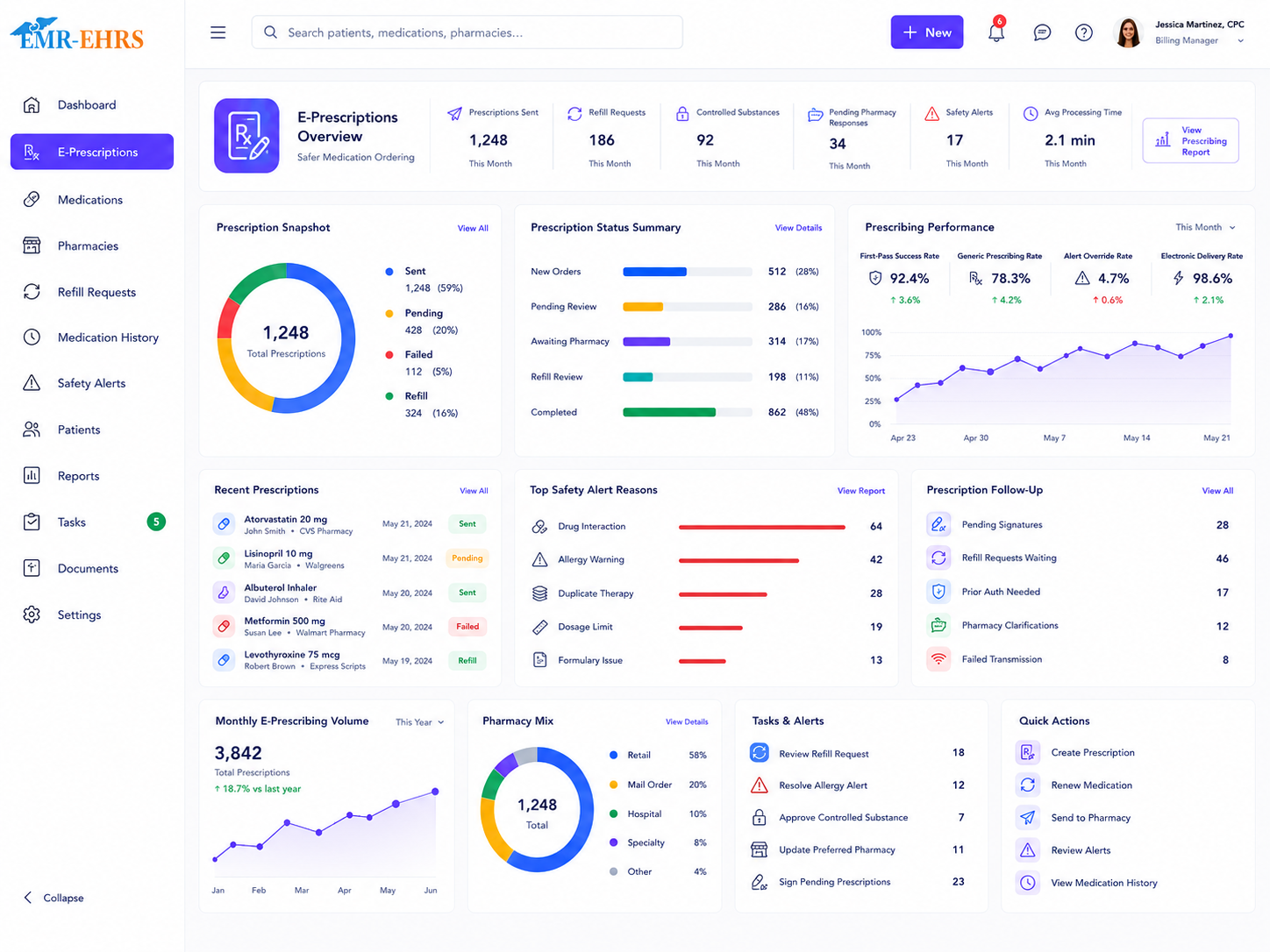
EMR e-prescriptions Feature is an electronic prescribing module that helps healthcare providers create, review, send, and manage prescriptions from the patient chart. It connects medication history, prescription details, allergy alerts if supported, drug interaction alerts if supported, pharmacy workflows, refill management, prescription history, and secure medication records inside the EMR.
EMR-EHRs E-Prescriptions Feature helps providers manage electronic prescriptions, patient medication records, safety alerts if supported, pharmacy workflows, refill requests, favorite prescription lists, and prescription history in one connected EMR system.
Healthcare practices need more than a basic prescription tool. They need a connected prescribing workflow that links patient charts, medication history, prescription details, pharmacy workflows, refills, safety checks, reports, and secure medication records.
Handwritten prescriptions can create pharmacy calls, unclear instructions, missing details, and delayed medication fulfillment.
When prescriptions, medication history, refill requests, and patient charts are separate, staff may enter the same information multiple times.
Providers need access to current medications, past prescriptions, discontinued medications, refill history, and allergy history before prescribing.
Prescribing workflows should support allergy alerts, drug-drug interaction alerts, drug-condition alerts, contraindication alerts, and duplicate therapy alerts where supported.
Providers need clear fields for medication name, strength, form, dose, frequency, duration, quantity, days supply if supported, directions, and refills.
Practices need organized pharmacy selection, electronic prescription transmission if supported, pharmacy fax workflow if supported, and transmission status visibility.
Refill requests, renewals, denials, medication changes, discontinued medications, and provider approvals need trackable worklists.
Medication coverage, formulary status, alternatives, cost visibility, and prior authorization workflows may influence medication selection where supported.
Controlled substance prescribing may require provider verification, role-based access, stronger authentication, audit trails, and policy-based workflows where supported.
Sent, failed, canceled, changed, renewed, pending, and pharmacy-response statuses should be easy to review where supported.
Prescription history, refill decisions, provider actions, pharmacy transmissions, and user activity should be stored in secure, audit-friendly records.
Practices need consistent prescribing rules, favorite prescription lists, refill routing, pharmacy workflows, user roles, and reports across providers.
The e-prescribing workflow begins from the patient record, where providers can review demographics, allergies if available, diagnoses if applicable, and medication history.
Providers review current active medications and previously documented medication details where available.
Providers review past prescriptions, discontinued medications if supported, refill history if supported, medication changes, and previous prescribing activity.
The allergy list, reaction details if documented, and allergy warnings if supported are reviewed before the prescription is sent.
Providers can search for a medication if supported, select from favorite prescription lists, use common medication templates if supported, or renew a previous prescription.
Medication name, strength, dosage form, route, dose, frequency, duration, quantity, refills, directions/SIG, and notes are entered.
Providers review drug interaction alerts, allergy alerts, duplicate therapy alerts, dosage warnings, contraindications, or missing information alerts where available.
Providers review formulary status, coverage indicators, preferred alternatives, benefit checks, cost visibility, or prior authorization flags where supported.
The patient's preferred pharmacy is selected or updated where supported.
For controlled medication workflows, provider identity verification, authentication, or controlled substance safeguards are completed where supported.
The prescription is sent electronically to the selected pharmacy where supported.
If electronic transmission is not used, staff can use fax or print workflows where supported and appropriate.
Sent, failed, pending, changed, canceled, renewed, or pharmacy response statuses are tracked where supported.
Refill requests are reviewed, approved, denied, renewed, changed, or routed to providers where supported.
Prescription details, refill decisions, pharmacy details, provider actions, and medication history are stored in the patient chart.
Practice teams review prescription reports, refill reports, safety alert reports if supported, pharmacy transmission reports if supported, and audit-friendly records.
Medication safety alerts should support provider review, but providers remain responsible for final prescribing decisions, medication selection, dosage, patient counseling, and clinical judgment.
Confirm support for formulary checks, benefit checks, medication cost visibility, preferred alternatives, or electronic prior authorization, including configuration and implementation requirements, during evaluation.
Confirm support for EPCS, DEA-related workflows, two-factor authentication, controlled substance prescribing, or regulatory reporting, including configuration and implementation requirements, during evaluation.
HIPAA-focused e-prescribing workflows, designed to support secure medication records, audit-friendly prescribing documentation, and secure patient medication history.
Confirm support for specific pharmacy networks, drug databases, payers, APIs, vendors, formularies, or pharmacy integrations, including connection method and implementation scope, during evaluation.
AI-powered tools should support prescribing workflow efficiency while providers remain responsible for final medication selection, dosage, prescription approval, patient counseling, and clinical judgment.
Help surface missing medication, SIG, pharmacy, refill, or status details before a prescription workflow moves forward.
Summarize medication safety context for provider review while keeping final prescribing decisions with the provider.
Help organize allergy, interaction, duplicate therapy, and missing information signals where available.
Support refill queue review, routing, renewal decisions, and follow-up tasks where available.
Summarize medication history, past prescriptions, changes, and refill activity for review.
Summarize prescribing activity, refill visibility, safety alerts, and pharmacy workflow reports.
Create prescriptions, review medication history, check safety alerts if supported, manage refills, and send prescriptions from the patient chart.
Route refill requests, prepare prescription tasks if supported, update medication history, and support provider prescribing workflows.
Monitor prescription activity, refill workflows, security settings, user access, provider activity, and prescribing reports.
Use specialty-specific medication workflows, favorite lists, and prescription templates where supported.
Support consistent prescribing workflows across multiple providers and clinical staff.
Manage prescribing workflows, pharmacy preferences, provider settings, user roles, and reports across locations where supported.
Track refill requests, renewals, denials, pharmacy responses, and provider approval status.
Review medication history, safety alerts, duplicate therapy alerts, refill history, and patient medication records.
| Workflow Area | Paper / Manual Prescribing | EMR-EHRs E-Prescriptions |
|---|---|---|
| Prescription creation | Handwritten or separate entry | Create prescriptions from the patient chart |
| Medication history | Manual chart review | Medication history visible where supported |
| Allergy checks | Manual review | Allergy alerts if supported |
| Drug interactions | Manual review | Drug interaction alerts if supported |
| Favorite prescriptions | Not available | Favorite prescription lists where supported |
| Pharmacy communication | Phone, fax, or paper handoff | Electronic transmission or fax workflow if supported |
| Refills | Manual calls and notes | Refill request workflow if supported |
| Prescription status | Manual tracking | Status tracking if supported |
| Prescription history | Paper or separate record | Patient-linked prescription history |
| Controlled substances | Manual policy workflow | EPCS workflow if supported |
| Security | Paper-based handling | Role-based and audit-friendly records where supported |
EMR-EHRs connects prescriptions, medication history, patient charts, refill workflows, pharmacy workflows, and medication records.
EMR-EHRs supports allergy alerts, drug interaction alerts, duplicate therapy alerts, and medication review workflows where available.
EMR-EHRs supports favorite prescription lists, reusable medication details, prescription history, and renewal workflows.
EMR-EHRs supports pharmacy selection, electronic prescription transmission if supported, and pharmacy fax workflows if supported.
EMR-EHRs helps providers review refill requests, medication changes, past prescriptions, and patient-linked prescribing history.
EMR-EHRs helps practices maintain prescription history, provider actions, refill decisions, and secure medication records.
EMR-EHRs helps configure prescribing workflows, medication lists, favorite prescriptions, refill routing, access permissions, reports, and staff training. Phone: (480) 782-1116. Email: jason@1stproviderschoice.com.
Review current prescribing, refill, pharmacy, medication history, provider, staff, and security workflows.
Configure providers, locations, user roles, prescribing permissions, pharmacy workflow, prescription defaults, and reporting access.
Configure favorite prescriptions, common medication workflows, SIG templates if supported, and specialty-specific prescription lists if supported.
Configure allergy review, drug interaction alerts if supported, duplicate therapy alerts if supported, medication history workflow, and provider review steps.
Configure refill routing, renewal workflow, pharmacy selection, electronic transmission if supported, fax workflow if supported, and prescription status tracking if supported.
Configure provider verification, controlled substance prescribing workflows, role controls, authentication workflows, and audit records where supported.
Train providers, clinical staff, administrators, refill teams, medication review teams, and practice managers.
Monitor prescription activity, refill workflows, failed transmissions if supported, safety alert workflows, prescribing reports, and user adoption.
Simplify electronic prescriptions, patient chart prescribing, medication history review, favorite prescription lists, allergy alerts if supported, drug interaction alerts if supported, pharmacy workflows, refill requests, prescription history, and secure medication records with EMR-EHRs E-Prescriptions Feature.
Phone:(480) 782-1116 Email:jason@1stproviderschoice.com
