Important Patient Notes Can Be Missed
Patient-specific details may be overlooked when notes are stored in separate systems, paper notes, staff memory, or buried inside unrelated chart sections.
EMR-EHRs Notes, Alerts & Reminders Feature helps healthcare practices create patient-specific notes, provider alerts, staff reminders, follow-up tasks, due dates, priorities, assigned owners, overdue tracking, completion history, and secure patient-linked task records inside one connected EMR workflow.
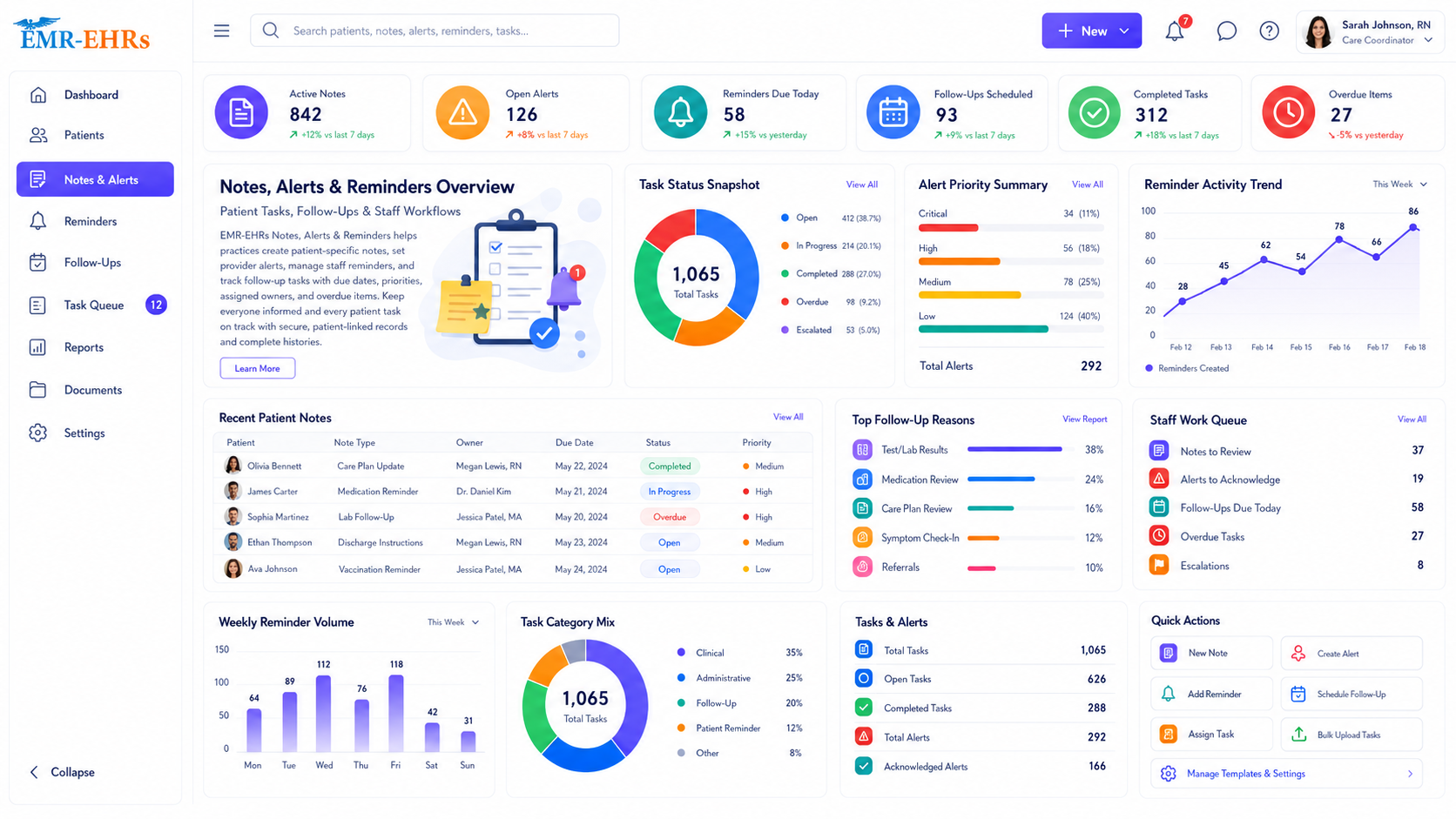
EMR notes, alerts, and reminders Feature helps healthcare practices create patient-specific notes, provider alerts, staff reminders, care follow-up tasks, and task reminders inside the EMR. It helps teams track due dates, assigned owners, reminder status, overdue tasks, completion history, and secure patient-linked activity.
EMR-EHRs Notes, Alerts & Reminders Feature helps providers and staff stay informed about important patient details, pending tasks, care reminders, follow-up needs, overdue items, and completed reminder history inside one connected EMR workflow.
Healthcare practices need more than sticky notes, verbal reminders, and disconnected task lists. They need a connected workflow that links patient chart notes, patient-specific alerts, provider tasks, staff reminders, due dates, assigned owners, overdue tracking, completion history, worklists, reports, and secure patient-linked documentation.
Patient-specific details may be overlooked when notes are stored in separate systems, paper notes, staff memory, or buried inside unrelated chart sections.
Sticky notes, spreadsheets, verbal reminders, and manual lists can lead to missed follow-ups, unclear ownership, and incomplete task history.
Without assigned owners, staff may not know who is responsible for callbacks, forms, lab follow-ups, appointment tasks, or administrative reminders.
Providers need visible patient-specific alerts for important chart details, clinical review needs, special instructions, follow-up requirements, and pending tasks where supported.
Practices need visibility into patient callback tasks, follow-up visits, patient recall reminders, lab follow-ups, test reviews, medication reviews, and care reminders where supported.
When reminders are not connected to the EMR workflow, pending results, visit-related tasks, refill follow-ups, and patient communication tasks can be missed.
Overdue reminders should show due date, priority, assigned owner, patient details, task category, status, aging, and follow-up notes.
Completed reminders, dismissed alerts if supported, completion notes, staff actions, and task history should stay connected to the patient chart.
Administrators need visibility into reminder volume, overdue tasks, staff worklists, provider tasks, unresolved alerts, and completion trends.
Practices need consistent alert categories, reminder rules, due dates, task ownership, and status tracking across providers.
Multi-location practices need location-specific reminders, overdue task reports, staff worklists, provider worklists, and operational visibility where supported.
EMR-EHRs alerts and reminders should be relevant, actionable, priority-based, and workflow-friendly to support care teams without creating unnecessary alert noise.
Patient notes, alerts, task assignments, reminder actions, completion history, and follow-up documentation should be stored in secure, audit-friendly records.
The workflow begins from the patient record so notes, alerts, and reminders stay connected to the correct patient.
The user creates a patient chart note, patient-specific alert, provider alert, staff reminder, follow-up task, or administrative reminder.
The user selects whether the item is a note, alert, clinical reminder, staff task, patient callback, follow-up reminder, appointment reminder if supported, lab reminder if supported, or billing reminder if supported.
The user categorizes the item by patient care, appointment, lab/test, medication, form, document, billing, callback, preventive care, follow-up, or custom category where supported.
The user adds important patient information, provider instruction, staff note, follow-up requirement, patient communication detail, or action item.
The reminder is assigned a due date so staff can track due, upcoming, overdue, and completed tasks.
The reminder can be marked by priority, urgency, importance, or escalation level where supported.
The reminder is assigned to a provider, clinical staff member, front desk user, billing team, care coordinator, administrator, or team worklist where supported.
The item appears in the patient chart, provider worklist, staff worklist, task queue, scheduling workflow, lab workflow, or dashboard where supported.
The assigned user completes the required action, reviews the chart, contacts the patient, schedules follow-up, reviews results, updates notes, or completes the task.
The task status is updated as pending, active, in progress, completed, deferred, dismissed, reassigned, escalated, or overdue where supported.
Unfinished reminders stay visible in overdue lists, worklists, dashboards, or reports where supported.
Completion notes, user actions, date/time, task status, and related patient chart history are saved where supported.
Teams review pending, overdue, completed, unresolved, deferred, dismissed, and escalated items where supported.
Confirm support for clinical decision support, allergy alerts, medication safety alerts, lab abnormal alerts, or automated clinical alerts, including configuration and implementation requirements, during evaluation.
Confirm support for appointment confirmations, SMS reminders, email reminders, phone reminders, or two-way communication, including configuration and implementation requirements, during evaluation.
Confirm support for drug interaction alerts, dosage alerts, medication safety alerts, refill automation, or medication decision support, including configuration and implementation requirements, during evaluation.
EMR-EHRs should focus on useful, workflow-friendly alerts that support providers and staff without replacing clinical judgment or adding unnecessary alert noise.
HIPAA-focused notes and reminders workflow, designed to support secure patient documentation, audit-friendly alert and reminder records, and secure patient task history.
Confirm support for specific integrations, portals, messaging tools, APIs, lab systems, or medication systems, including connection method and implementation scope, during evaluation.
AI-powered tools should support workflow efficiency while providers and staff remain responsible for final clinical review, patient communication, task completion, care decisions, and documentation.
Help staff prioritize reminders, overdue tasks, follow-ups, and worklist items where available.
Summarize overdue reminders, assigned owners, aging, priority, and follow-up history.
Summarize patient-specific notes and task context for staff or provider review.
Suggest possible follow-up tasks for staff review where available.
Group related alerts and reminders to help reduce unnecessary alert noise where available.
Summarize reminder reports, alert usage, staff worklists, and overdue task visibility.
View patient-specific alerts, clinical review tasks, important chart notes, lab review reminders if supported, medication review reminders if supported, and follow-up tasks.
Manage patient callbacks, lab follow-ups, test follow-ups, care reminders, staff tasks, and completion notes.
Track appointment-related reminders, missing forms, patient communication tasks, check-in reminders if supported, and scheduling follow-up tasks.
Manage patient follow-up, recall reminders, care gap reminders if supported, chronic care reminders, and overdue tasks.
Track billing reminders, insurance tasks, document requests, claim follow-up tasks, and patient account reminders where supported.
Monitor reminder volume, overdue tasks, staff worklists, alert usage, completion trends, and workflow reports.
Standardize reminder categories, alert visibility, task ownership, follow-up workflows, and reports across providers.
Track notes, alerts, reminders, overdue tasks, staff worklists, and reports across locations where supported.
| Workflow Area | Manual Reminder Workflow | EMR-EHRs Notes, Alerts & Reminders |
|---|---|---|
| Patient notes | Paper notes or separate files | Patient chart-connected notes |
| Patient alerts | Verbal updates or separate notes | Patient-specific chart alerts where supported |
| Staff reminders | Sticky notes or spreadsheets | Assigned staff reminders where supported |
| Provider alerts | Manual messages | Patient-specific provider alerts where supported |
| Follow-up tasks | Manual tracking | Follow-up task worklists |
| Due dates | Easy to miss | Due date and overdue visibility |
| Task ownership | Unclear responsibility | Assigned owner where supported |
| Status tracking | Manual updates | Pending, completed and overdue status where supported |
| Overdue items | Hard to monitor | Overdue reminder visibility |
| Reports | Limited visibility | Alert, reminder and task reports |
| Security | Decentralized notes | Role-based and audit-friendly records where supported |
EMR-EHRs connects patient notes, alerts, reminder tasks, and task history with the patient chart.
EMR-EHRs helps practices keep important patient details, follow-up needs, and provider alerts visible where supported.
EMR-EHRs helps teams assign tasks to providers, staff, care coordinators, billing teams, or administrators where supported.
EMR-EHRs helps providers and staff manage reminders, patient tasks, overdue items, and workflow priorities.
EMR-EHRs helps teams identify pending, overdue, unresolved, and completed reminders where supported.
EMR-EHRs supports patient callbacks, follow-up reminders, lab follow-up reminders if supported, appointment reminders if supported, and care reminders where supported.
EMR-EHRs helps practices review reminder volume, overdue tasks, completed items, staff worklists, provider tasks, and alert history.
EMR-EHRs supports secure patient notes, reminder history, staff action records, and audit-friendly task documentation where supported.
EMR-EHRs helps configure alert categories, reminder rules, due dates, task owners, worklists, reports, user roles, and staff training. Phone: (480) 782-1116. Email: jason@1stproviderschoice.com.
Review current patient notes, alert usage, staff reminders, provider reminders, follow-up tasks, overdue tasks, and reporting workflows.
Configure patient notes, patient-specific alerts, provider alerts, staff reminders, appointment reminders if supported, lab reminders if supported, medication reminders if supported, preventive care reminders if supported, and administrative reminders.
Configure due dates, priorities, reminder owners, recurrence if supported, task categories, visibility rules if supported, and escalation workflows if supported.
Configure provider, clinical staff, front desk, care coordinator, billing, administrator, and manager access where applicable.
Configure provider worklists, staff worklists, overdue reminder queues, task reports, alert reports, reminder reports, and completion reports.
Train providers, clinical staff, front desk teams, care coordinators, billing teams, administrators, and managers.
Monitor reminder volume, overdue tasks, alert usefulness, completion rates, staff adoption, report usage, and workflow performance.
Simplify patient chart notes, patient-specific alerts, provider alerts, staff reminders, follow-up tasks, overdue reminders, worklists, reports, and secure task history with EMR-EHRs Notes, Alerts & Reminders Feature.
Phone:(480) 782-1116 Email:jason@1stproviderschoice.com
