Patients Need Easier Access to Health Information
Patients expect online access to selected records, visit summaries, lab results, medications, documents, and follow-up instructions where supported.
EMR-EHRs Patient Portal Software helps medical practices give patients secure online access to appointments, digital forms, messages, selected records, lab results, documents, refill requests, statements, payments, family/proxy access, and self-service workflows where supported.
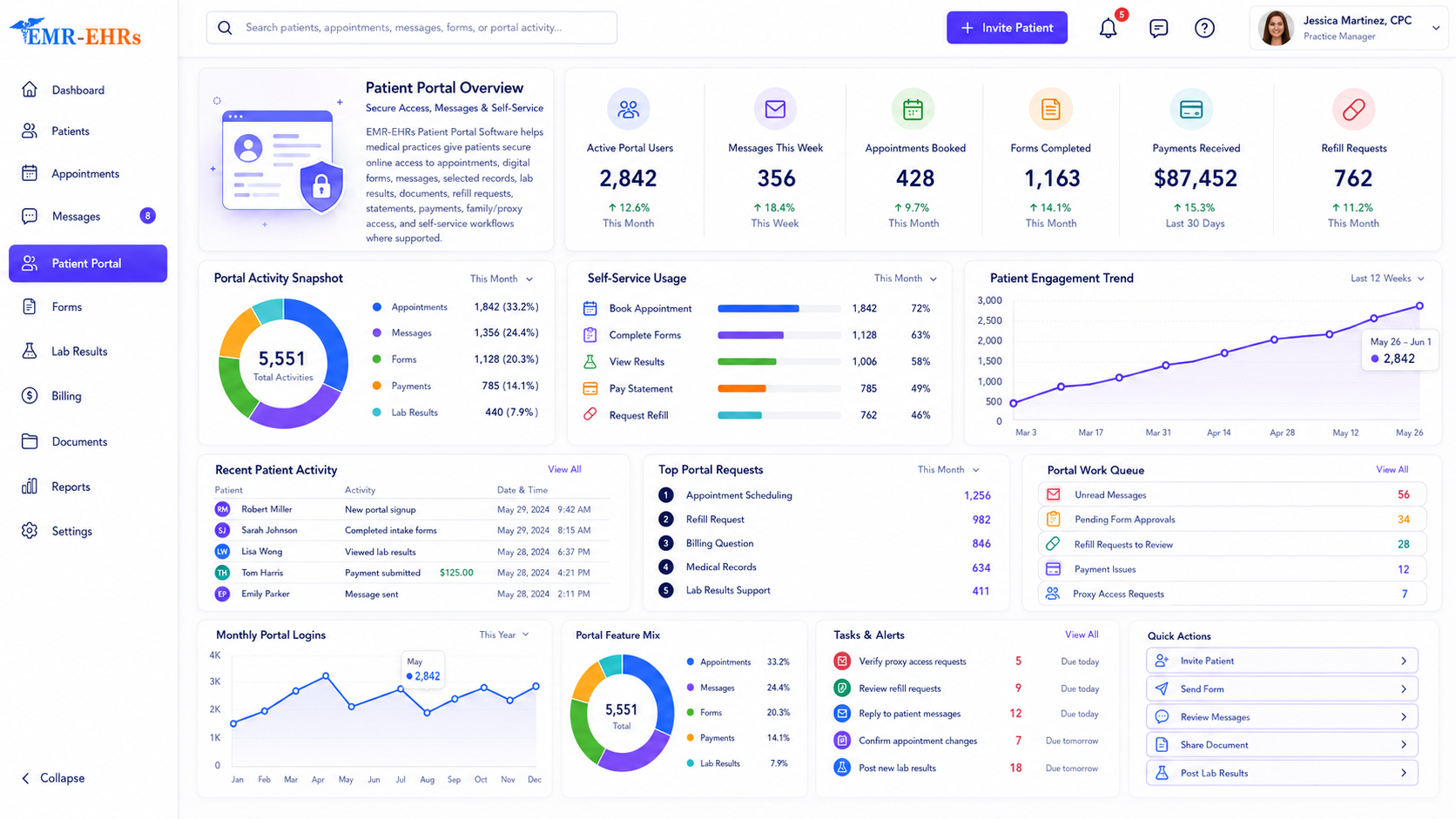
Patient portal software is a secure online system that allows patients to access selected health information and complete self-service tasks such as appointment requests, digital forms, secure messaging, lab result review, document access, medication review, prescription refill requests, statement access, and online payments where supported.
EMR-EHRs Patient Portal Software helps medical practices connect patient access, appointment workflows, digital forms, secure communication, clinical information, documents, billing visibility, and patient self-service workflows in one portal experience where supported.
| Area | Website Forms | Full EMR Access | EMR-EHRs Patient Portal Software |
|---|---|---|---|
| Main user | Website visitor | Practice staff/providers | Patients and authorized users |
| Access type | Public/basic form | Internal clinical/admin access | Secure patient login where supported |
| Appointments | Contact request only | Staff scheduling workflow | Appointment request/scheduling visibility where supported |
| Forms | Basic submission | Staff-facing forms | Digital intake, consent, and patient forms where supported |
| Messages | General contact form | Internal communication | Secure patient-provider messaging where supported |
| Records | Not available | Full clinical chart | Selected medical record access where supported |
| Billing | Not connected | Staff billing workflow | Statements, balances, and payments where supported |
| Family access | Not available | Staff-managed | Proxy/family access where supported |
| Purpose | Lead capture | Practice operations | Patient self-service and engagement |
Patients expect online access to selected records, visit summaries, lab results, medications, documents, and follow-up instructions where supported.
Appointment questions, form requests, document requests, refill requests, portal access issues, and billing questions can increase call volume.
Manual intake forms can delay check-in, create duplicate data entry, and increase front desk work.
Without secure portal messaging, patients may rely on phone calls or unsecured channels for non-urgent communication.
Practices need organized appointment request, confirmation, cancellation, rescheduling, reminder, and staff approval workflows where supported.
Patients may need to review lab results, visit summaries, care instructions, medications, documents, and follow-up details where supported.
Refill requests can become hard to manage when they come through phone calls, voicemail, or disconnected communication channels.
Patients may need access to statements, balances, payment history, receipts, payment plans, and online payment options where supported.
Parents, guardians, caregivers, and authorized representatives may need controlled portal access where supported.
A strong portal should support self-service, secure communication, records access, forms, refills, billing visibility, and follow-up workflows.
Patient portal access must be designed around secure login, authorized users, access controls, proxy permissions, and privacy-focused workflows.
Practices need visibility into messages, forms, appointment requests, refill requests, billing questions, incomplete items, and staff follow-up tasks.
Patients often need portal access from phones, tablets, and browsers where supported.
AI-assisted summaries can help review messages, intake gaps, appointment requests, refill requests, billing questions, and follow-up needs where available, but final decisions must remain with staff and providers.
Patients receive an invitation or create portal access based on the practice supported workflow.
The patient, family member, caregiver, proxy user, or authorized representative logs in where supported.
Patients review or update demographics, contact information, insurance details, pharmacy details, emergency contacts, and communication preferences where supported.
Patients request, schedule, confirm, cancel, reschedule, or review appointments where supported.
Patients complete registration forms, intake forms, medical history, consent forms, questionnaires, and pre-visit forms where supported.
Patients send non-urgent messages, review care team responses, upload attachments, and receive communication where supported.
Patients review selected records, visit summaries, lab results, test results, medications, allergies, documents, care instructions, and forms where supported.
Patients request refills, review medication details, select pharmacy information, or track refill status where supported.
Patients review statements, balances, family balances, guarantor balances, payment history, receipts, or payment plan information where supported.
Patients pay balances, statement amounts, partial payments, or payment plan balances where supported.
Authorized users access dependent, minor, caregiver, or family account workflows where supported.
Staff review messages, appointment requests, form submissions, refill requests, billing questions, incomplete tasks, and portal activity where supported.
The portal may support appointment reminders, form reminders, result notifications, message notifications, payment reminders, and follow-up alerts where available.
AI-assisted tools may summarize messages, intake gaps, incomplete forms, appointment requests, refill requests, billing questions, and follow-up tasks where available.
Only claim online payments, portal payments, payment plans, payment receipts, payment links, or payment gateway support if EMR-EHRs verifies support.
Only claim SMS, email reminders, automated reminders, bulk messaging, or campaign messaging if EMR-EHRs verifies support.
Only claim native mobile app, App Store/Google Play app, offline access, push notifications, or mobile app features if EMR-EHRs verifies support.
HIPAA-focused patient access, designed to support secure patient login, privacy-focused patient portal workflow, and audit-friendly portal activity where supported.
AI-assisted portal tools should support summaries, workflow visibility, and follow-up review while EMR-EHRs users, providers, staff, billers, managers, and administrators remain responsible for final care, communication, billing, and workflow decisions.
Need secure access to appointments, forms, messages, results, records, documents, refills, statements, and payments where supported.
Need organized portal messages, refill requests, patient questions, result follow-up, and patient communication visibility where supported.
Need appointment requests, form completion status, patient profile updates, portal access questions, and check-in readiness visibility where supported.
Need patient billing questions, statement visibility, payment activity, balance review, and payment follow-up where supported.
Need portal activity, patient engagement, message volume, form completion, appointment requests, staff workload, and portal workflow visibility where supported.
Need consistent portal workflows for patients, providers, locations, appointment requests, documents, billing, and communication where supported.
| Workflow Area | Manual Patient Communication | EMR-EHRs Patient Portal Software |
|---|---|---|
| Appointments | Phone calls and voicemails | Appointment requests/scheduling where supported |
| Forms | Paper forms | Digital forms where supported |
| Messages | Phone calls or unsecured channels | Secure messaging where supported |
| Results | Manual calls or printed copies | Result access where supported |
| Documents | Office pickup or mail | Document access where supported |
| Refills | Phone requests | Refill requests where supported |
| Billing | Mailed statements only | Statement and payment access where supported |
| Proxy access | Manual coordination | Family/proxy access where supported |
| Follow-up | Manual reminders | Portal reminders where supported |
| Staff workload | High call volume | Self-service workflow where supported |
| AI summaries | Not available | AI-assisted summaries where available |
Use a real EMR-EHRs patient portal dashboard screenshot if available. If not, use a clearly labeled custom patient portal workflow dashboard mockup.
Requests, reminders and status where supported.
Digital intake, consents and review queues.
Secure communication and staff routing.
AI portal summary where available.
Add only verified proof elements, such as real patient portal dashboard screenshots, workflow demo video, setup details, testimonials, support details, verified badges, phone number, or email.
EMR-EHRs helps practices give patients secure access to appointments, forms, records, documents, messages, and billing workflows where supported.
EMR-EHRs supports appointment requests, digital intake forms, consent forms, pre-visit questionnaires, patient updates, and staff review workflows where available.
EMR-EHRs helps patients and care teams communicate through secure portal messaging, message history, routing, and follow-up workflows where supported.
EMR-EHRs can support access to visit summaries, records, lab results, test results, medications, documents, instructions, and clinical summaries where available.
EMR-EHRs can support prescription refill requests, medication review, pharmacy details, refill routing, and refill status visibility where available.
EMR-EHRs can support statement access, balance review, payment history, online payment, receipts, and billing questions where available.
EMR-EHRs can support caregiver, parent, guardian, dependent, and authorized representative access workflows where supported.
EMR-EHRs helps staff review messages, appointment requests, forms, refill requests, billing questions, incomplete tasks, and portal activity where supported.
EMR-EHRs supports secure patient login, authorized access, proxy permissions where supported, secure messages, access controls, and audit-friendly portal activity where available.
EMR-EHRs can support patient message summaries, intake gap summaries, appointment request summaries, refill request summaries, billing question summaries, and portal activity summaries where available.
Patients receive or create secure portal access where supported.
Patients log in and review profile, contact, insurance, pharmacy, and communication preferences where supported.
Patients request appointments, complete forms, update history, sign consents, submit pre-visit details, and review appointment status where supported.
Patients send messages, review responses, ask non-urgent questions, receive notifications, and communicate with the care team where supported.
Patients review visit summaries, records, lab results, medications, documents, forms, instructions, and result notifications where supported.
Patients review medications, submit refill requests, update pharmacy details, and track refill status where supported.
Patients review statements, balances, payment history, receipts, payment plans, billing questions, and online payments where supported.
Staff review portal activity, messages, forms, appointment requests, refill requests, billing questions, incomplete tasks, and follow-up items where supported.
Patient portal software gives patients secure online access to appointment requests, digital forms, secure messages, selected records, lab results, documents, medication information, refill requests, statements, payments, and self-service workflows where supported. EMR-EHRs Patient Portal Software helps medical practices improve patient access and reduce manual front desk tasks.
EMR-EHRs helps practices reduce phone calls, collect digital intake forms, manage appointment requests, support secure messaging, share selected records, route refill requests, support billing visibility, and manage portal activity from a staff dashboard where supported.
Medical practices should look for secure patient login, appointment requests, digital intake forms, secure messaging, records access, lab result access, document access, refill requests, statement access, online payments where supported, family/proxy access, mobile-friendly access, staff dashboard, privacy-focused workflow, and support.
Yes. EMR-EHRs can support patient access to selected records, visit summaries, lab results, test results, documents, secure messages, statements, balances, payments, receipts, and refill requests where supported.
EMR-EHRs Patient Portal Software supports privacy-focused patient access with secure login, authorized user access, proxy permissions where supported, secure messaging, access controls, session controls where supported, and audit-friendly portal activity where available, without making unsupported compliance guarantees.
Give patients secure access to appointments, digital forms, messages, selected records, lab results, documents, refill requests, statements, payments, family/proxy access, and self-service workflows with EMR-EHRs Patient Portal Software where supported.
Phone: (480) 782-1116 | Email: info@emr-ehrs.com