Manual Prescriptions Slow Down Providers
Paper prescriptions and disconnected prescribing tools can slow down clinical visits, increase manual documentation, and create extra staff work.
EMR-EHRs eRx Add-on helps healthcare practices create prescriptions from the patient chart, review medication history, manage refill requests, route prescriptions to pharmacies, track prescription status, and maintain secure medication records where supported inside the existing EMR-EHRs workflow.
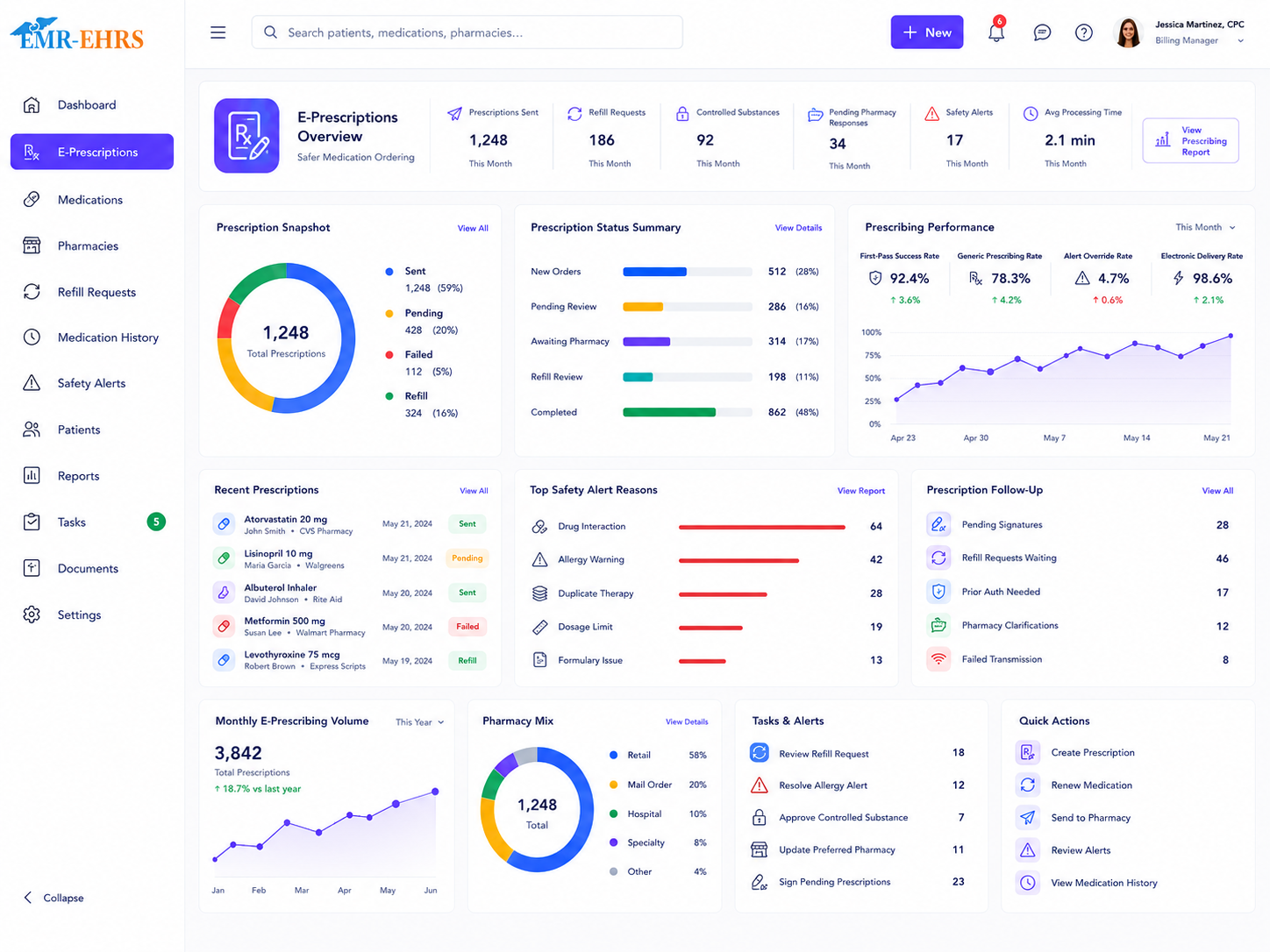
The EMR-EHRs eRx Add-on is a prescription workflow feature inside the EMR-EHRs platform. It helps healthcare providers create, review, send, and manage prescriptions from the patient chart where supported.
EMR-EHRs eRx Add-on helps practices manage prescription creation, eRx workflows, medication history, pharmacy routing, refill requests, prescription status, secure prescription records, and provider review workflows where supported.
Healthcare practices need more than a separate prescription tool. They need a connected prescribing feature that supports patient chart prescribing, medication history review, dose/SIG entry, provider approval, pharmacy routing, refill management, prescription status tracking, and secure prescription history.
Paper prescriptions and disconnected prescribing tools can slow down clinical visits, increase manual documentation, and create extra staff work.
When prescribing happens outside the EMR, staff may need to manually update the chart, medication list, visit note, and refill history.
Providers need quick access to active medications, past prescriptions, discontinued medications, refill history, and medication changes where supported.
A clear medication list helps providers review what the patient is already taking before adding or renewing medication where supported.
Refill requests from pharmacies, patients, portal messages, or staff need organized review, approval, denial, renewal, and tracking where supported.
Incorrect pharmacy details, missing preferred pharmacy information, or manual pharmacy communication can delay prescription routing.
Teams need visibility into pending, sent, failed, delivered, renewed, denied, canceled, or completed prescription activity where supported.
Failed electronic sends should not be missed. They may need correction, resend, reassignment, or follow-up.
Allergy alerts, interaction alerts, duplicate therapy alerts, dose alerts, and clinical decision support messages should support final provider review.
Providers may need formulary status, coverage details, medication alternatives, prior authorization requirements, and patient cost information where supported.
Medication prior authorization may require payer questions, documentation, status tracking, staff follow-up, and provider review where supported.
Controlled substance prescribing may require provider-only access, identity verification, controlled medication permissions, and audit-friendly tracking where supported.
Prescription history, provider approvals, refill decisions, pharmacy routing, safety alert acknowledgments, and user actions should be securely tracked.
Technology can support workflow review, but providers remain responsible for medication selection, dosage, instructions, counseling, and prescription approval.
The provider opens the patient chart and reviews patient demographics, visit context, diagnoses, allergies, and medication details where supported.
The provider reviews active medications, past prescriptions, refill history, discontinued medications, medication changes, and outside medication history where supported.
The provider searches for the medication and selects the appropriate drug, strength, dosage form, route, and frequency.
The provider enters SIG instructions, quantity, days supply, dispense amount, refill count, start date, stop date if supported, and patient instructions.
The system may show allergy alerts, drug interaction alerts, duplicate therapy alerts, contraindication alerts, dose alerts, or other safety messages where supported.
The provider reviews alerts, warnings, severity, and override requirements where supported.
The provider selects or updates the patient's preferred pharmacy where supported.
The workflow may show formulary status, coverage details, patient cost information, alternatives, step therapy, or prior authorization requirements where supported.
The provider confirms medication, dosage, instructions, quantity, refills, pharmacy, patient instructions, and safety information before approval.
The provider approves the prescription before it is sent or saved.
The prescription is sent electronically to the selected pharmacy through the supported eRx workflow.
Prescription status may show pending, sent, delivered, failed, canceled, denied, renewed, or completed where supported.
Failed sends can be corrected, resent, canceled, assigned, or marked for follow-up where supported.
Refill requests are received, routed, reviewed, approved, denied, renewed, changed, or completed where supported.
Prescription details, provider actions, pharmacy routing, refill decisions, status changes, and safety alert acknowledgments are stored where supported.
Teams review prescription volume, refill queues, failed prescriptions, prior authorization tasks, pending prescriptions, and provider worklists where supported.
Confirm support for direct e-prescribing, medication database, diagnosis-linked prescribing, or pharmacy routing, including configuration and implementation requirements, during evaluation.
Confirm support for outside medication history, pharmacy fill history, medication reconciliation, or patient-reported medication capture, including configuration and implementation requirements, during evaluation.
Medication safety alerts should support provider review, but providers remain responsible for final medication selection, dosage, instructions, warnings, and prescription decisions.
Confirm support for pharmacy directory access, electronic routing, pharmacy messaging, mail-order pharmacy, or specialty pharmacy support, including configuration and implementation requirements, during evaluation.
Confirm support for formulary, real-time benefits, cost transparency, medication alternatives, payer rules, or coverage data, including configuration and implementation requirements, during evaluation.
Confirm support for electronic prior authorization, payer question sets, real-time responses, approvals, denials, attachments, or renewals, including configuration and implementation requirements, during evaluation.
Confirm support for EPCS, identity proofing, two-factor authentication, PDMP connection, or controlled substance prescribing, including configuration and implementation requirements, during evaluation.
Medication education tools should support patient understanding, but providers remain responsible for final clinical guidance, medication counseling, and patient instructions.
HIPAA-focused prescription workflow, designed to support secure eRx access, audit-friendly prescription activity records, and role-based prescribing permissions.
Confirm support for specific pharmacy networks, eRx vendors, APIs, NCPDP, EPCS, PDMP, payer systems, or third-party integrations, including connection method and implementation scope, during evaluation.
AI-powered prescription tools should support workflow review and staff efficiency while providers remain responsible for final medication selection, dosage, instructions, safety review, patient counseling, and prescription approval.
Summarize prescription context, medication details, and pending provider review items.
Help summarize active medications, refill history, changes, and medication list review needs.
Summarize refill requests, routing context, and pending provider decisions where available.
Summarize prior authorization tasks, requirements, and follow-up status where available.
Help summarize failed prescription queues and possible follow-up work for staff review.
Help providers review pending prescriptions, refills, safety alerts, and prescription tasks.
Create prescriptions, review medication history, respond to safety alerts, approve refills, and send prescriptions where supported.
Prepare prescription tasks, review medication lists, route refill requests, and support provider review where permitted.
Manage refill queues, pharmacy requests, renewal workflows, status tracking, and patient follow-up where supported.
Support pharmacy updates, patient communication, and medication request routing where supported.
Monitor prescription reports, refill queues, failed prescriptions, worklists, permissions, and secure access.
Manage specialty medications, recurring prescriptions, pharmacy routing, and specialty-specific medication workflows where supported.
Route prescription tasks and refill requests to the correct provider where supported.
Manage location-based medication workflows, pharmacy preferences, and prescription reporting where supported.
| Workflow Area | Manual Prescription Workflow | EMR-EHRs eRx Add-on |
|---|---|---|
| Prescription creation | Paper or separate system | Patient chart prescribing where supported |
| Medication history | Manual review | Medication history view where supported |
| Pharmacy selection | Written or phone-based | Preferred pharmacy routing where supported |
| Refill requests | Calls and paper notes | Refill queue where supported |
| Safety review | Manual checking | Allergy and interaction alerts where supported |
| Prescription status | Hard to track | Status tracking where supported |
| Prior authorization | Manual forms | ePA workflow where supported |
| Controlled substances | Manual process | EPCS workflow where supported |
| Reports | Manual tracking | Prescription and refill reports where supported |
| Security | Paper handling | Role-based access and audit-friendly history |
This conceptual workflow preview illustrates a eRx workflow dashboard mockup.
Dose, instructions, quantity, days supply and refill fields.
Pharmacy selection and routing where supported.
Safety alert panel if supported.
Refill request queue, provider approval and AI summary where available.
EMR-EHRs helps providers create and manage prescriptions from the patient chart where supported.
EMR-EHRs supports medication history, active medication lists, refill history, and medication review workflows where supported.
EMR-EHRs helps practices manage refill requests, provider approvals, denials, renewals, and follow-up tasks where supported.
EMR-EHRs supports pharmacy selection, preferred pharmacy details, and prescription routing where supported.
EMR-EHRs can support allergy alerts, drug interaction alerts, duplicate therapy alerts, and safety review workflows where available.
EMR-EHRs supports role-based prescribing access, secure medication history, and audit-friendly prescription activity where supported.
EMR-EHRs can support medication summaries, refill summaries, prescription task prioritization, and provider worklist summaries where available.
EMR-EHRs helps configure prescription workflows, pharmacy settings, refill queues, user roles, reports, and staff training. Phone: (480) 782-1116. Email: jason@1stproviderschoice.com.
Review current prescribing workflow, refill workflow, pharmacy workflow, medication history workflow, prior authorization workflow if supported, controlled substance workflow if supported, and provider approval process.
Configure medication search, prescription creation, dose fields, SIG instructions, quantity, refills, provider approval, pharmacy selection, and status tracking where supported.
Configure medication lists, allergy lists, interaction alerts, duplicate therapy alerts, dose warnings, and safety review workflows where supported.
Configure pharmacy selection, preferred pharmacies, pharmacy details, send workflow, pharmacy routing, and prescription status where supported.
Configure pharmacy refill requests, patient refill requests, portal requests, refill routing, provider review, refill status, and follow-up tasks where supported.
Configure formulary details, benefit information, prior authorization questions, PA status, payer responses, and follow-up routing where supported.
Configure provider permissions, controlled medication access, identity verification, audit history, and related workflows where supported.
Configure provider access, staff permissions, refill team permissions, controlled medication permissions, user roles, and audit-friendly activity history.
Configure prescription reports, refill reports, pending tasks, failed prescription reports, prior authorization worklists, and provider worklists where supported.
Train providers, clinical staff, refill teams, front desk teams, administrators, and managers.
Monitor prescription usage, refill queue performance, failed sends, medication history review, safety alerts, user adoption, and workflow feedback.
The EMR-EHRs eRx Add-on is a prescription workflow feature inside the EMR-EHRs platform that helps providers create, review, send, and manage prescriptions from the patient chart where supported. It can support prescription creation, medication search, dose and SIG entry, refill workflows, pharmacy routing, prescription status tracking, secure prescription history, and provider review workflows where supported.
Yes, where supported. The EMR-EHRs eRx Add-on can help providers select the patient's preferred pharmacy, review prescription details, approve the medication, send the prescription electronically, track send status, and manage failed prescription follow-up where available. Pharmacy routing and electronic sending should be confirmed during setup.
The EMR-EHRs eRx Add-on can support refill request queues where available, including pharmacy refill requests, patient refill requests, portal refill requests if supported, staff routing, provider review, approval, denial, medication renewal, refill status tracking, refill history, and follow-up tasks. This helps keep refill decisions connected to the patient record.
The EMR-EHRs eRx Add-on can support medication safety alerts where available, including allergy alerts, drug-drug interaction alerts, drug-allergy interaction alerts, duplicate therapy alerts, contraindication alerts, dose alerts, alert severity, override reason, and provider acknowledgment. These alerts support review, but providers remain responsible for final medication decisions.
Practices should use an integrated eRx add-on because manual prescribing can create duplicate work, disconnected medication history, refill delays, hard-to-track prescription status, and weaker prescription records. The EMR-EHRs eRx Add-on supports chart-connected prescribing, refill workflows, pharmacy routing, secure history, reports, and audit-friendly prescription activity where supported.
Create prescriptions, review medication history, manage refills, route prescriptions to pharmacies, track prescription activity, and maintain secure medication records with the EMR-EHRs eRx Add-on where supported.
Phone: (480) 782-1116 | Email: jason@1stproviderschoice.com
