Built-In Scanning Module

EMR Scanning Feature for Patient Charts and Medical Documents

EMR-EHRs Scanning Feature helps healthcare practices digitize paper records, scan medical documents, upload files, attach documents to patient charts, organize records by category, route documents for review, and manage secure document history where supported.
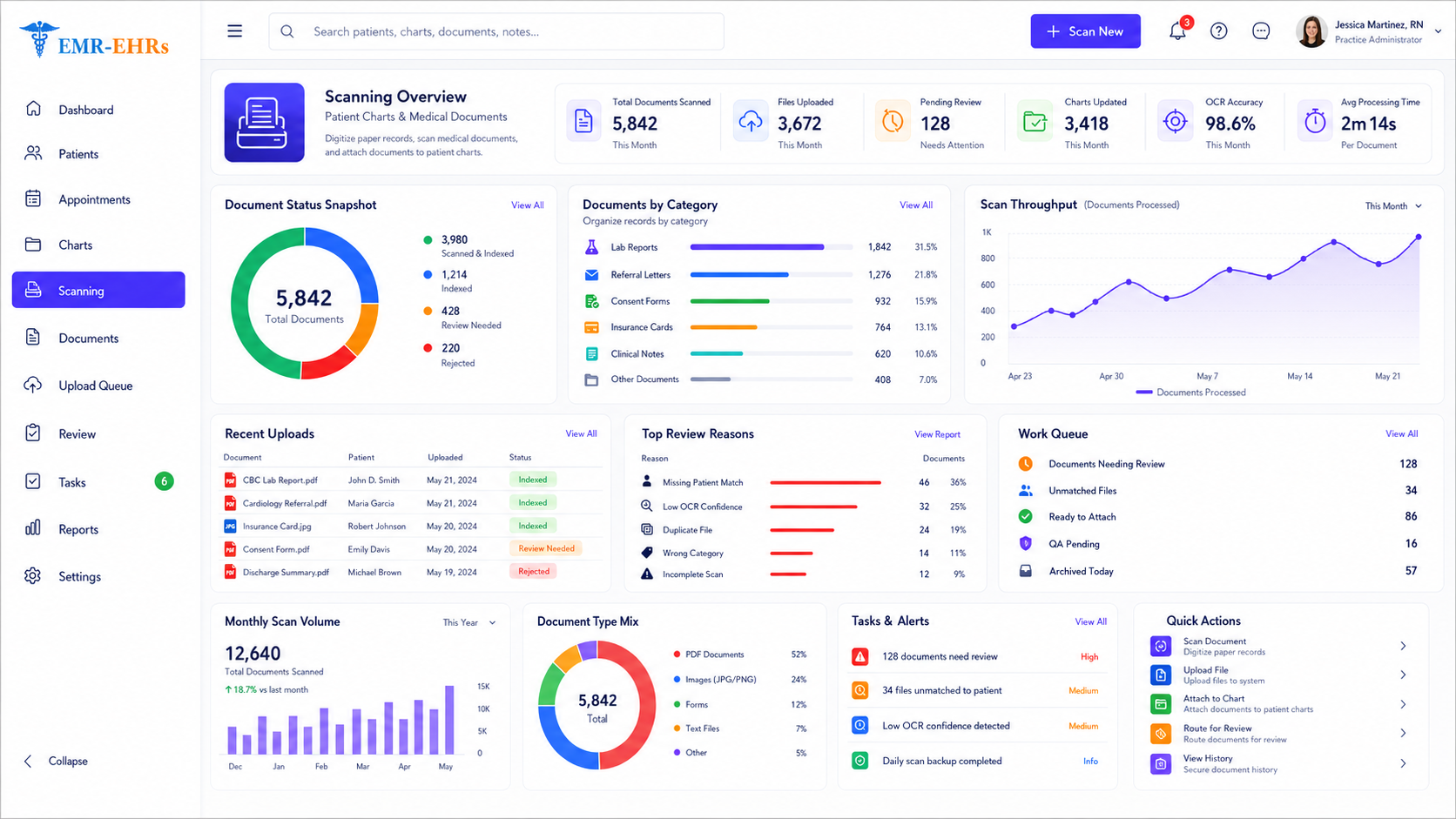
EMR Scanning dashboard for scanned documents, chart updates, OCR accuracy, review queues, uploads, work queues, and quick actions
ScanUploadIndexAttach to ChartReviewRouteSearchSecure Storage
Quick answer

What Is EMR Scanning Feature?

EMR scanning Feature helps healthcare practices scan, upload, categorize, index, route, and securely store paper or digital medical documents inside the electronic medical record. It helps staff attach patient forms, insurance cards, IDs, referrals, lab reports, outside records, billing documents, and clinical paperwork to the correct patient chart.

EMR-EHRs Scanning Feature helps practices digitize paper records, attach scanned files to patient charts, organize documents by type, route documents for review, and manage secure document history where supported.

Why Healthcare Practices Need Built-In EMR Scanning Feature

Healthcare practices need more than a scanner and a folder. They need a patient-linked scanning workflow that supports document capture, indexing, quality review, routing, secure storage, and fast retrieval.

Paper Documents Slow Down Daily Workflow

Paper records, patient forms, referrals, IDs, insurance cards, authorizations, and outside reports can delay front desk, clinical, billing, and medical records workflows.

Scanned Files Can Be Saved in the Wrong Folder

When documents are scanned to desktops, shared folders, or local drives, files can be misplaced, duplicated, renamed incorrectly, or attached to the wrong patient.

Patient Charts Need Complete Supporting Documents

Providers and staff need patient-linked access to signed forms, consents, referrals, lab reports, imaging reports, outside medical records, and billing support documents.

Manual Filing Makes Document Retrieval Difficult

Without categories, indexing, document dates, patient matching, and chart attachment, staff may struggle to find the right scanned document quickly.

Front Desk Teams Need Faster Scanning for Intake Documents

Front desk staff often scan IDs, insurance cards, intake forms, HIPAA acknowledgments, consent forms, and referral documents during patient registration or check-in.

Billing Teams Need Insurance and Authorization Documents

Billing teams may need scanned insurance cards, referral paperwork, prior authorization documents, claim support documents, signed financial policies, and medical necessity documents.

Providers Need Outside Records Inside the Chart

Providers need fast access to outside records, diagnostic reports, specialist notes, hospital records, medication lists, referral documents, and lab reports.

Document Review Needs Clear Ownership

Scanned documents may need review by front desk staff, providers, clinical staff, billing teams, medical records teams, or administrators.

Batch Scanning Can Create Indexing Problems If Unsupported

Bulk scanning can save time, but documents still need correct patient matching, category assignment, page order review, and quality checks.

OCR and Search May Be Needed for Faster Retrieval If Supported

OCR can help staff search scanned documents by extracted text, keywords, document title, patient, date, status, or category where supported.

Scanned Documents Need Quality Review

Poor scan quality, missing pages, wrong page order, incorrect patient matching, or wrong document type can create chart errors.

Sensitive Medical Documents Need Secure Access

Scanned records may contain PHI, insurance details, signatures, IDs, clinical reports, billing information, and protected patient documents.

Practices Need Scanning Reports and Worklists

Managers need visibility into scanned documents, uploaded files, pending reviews, rejected scans, missing categories, and staff worklists where supported.

Multi-Provider and Multi-Location Practices Need Consistent Workflows

Larger practices need standardized document categories, location-based queues, provider routing, and document access controls where supported.

How EMR-EHRs Scanning feature Works

1

Staff Receives a Paper or Digital Document

The document may be a patient form, insurance card, patient ID, referral, authorization, lab report, diagnostic report, outside record, signed consent, billing document, or clinical note.

2

Staff Selects or Searches the Correct Patient Record

The staff member searches for the patient and confirms the correct patient chart before scanning or attaching the file.

3

Staff Scans or Uploads the Document Where Supported

The document is scanned directly into the EMR or uploaded from an approved source where supported.

4

Staff Previews the Scanned Document

The staff member reviews the scanned image or uploaded file before saving it to the patient chart.

5

Staff Selects the Document Category

The user selects a category such as intake form, consent, ID, insurance card, referral, lab report, outside record, billing document, authorization, or clinical document.

6

Staff Adds Document Details

The user adds document name, document date, source, provider, location, notes, status, or tags where supported.

7

OCR, Barcode Recognition or Document Recognition Runs Where Supported

OCR, barcode recognition, text extraction, or document matching may help make documents searchable or easier to index where supported.

8

Staff Reviews Scan Quality

Staff reviews image clarity, page count, page order, patient match, document type, category, and duplicate documents where supported.

9

Staff Corrects Errors Where Supported

The user may rescan, rotate, crop, split, merge, rename, recategorize, or correct document details where supported.

10

Document Is Attached to the Correct Patient Chart

The scanned document is saved to the patient chart and becomes available to authorized users.

11

Document Is Routed to the Right Worklist Where Supported

The document may be routed to a provider, clinical staff member, billing team, front desk team, medical records team, or administrator where supported.

12

Reviewer Takes Action Where Supported

The reviewer can approve, sign off, add notes, request correction, reassign, mark complete, or create a follow-up task where supported.

13

Authorized Users Search and Retrieve the Document

Users can find documents by patient, document name, type, category, date, source, status, tag, or OCR text where supported.

14

Document History Is Stored Where Supported

Document access, edits, routing, review actions, exports, downloads, and activity history are stored in audit-friendly records where supported.

15

Scanning Reports and Worklists Are Reviewed

Managers review scanned documents, uploaded documents, pending reviews, completed reviews, rejected documents, missing categories, and staff worklists where supported.

Scan Medical Documents Directly Into the Patient Chart Where Supported

Only claim direct scanner integration, one-step scanning, TWAIN scanning, scanner drivers, or device compatibility when EMR-EHRs verifies support.

Patient chart scanning
Direct scan to patient record if supported
Upload document to patient record if supported
Patient lookup
Patient matching
Chart attachment
Document preview
Document category
Document date
Document source
Provider association if supported
Location association if supported
Staff note
Save to patient documents section
Duplicate check if supported

Scan and Organize Common Medical Practice Documents

Patient intake forms
New patient registration forms
Consent forms
HIPAA acknowledgment forms if supported
Insurance cards
Patient ID cards
Driver's license copies if supported
Referral documents
Authorization documents
Prior authorization paperwork if supported
Lab reports
Diagnostic reports
Imaging reports
Outside medical records
Hospital discharge summaries
Specialist notes
Medication lists
Patient correspondence
Billing documents
Claim support documents
Signed financial policies
Medical necessity documents if supported
Treatment plans if supported

Index Scanned Documents by Patient, Category, Date and Status

Document categories
Document type
Document name
Document date
Patient name
Patient ID
Provider
Location if supported
Source
Status
Tags if supported
Notes
Custom categories if supported
Required indexing fields if supported
Duplicate detection if supported
Indexing quality review

Review Scan Quality Before Saving Documents to the Chart

Scan preview
Image clarity review
Page count review
Page order review
Patient match review
Document type review
Category review
Duplicate review if supported
Rotation if supported
Cropping if supported
Re-scan workflow if supported
Split document if supported
Merge document if supported
Error correction
Staff approval
Quality status
Completion note if supported

Make Scanned Medical Documents Searchable With OCR If Supported

Only claim OCR, searchable PDFs, extracted text, handwriting recognition, AI extraction, or automatic indexing when EMR-EHRs verifies support.

OCR if supported
Text recognition if supported
Searchable scanned documents if supported
Searchable PDF if supported
Keyword search if supported
Search by document title
Search by patient
Search by date
Search by category
Search by provider if supported
Search by extracted text if supported
Search by tags if supported
Search by status if supported
OCR quality review if supported

Use Barcode Scanning and Document Matching If Supported

Only claim barcode scanning, auto-matching, batch separation, or auto-indexing when EMR-EHRs verifies support.

Barcode scanning if supported
Barcode cover sheets if supported
Patient barcode matching if supported
Document type matching if supported
Batch document separation if supported
Auto-indexing if supported
Claim document matching if supported
Lab document matching if supported
Referral document matching if supported
Quality review
Manual correction workflow

Handle Batch Scanning and Bulk Document Uploads If Supported

Only claim batch scanning, bulk upload, multi-document processing, document split/merge, or rejected scan queues when EMR-EHRs verifies support.

Batch scanning if supported
Bulk upload if supported
Multiple document scanning if supported
Page separation if supported
Multi-page document support if supported
Document preview
Document split if supported
Document merge if supported
Patient matching
Category assignment
Batch quality review
Batch status
Error correction
Rejected scan queue if supported

Route Scanned Documents to the Right Staff or Provider Workflow

Document routing if supported
Provider review queue if supported
Clinical staff review queue if supported
Billing review queue if supported
Front desk document queue if supported
Admin review queue if supported
Assigned owner
Review status
Approval status if supported
Sign-off status if supported
Internal note if supported
Follow-up task if supported
Reassignment if supported
Completion tracking

Give Providers Fast Access to Scanned Clinical Documents

Outside records
Lab reports
Diagnostic reports
Imaging reports
Referral documents
Specialist notes
Hospital records
Clinical forms
Prior notes
Medication lists
Provider review status if supported
Provider sign-off if supported
Patient chart access
Clinical document search
Document history

Scan Insurance, Billing and Authorization Documents Into the EMR

Insurance card scanning
Patient ID scanning
Authorization document scanning
Referral document scanning
Claim support documents
Signed financial policies
Patient balance documents if supported
Medical necessity documents if supported
Prior authorization paperwork if supported
Billing notes
Billing team review queue if supported
Claims workflow connection if supported
Document status
Secure document access

Find Scanned Documents Quickly From the Patient Chart

Patient document list
Search by patient
Search by document name
Search by document type
Search by category
Search by date
Search by provider if supported
Search by status if supported
Search by tags if supported
Search by OCR text if supported
Filter by source
Sort by date
Document preview
Download or print if supported

Store Scanned Records Inside a Secure Document Management Workflow

Patient-linked document storage
Document folder or category view
Document management module connection
File naming standards
Document type standards
Document status
Version history if supported
Document replacement if supported
Archive workflow if supported
Retention workflow if supported
Access permissions
Secure storage
Audit-friendly history

Built-In Scanning for Specialty, Multi-Provider and Multi-Location Practices

Specialty-specific document categories if supported
Specialty forms
Specialty reports
Procedure documents
Therapy documents
Surgical documents
Referral-heavy workflows
Multi-provider document routing if supported
Location-specific scanning queues if supported
Location-based reports if supported
Provider-specific document review if supported
Multi-location document access if supported

HIPAA-Focused Scanning Feature for Secure Medical Documents

HIPAA-focused scanning workflow, designed to support secure medical document storage, audit-friendly scanned document records, and role-based document permissions.

Role-based document access
User permissions
Restricted document categories if supported
Secure document storage
Patient-linked document history
Document access history if supported
Document change history if supported
Scan activity history if supported
Export/download history if supported
Audit-friendly document records
Privacy-focused document workflow
Secure scanning process
Sensitive document access controls

Connect Scanning With Patient Charts, Document Management, Billing and Clinical Workflows

Only list specific scanner models, scanner drivers, APIs, TWAIN support, HL7/FHIR, OCR engines, cloud storage, or third-party integrations when EMR-EHRs verifies support.

EMR patient record connection
Document management connection
Patient forms connection if supported
Patient check-in connection if supported
Billing and collections connection if supported
Claims support document connection if supported
Lab orders connection if supported
Referral workflow connection if supported
Notes and alerts connection if supported
Provider review workflow if supported
Reports workflow
Secure data exchange if supported

Track Scanned Documents, Pending Reviews and Staff Worklists

Scanning Reports

  • Documents scanned
  • Documents uploaded
  • Scans by staff member if supported
  • Scans by document type
  • Scans by provider if supported
  • Scans by location if supported
  • Scans by date range
  • Batch status if supported

Review Reports

  • Pending review documents
  • Completed review documents
  • Provider review queue if supported
  • Billing review queue if supported
  • Rejected documents if supported
  • Duplicate documents if supported
  • Missing category reports if supported

Document Management Reports

  • Documents by category
  • Documents by patient
  • Documents by status
  • Documents by source
  • Documents pending indexing if supported
  • Overdue review tasks if supported

AI-Powered Tools to Support Scanning, Indexing and Document Review

AI-powered tools should support document organization and staff review while providers and staff remain responsible for final document verification, patient record updates, billing review, clinical review, and documentation.

AI document summary if available

Summarize scanned document context for staff, provider, or billing review where available.

AI document category suggestion if available

Suggest document categories or tags while staff remain responsible for final indexing.

AI missing information detection if available

Help identify missing pages, unclear fields, or incomplete document details where available.

AI duplicate document detection if available

Help surface possible duplicate documents for staff review where available.

AI document routing suggestion if available

Suggest provider, billing, clinical, or front desk routing for human confirmation.

AI worklist prioritization if available

Help prioritize pending scans, rejected scans, review queues, and high-priority documents.

Built for Front Desk Teams, Medical Records Staff, Providers, Billing Teams and Administrators

Front Desk Teams

Scan IDs, insurance cards, intake forms, consent forms, referrals, registration documents, and patient paperwork into the correct chart where supported.

Medical Records Teams

Digitize outside records, historical charts, clinical documents, scanned packets, correspondence, and document archives where supported.

Providers

Review scanned lab reports, outside records, referrals, diagnostic reports, forms, specialist notes, and clinical documents inside the patient chart.

Billing Teams

Access scanned insurance cards, authorizations, claim support documents, signed policies, referral documents, and billing-related paperwork where supported.

Clinical Staff

Review scanned clinical forms, referrals, lab documents, treatment plans, medication lists, prior notes, and follow-up documents.

Practice Administrators

Monitor scanning volume, document review queues, pending documents, staff workload, document quality, and secure document workflows where supported.

Multi-Provider Practices

Route scanned documents to the correct provider, care team, billing team, or review queue where supported.

Multi-Location Practices

Manage scanning workflows, document access, location queues, and reports across locations where supported.

EMR-EHRs Scanning feature vs Manual Folder-Based Scanning

Workflow AreaManual Folder-Based ScanningEMR-EHRs Scanning feature
Patient matchingManual file namingPatient chart attachment where supported
Document storageLocal folders or shared drivesPatient-linked EMR document storage
Document categoriesInconsistent namingDocument categories and indexing
SearchFolder browsingPatient, category, date, tag, or OCR search where supported
Review routingManual messagesStaff/provider routing where supported
Billing documentsSeparate filesBilling document access where supported
Quality reviewManual checkScan preview and quality review workflow
Batch scanningHard to organizeBatch scanning workflow where supported
SecurityFolder permissionsRole-based document access where supported
Audit historyLimited trackingAudit-friendly document activity where supported

What to Look for in the Best EMR Scanning Feature

Scan to patient chart if supported
Upload documents to patient record if supported
Patient matching
Document categories
Document indexing
Document preview
Scan quality review
OCR/searchable documents if supported
Barcode scanning if supported
Batch scanning if supported
Bulk upload if supported
Document routing if supported
Provider review workflow if supported
Billing document workflow if supported
Search and filters
Document storage
Role-based access
Audit-friendly history
AI document assistance if available
Implementation, training, and support

See the Built-In Scanning Workflow in Action

Patient Chart DocumentsScan, preview, index and route
Scan document button
Upload document option
Document preview panel
Category and date fields
Patient matching confirmation
OCR indicator if supported
Barcode indicator if supported
Batch scanning queue
Provider review queue
Billing review queue
Document history
Search and filter panel
Secure accessDocument statusQuality reviewAudit historyReports

Why Choose EMR-EHRs for Built-In Scanning?

Patient Chart-Connected Scanning

EMR-EHRs helps practices attach scanned medical documents to the correct patient record where supported.

Better Document Organization

EMR-EHRs supports document categories, indexing, notes, statuses, and search workflows where supported.

Faster Document Retrieval

EMR-EHRs helps authorized users find scanned records by patient, category, date, status, tag, or OCR text where supported.

Staff and Provider Review Workflows

EMR-EHRs helps route scanned documents to front desk, clinical, provider, billing, or administrative workflows where supported.

Billing and Clinical Document Support

EMR-EHRs helps practices manage scanned insurance cards, referrals, authorizations, outside records, lab reports, and billing documents where supported.

Secure and Audit-Friendly Records

EMR-EHRs supports role-based document access, secure document storage, patient-linked history, and audit-friendly scanning records where supported.

AI-Powered Document Support If Available

EMR-EHRs can support document summaries, category suggestions, duplicate detection, and worklist prioritization where available.

Implementation, Training and Support

EMR-EHRs helps configure document categories, scanning workflows, review queues, user roles, reports, and staff training. Phone: (480) 782-1116. Email: info@emr-ehrs.com.

Implementation, Setup and Training for EMR Scanning Workflows

1

Current Document Workflow Review

Review current paper documents, scanning process, document storage, document categories, staff roles, provider review, billing review, and security needs.

2

Document Category Setup

Configure document categories such as intake forms, consents, IDs, insurance cards, referrals, lab reports, outside records, billing documents, authorizations, and clinical documents where supported.

3

Scanning and Upload Workflow Setup

Configure scan-to-chart workflow, upload workflow, patient matching, document preview, quality review, OCR if supported, barcode scanning if supported, and batch scanning if supported.

4

Quality Review Setup

Configure scan preview, page order review, image clarity review, patient match confirmation, duplicate review if supported, and correction workflow.

5

Routing and Review Queue Setup

Configure front desk review, provider review, clinical review, billing review, admin review, status tracking, reassignment, and completion workflows where supported.

6

Security and Permissions Setup

Configure role-based access, restricted document types, user permissions, access history, document activity history, and secure document storage where supported.

7

Reports and Worklist Setup

Configure scanning reports, document review queues, pending documents, completed documents, rejected scans if supported, and staff workload reports.

8

Staff Training

Train front desk teams, medical records staff, providers, clinical staff, billing teams, administrators, and managers.

9

Go-Live and Optimization

Monitor document quality, scanning volume, review queues, indexing accuracy, staff adoption, search usage, and workflow performance.

Current paper workflow review
Current scanning workflow review
Document category setup
Patient matching setup
Scan-to-chart setup if supported
Upload workflow setup if supported
OCR setup if supported
Barcode setup if supported
Batch scanning setup if supported
Quality review setup
Routing setup
Provider review setup if supported
Billing review setup if supported
Report setup
Role and permission setup
Staff training
Ongoing optimization

EMR Scanning Feature FAQs

EMR scanning Feature helps healthcare practices scan, upload, categorize, index, route, and securely store paper or digital medical documents inside the electronic medical record. EMR-EHRs Scanning Feature helps practices attach scanned forms, IDs, insurance cards, referrals, lab reports, outside records, billing documents, and clinical paperwork to the correct patient chart where supported.
EMR-EHRs Scanning feature can help practices scan and organize patient intake forms, registration forms, consent forms, insurance cards, patient IDs, referral documents, authorization paperwork, lab reports, diagnostic reports, imaging reports, outside medical records, hospital discharge summaries, specialist notes, medication lists, billing documents, claim support documents, and clinical paperwork where supported.
Yes, where supported. EMR-EHRs Scanning feature can help staff select the correct patient, scan or upload the document, preview the file, choose a document category, add document date/source/status, and attach the scanned record to the patient chart. This helps reduce misplaced files and keeps medical documents patient-linked.
EMR-EHRs Scanning feature may support OCR, searchable scanned documents, barcode matching, batch scanning, bulk upload, document split/merge, and manual correction workflows where available. These tools can help practices search scanned records, process larger document volumes, and improve document organization. Staff should still verify patient match, document type, scan quality, and final chart placement.
Practices should use built-in EMR scanning because folder-based scanning can create wrong file names, misplaced documents, weak tracking, limited search, and disconnected records. EMR-EHRs Scanning feature supports patient-linked storage, document categories, indexing, search, review queues, secure access, audit-friendly history, and faster retrieval where supported.

Ready to Digitize Medical Documents and Improve Chart Access?

Convert paper records, forms, IDs, insurance cards, referrals, lab reports, outside records, billing documents, and clinical paperwork into secure patient-linked digital records with EMR-EHRs Scanning Feature.

Phone: (480) 782-1116   Email: info@emr-ehrs.com
