Phone Appointment Reminders
Send voice reminder calls to patients before scheduled appointments where supported.
EMR-EHRs patient appointment reminder software helps medical practices reduce no-shows, support reminder calls, send text and email reminders, track confirmations, manage cancellations, and keep provider schedules organized where supported.
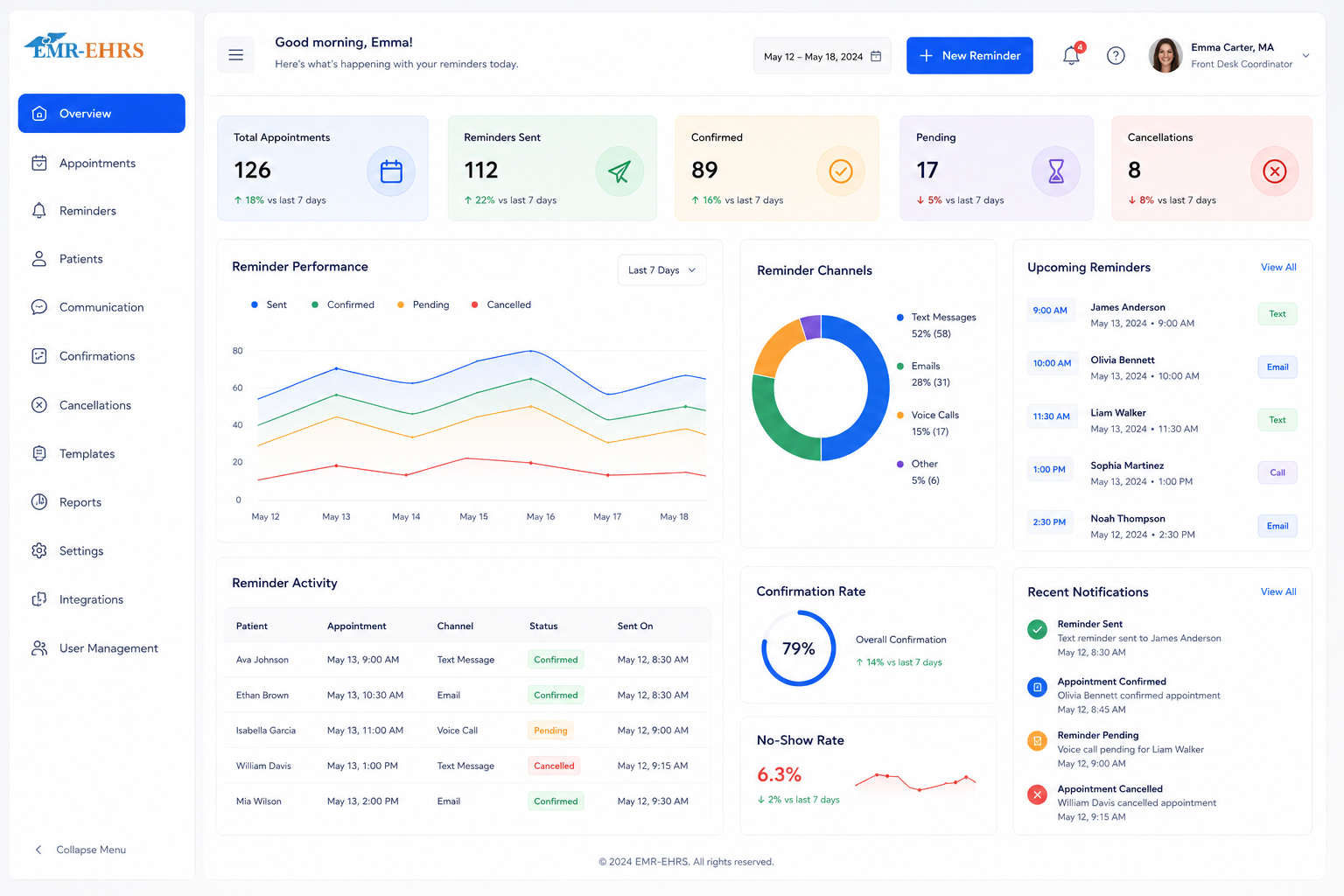
Patient appointment reminder software helps remind patients about upcoming medical appointments through supported channels such as phone calls, text messages, or emails. EMR-EHRs helps medical practices send reminders, track confirmations, manage cancellations, support rescheduling, reduce no-shows, and keep appointment workflows connected with scheduling and EHR systems where supported.
Send voice reminder calls to patients before scheduled appointments where supported.
Send SMS reminders so patients can quickly view appointment details and respond where supported.
Send email reminders with appointment date, time, provider, location, and instructions where supported.
Track which patients confirmed appointments and which still need follow-up where supported.
See canceled appointments earlier so staff can manage the schedule more effectively.
Help patients request appointment changes before the scheduled visit where supported.
Track sent, pending, delivered, failed, confirmed, and canceled statuses where supported.
Identify reminders that did not reach the patient and need staff attention where supported.
Send reminders based on provider schedules and appointment calendars where supported.
Support reminder workflows for different office locations where supported.
Configure reminder workflows for visits, follow-ups, procedures, therapy, or recurring appointments where supported.
Support reminders for repeat visits and follow-up-heavy workflows where supported.
Support follow-up for patients who miss scheduled appointments where supported.
Include arrival time, documents, insurance cards, copays, or preparation requirements where supported.
Reach patients through verified channels based on practice workflow and patient needs where supported.
Give staff a clear view of reminder activity, response status, and appointments needing attention.
The appointment is created in the EMR-EHRs scheduling workflow.
The workflow uses the appointment date, provider, location, visit type, and reminder configuration where supported.
The patient receives a phone, text, or email reminder through supported channels.
The patient confirms, cancels, or requests rescheduling where supported.
The front desk sees confirmed, pending, canceled, failed, and unconfirmed statuses where supported.
Failed or unconfirmed reminders can be reviewed for manual follow-up.
Open slots can be reviewed and filled faster.
Reminder details can help patients arrive with the right information and documents where supported.
AI-assisted reminder tools should support review and prioritization while practice staff remain responsible for final reminder, scheduling, patient communication, and follow-up decisions.
This conceptual workflow preview shows how reminder delivery, confirmations, failed attempts, cancellations and rescheduling requests can be monitored by staff.
Appointments with response status.
Appointments needing confirmation.
Reminder attempts needing follow-up.
Reminder insights where available.
Reminder workflows help patients remember visits and respond before appointment time.
Staff spend less time making manual reminder calls and tracking confirmations.
Earlier cancellations and reschedule requests help practices manage open slots.
Patients receive timely reminders through supported channels.
Reminders can include location details, instructions, documents, and pre-visit requirements where supported.
Confirmation visibility and fewer empty slots help providers use schedules more effectively.
Configured workflows reduce missed calls, forgotten reminders, and tracking mistakes.
Staff can see which patients confirmed, canceled, failed to respond, or need manual follow-up.
Reminder activity connects with scheduling, patient records, and front-desk processes where supported.
EMR-EHRs appointment reminders support the full practice workflow, not only reminder calls.
| Capability | Manual Reminder Calls | Basic Reminder Tool | EMR-EHRs |
|---|---|---|---|
| Phone reminders | No | Limited | Where supported |
| Text reminders | No | Often available | Where supported |
| Email reminders | No | Often available | Where supported |
| Appointment confirmation tracking | Manual | Limited | Where supported |
| Cancellation tracking | Manual | Limited | Where supported |
| Reschedule request support | Manual | Limited | Where supported |
| Reminder delivery status | Manual | Limited | Where supported |
| Failed reminder visibility | Manual | Limited | Where supported |
| Reminder dashboard | No | Limited | Where supported |
| Provider schedule connection | No | Limited | Where supported |
| Patient record connection | No | Limited | Where supported |
| Multi-provider support | Manual | Limited | Where supported |
| Multi-location support | Manual | Limited | Where supported |
| Healthcare workflow focus | No | Limited | Yes |
EMR-EHRs helps healthcare practices replace manual reminder calls with connected appointment reminder workflows that support patient communication, schedule accuracy, and front-desk efficiency.
EMR-EHRs supports healthcare appointment reminder workflows.
EMR-EHRs supports phone, text, and email reminder workflows where available.
EMR-EHRs helps practices improve reminder visibility before visits.
EMR-EHRs connects reminders with scheduling workflows where supported.
EMR-EHRs helps staff manage confirmations, cancellations, rescheduling, and failed reminders where supported.
EMR-EHRs supports reminder workflows across providers and locations where available.
Patient appointment reminder software helps remind patients about upcoming medical appointments through supported channels such as phone calls, text messages, or emails. EMR-EHRs can also help medical practices track confirmations, cancellations, reschedule requests, failed reminders, and front-desk follow-up from one connected reminder workflow where supported.
EMR-EHRs can help reduce no-shows by sending appointment reminders before the visit and tracking patient responses where supported. Staff can see which appointments are confirmed, pending, canceled, failed, or need follow-up, helping the practice act earlier.
EMR-EHRs can support appointment reminder workflows through phone, text, and email where available and verified. This helps practices improve confirmation visibility, reduce manual reminder calls, and support front-desk workflows for confirmations, cancellations, and rescheduling.
Automated appointment reminders can save staff time, reduce missed calls, improve confirmation tracking, and help practices reach patients consistently. EMR-EHRs supports repeatable reminder workflows connected with appointment schedules and patient communication processes where supported.
Yes, where supported. EMR-EHRs appointment reminders can connect with patient scheduling workflows so reminder activity supports appointment confirmations, cancellations, reschedule requests, provider calendars, failed reminder follow-up, and front-desk schedule management.
See how EMR-EHRs helps medical practices send phone, text, and email appointment reminders where supported, track confirmations, manage cancellations, support rescheduling, and keep provider schedules organized.
Phone: (480) 782-1116 | Email: jason@1stproviderschoice.com
