Multi-Specialty Medical Groups
EMR-EHRs supports shared patient charts, specialty templates, provider schedules, clinical documentation, referrals, billing, reporting, and patient communication across multiple specialties.
EMR-EHRs provides multi-specialty EHR software designed to help practices manage multiple providers, departments, specialties, locations, patient records, specialty-specific templates, referrals, orders, tasks, billing, reporting, patient communication, and secure role-based access from one connected system.
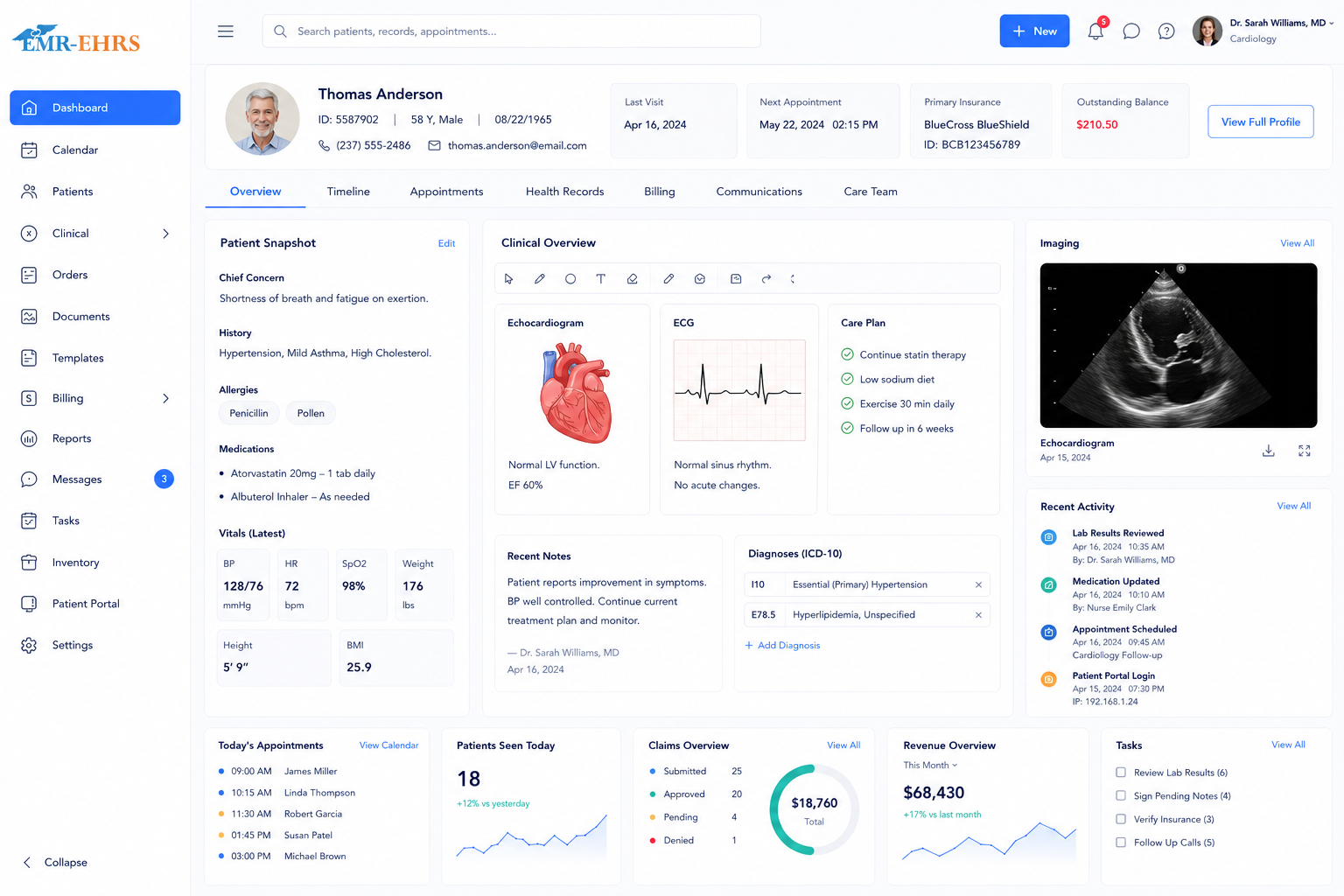
Multi-specialty EHR software is a digital health record system built for practices that manage more than one specialty, provider, department, or location. EMR-EHRs helps multi-specialty practices manage shared patient records, specialty-specific templates, clinical documentation, multi-provider scheduling, referrals, orders, tasks, billing, reporting, patient communication, and role-based access from one connected platform.
EMR-EHRs supports shared patient charts, specialty templates, provider schedules, clinical documentation, referrals, billing, reporting, and patient communication across multiple specialties.
EMR-EHRs supports provider-specific schedules, user roles, task assignment, shared records, documentation workflows, billing queues, reporting dashboards, and patient communication.
EMR-EHRs supports department-specific workflows, scheduling views, specialty templates, task tracking, referrals, patient records, billing, reporting, and secure access permissions.
EMR-EHRs supports centralized records, location-based schedules, provider access, reporting, billing workflows, patient communication, and location-specific operational visibility where applicable.
EMR-EHRs supports primary care, internal medicine, chronic care, specialty referrals, follow-up documentation, lab review, imaging reports, billing, and patient portal workflows.
EMR-EHRs supports practices that combine specialties such as internal medicine, cardiology, dermatology, pain management, podiatry, mental health, endocrinology, gastroenterology, physical therapy, and more.
EMR-EHRs supports scalable workflows for practices adding new specialties, providers, departments, locations, templates, reports, users, and billing requirements.
EMR-EHRs supports registration, eligibility checks, appointment management, claims, denials, payments, patient responsibility tracking, reporting, and role-based access for back-office teams.
A patient portal helps multi-specialty practices reduce phone calls and paperwork by allowing patients to request appointments, complete forms, update insurance information, send secure messages, receive reminders, request refills, view instructions, receive result updates where appropriate, and make payments online.
AI-powered features are designed to support documentation efficiency and workflow review. Final clinical decisions, diagnosis, treatment, medication decisions, coding decisions, and documentation remain under provider control.
| Area | Generic EMR | EMR-EHRs Multi-Specialty EHR |
|---|---|---|
| Main workflow | General medical charting | Multiple specialties, providers, departments, and locations |
| Patient records | Basic chart access | Shared patient records across specialties |
| Templates | General templates | Specialty-specific and provider-specific templates |
| Scheduling | Basic appointment calendar | Multi-provider, multi-department, and multi-location scheduling |
| Care coordination | Limited | Internal referrals, tasks, handoffs, follow-ups |
| Documents | Basic attachments | Labs, imaging reports, outside records, specialty documents |
| Billing | Standard claims | Specialty-specific billing, claims, denials, reports |
| Reporting | General reports | Provider, specialty, department, location, billing dashboards |
| Access control | Basic users | Role-based, department-based, and provider-based permissions |
| Growth support | Limited | Supports adding specialties, providers, locations, and workflows |
EMR-EHRs reviews specialties, providers, departments, locations, scheduling workflows, intake forms, templates, referrals, tasks, billing, reporting, patient portal, and user roles.
Set up specialty-specific templates, provider-specific templates, consultation templates, follow-up templates, procedure note templates where applicable, referral templates, and documentation preferences.
Configure chart structure, patient history, specialty visit history, medication history, allergy history, lab history, imaging report attachments, documents, referrals, and care plan views.
Configure provider calendars, department calendars, specialty calendars, visit types, appointment reminders, waitlists, same-day scheduling, and multi-location views where applicable.
Configure patient registration forms, specialty intake forms, medical history forms, consent forms, insurance forms, document upload, and check-in workflows.
Configure internal referrals, external referrals, referral status tracking, provider handoff tasks, lab follow-up tasks, imaging follow-up tasks, document review tasks, and administrative task queues.
Configure order tracking, lab result review, imaging report attachment workflows, diagnostic report attachment workflows, outside record attachment workflows, document categorization, follow-up tasks, and secure storage.
Configure medication history, allergy review, specialty medication review, refill request workflows, e-prescribing workflow where available, prior authorization tasks, and pharmacy communication workflows.
Configure eligibility, prior authorization, CPT/ICD workflows, specialty-specific billing, visit coding, procedure coding where applicable, charge capture, claims, payment posting, denial tracking, patient responsibility, and billing reports.
Configure online appointment requests, forms, secure messaging, reminders, refill requests, patient instructions, result communication where appropriate, payment access, and communication history.
Configure provider productivity reports, specialty reports, department reports, location reports where applicable, appointment reports, referral reports, task reports, billing reports, denial reports, revenue dashboards, and operational dashboards.
Configure provider permissions, department permissions, location permissions where applicable, administrative permissions, billing permissions, audit trails, staff access, and secure record access.
Plan migration of patient demographics, records, documents, visit history, medications, allergies, lab history, billing data, referral history, and historical notes.
Train providers, specialty teams, front desk staff, clinical staff, billing staff, administrators, managers, and reporting users.
Support the practice during launch and workflow adoption.
Improve templates, scheduling workflows, referrals, tasks, billing queues, dashboards, forms, portal usage, staff adoption, and specialty workflows after launch.
Talk to an EMR-EHRs specialist to see how our multi-specialty EHR software can support your practice workflow.












See how EMR-EHRs can help your practice manage shared patient records, specialty templates, provider schedules, department workflows, referrals, tasks, orders, documents, billing, reporting, patient communication, and secure access from one connected system.
