Healthcare Practices Still Depend on Fax
Practices still receive and send referrals, outside records, authorizations, lab reports, pharmacy documents, payer communication, and billing paperwork by fax.
EMR-EHRs Fax Management Feature helps healthcare practices manage incoming and outgoing faxes, attach faxed documents to patient charts, route fax records for review, track fax status, manage failed fax follow-up where supported, and maintain secure fax history inside the EMR workflow.
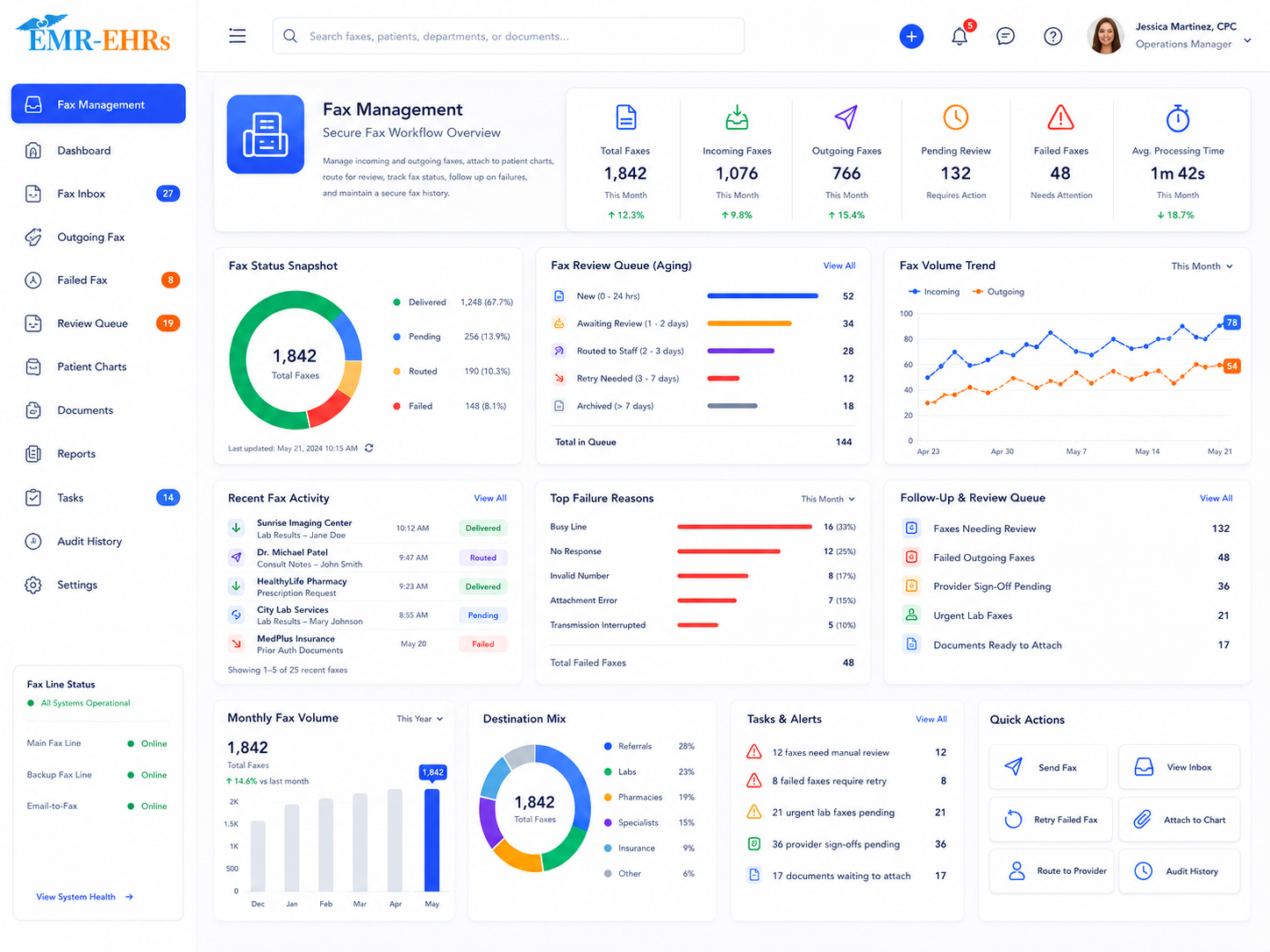
EMR fax management Feature helps healthcare practices send, receive, route, track, attach, and store inbound and outbound faxes inside the electronic medical record workflow. It helps staff manage faxed referrals, lab reports, outside records, pharmacy documents, billing paperwork, payer documents, authorizations, and clinical records from a patient-linked workflow.
EMR-EHRs Fax Management Feature helps practices manage incoming and outgoing healthcare faxes, attach faxed records to patient charts, route fax documents for review, track fax status, and maintain secure fax history where supported.
Healthcare practices need more than a standalone fax machine. They need a connected fax workflow that supports inbound fax capture, outbound faxing, patient chart attachment, routing, delivery visibility, failed fax follow-up, secure access, and audit-friendly fax history.
Practices still receive and send referrals, outside records, authorizations, lab reports, pharmacy documents, payer communication, and billing paperwork by fax.
Printing, scanning, dialing, waiting for confirmation, sorting pages, and filing faxed documents manually can slow down front desk and back-office teams.
Faxed lab reports, referrals, outside records, authorization documents, and payer correspondence need correct patient matching before they are saved.
Practices need to know whether faxed documents are pending, sent, delivered, failed, retried, canceled, or completed where supported.
Faxed records should include document type, category, source, date, sender, recipient, provider, patient, and status where supported.
Printed faxes and disconnected scanned files increase the risk of misplaced documents, delayed review, and incomplete patient charts.
Referral documents, specialist notes, outside records, and referral follow-up paperwork need clear fax routing, attachment, and review workflows.
Faxed lab reports, diagnostic reports, imaging reports, discharge summaries, and outside clinical records may need provider review and patient chart access.
Pharmacy documents, prescription-related paperwork, refill-related documents, stamps, and signatures require controlled workflows where supported.
Billing teams may need payer correspondence, authorizations, claim support documents, medical necessity paperwork, denial documents, and appeal documents.
Failed faxes should not be missed. They may need correction, resend, assignment, or follow-up where supported.
Faxed documents may contain PHI, clinical records, payer information, signatures, and billing data.
Administrators need visibility into inbound volume, outbound volume, pending faxes, failed faxes, routed faxes, completed faxes, and staff workload where supported.
Larger practices need provider-specific queues, location-specific inboxes, shared worklists, and role-based fax access where supported.
A fax may be received from another provider, lab, pharmacy, hospital, payer, referral partner, or administrative source. A fax may also be created from patient forms, visit notes, documents, referrals, letters, reports, prescription-related documents, or billing documents where supported.
Incoming faxes enter the fax inbox where supported. Outgoing faxes enter the outbound fax queue where supported.
Staff reviews the fax preview, page count, sender, recipient, document type, and fax quality where supported.
The fax is matched or manually linked to the correct patient chart using patient lookup, identifiers, or manual review where supported.
The user selects the fax category such as referral, lab, diagnostic report, authorization, billing, pharmacy, outside record, clinical record, administrative document, or custom category where supported.
The user adds fax date, source, sender, recipient, provider, location, visit/order/referral association, notes, tags, or status where supported.
Incoming or outgoing fax documents are saved to the patient chart where supported.
The fax can be routed to provider, clinical staff, billing team, referral team, front desk, or admin queue where supported.
The reviewer may approve, sign, annotate, respond, resend, forward, mark complete, request correction, reassign, or create a follow-up task where supported.
Authorized users can send documents from the patient chart, document list, form, note, letter, referral, prescription-related document, or billing document where supported.
Fax status may show pending, sent, received, delivered, failed, retried, canceled, attached, reviewed, or completed where supported.
Delivery confirmation, receipt notice, or transmission details can be saved to fax history where supported.
Failed faxes can be corrected, resent, assigned, canceled, or marked for follow-up where supported.
Fax access, attachments, routing, delivery attempts, signatures, stamps, user actions, and changes are stored in audit-friendly fax history where supported.
Managers review inbound volume, outbound volume, failed faxes, pending faxes, routed faxes, provider queues, billing queues, referral queues, and staff worklists where supported.
Confirm support for automated inbound routing, sender recognition, OCR matching, duplicate detection, or automatic patient matching, including configuration and implementation requirements, during evaluation.
Confirm support for direct outbound faxing, pharmacy faxing, recipient directories, automatic sending, or delivery confirmation, including configuration and implementation requirements, during evaluation.
Confirm support for prescription faxing, pharmacy faxing, refill faxing, stamp, or electronic signature, including configuration and implementation requirements, during evaluation.
Confirm support for delivery confirmation, receipt notification, transmission logs, retry logic, or failed fax reasons, including configuration and implementation requirements, during evaluation.
Confirm support for stamps, electronic signatures, signature authorization, templates, or custom cover sheets, including configuration and implementation requirements, during evaluation.
HIPAA-focused fax management workflow, designed to support secure healthcare faxing, audit-friendly fax activity records, and role-based fax permissions.
Confirm support for specific fax vendors, fax APIs, eFax providers, scanner models, HL7/FHIR, pharmacy systems, lab systems, payer systems, or third-party integrations, including connection method and implementation scope, during evaluation.
AI-powered fax tools should support faster review, routing, and document organization while providers and staff remain responsible for final patient matching, fax verification, clinical review, billing review, signatures, communication, and documentation.
Summarize fax content, sender context, and likely next steps for staff review.
Suggest fax categories while staff confirm the final document type and patient record.
Suggest possible patient matches while staff remain responsible for final patient matching.
Help identify possible duplicate fax documents for staff review.
Summarize failed fax queues, reasons if available, and follow-up items.
Help prioritize inbound faxes, failed faxes, referral faxes, billing faxes, and review queues.
Manage inbound faxes, attach documents to charts, route paperwork, send forms, and track fax status where supported.
Review faxed lab reports, outside records, referrals, diagnostic reports, visit notes, medication documents, and clinical records.
Manage payer faxes, authorization documents, claim support documents, denial paperwork, appeals, and signed financial documents where supported.
Send and receive referral documents, outside records, specialist notes, and referral follow-up documents where supported.
Review faxed clinical forms, lab reports, diagnostic reports, prescription-related documents, and follow-up paperwork where supported.
Monitor fax volume, failed faxes, pending review queues, staff workload, fax reports, and secure fax activity.
Route faxes to the correct provider, care team, billing team, or review queue where supported.
Manage fax inboxes, outbound queues, reports, user access, and fax workflows across locations where supported.
| Workflow Area | Manual Fax Machine Workflow | EMR-EHRs Fax Management |
|---|---|---|
| Incoming faxes | Printed pages or fax tray | Inbound fax inbox where supported |
| Patient matching | Manual sorting | Patient chart attachment where supported |
| Outgoing faxes | Paper dialing and printing | Send from EMR workflow where supported |
| Fax status | Manual confirmation checks | Status tracking where supported |
| Failed faxes | Easy to miss | Failed fax follow-up where supported |
| Document storage | Paper folders or scanned files | Patient-linked fax history |
| Routing | Manual handoff | Staff/provider routing where supported |
| Referrals | Paper-heavy workflow | Referral fax workflow where supported |
| Billing documents | Separate paperwork | Billing fax workflow where supported |
| Security | Paper exposure risk | Role-based fax access where supported |
| Audit history | Limited tracking | Audit-friendly fax activity where supported |
EMR-EHRs helps practices manage incoming and outgoing faxes from one connected workflow where supported.
EMR-EHRs helps attach inbound and outbound fax documents to the correct patient chart where supported.
EMR-EHRs helps route faxed documents to providers, billing teams, referral teams, clinical staff, and administrators where supported.
EMR-EHRs helps users track pending, sent, received, failed, completed, and confirmed fax activity where supported.
EMR-EHRs helps practices manage faxed referrals, outside records, lab reports, pharmacy documents, authorizations, payer documents, and billing support files where supported.
EMR-EHRs supports role-based fax access, secure fax document storage, patient-linked history, and audit-friendly fax activity where supported.
EMR-EHRs can support fax summaries, category suggestions, routing suggestions, duplicate detection, and worklist prioritization where available.
EMR-EHRs helps configure fax workflows, document categories, routing queues, user roles, reports, and staff training. Phone: (480) 782-1116. Email: jason@1stproviderschoice.com.
Review inbound fax process, outbound fax process, fax numbers, fax users, patient chart workflow, document categories, referral workflow, billing workflow, provider review workflow, and security needs.
Configure fax inboxes, outbound fax queues, fax categories, patient chart attachment workflow, sender/recipient details, and status tracking where supported.
Configure patient lookup, patient matching, chart attachment, document preview, category assignment, source, date, and fax document storage where supported.
Configure categories for referrals, labs, diagnostics, authorizations, billing, payer correspondence, pharmacy documents, prescription-related documents, clinical documents, and administrative documents where supported.
Configure provider review, clinical review, billing review, referral review, front desk review, admin review, status tracking, reassignment, and completion workflows where supported.
Configure sent, received, pending, delivered, failed, retried, canceled, reviewed, completed, resend, and follow-up workflows where supported.
Configure cover sheets, templates, stamps, electronic signatures, recipient details, confidentiality notices, and authorized users where supported.
Configure role-based access, restricted fax categories, user permissions, fax access history, activity history, and secure fax storage where supported.
Configure fax activity reports, inbound reports, outbound reports, failed fax reports, pending review reports, delivery reports, and staff worklist reports where supported.
Train front desk teams, providers, clinical staff, referral teams, billing teams, administrators, and managers.
Monitor fax volume, failed faxes, routing accuracy, patient matching, staff adoption, report usage, and workflow performance.
Manage incoming faxes, outgoing faxes, patient chart attachments, referral documents, lab reports, pharmacy documents, billing paperwork, fax status tracking, delivery confirmation where supported, failed fax follow-up where supported, secure storage, and staff review workflows with EMR-EHRs Fax Management Feature.
Phone:(480) 782-1116 Email:jason@1stproviderschoice.com
