Clinical Safety Module

EMR Drug Dispensing Feature for Safer In-House Medication Workflow

EMR-EHRs Drug Dispensing Feature helps healthcare practices connect prescriptions, medication verification, inventory, dispensing history, billing workflows, reports, and secure medication records in one organized EMR workflow.

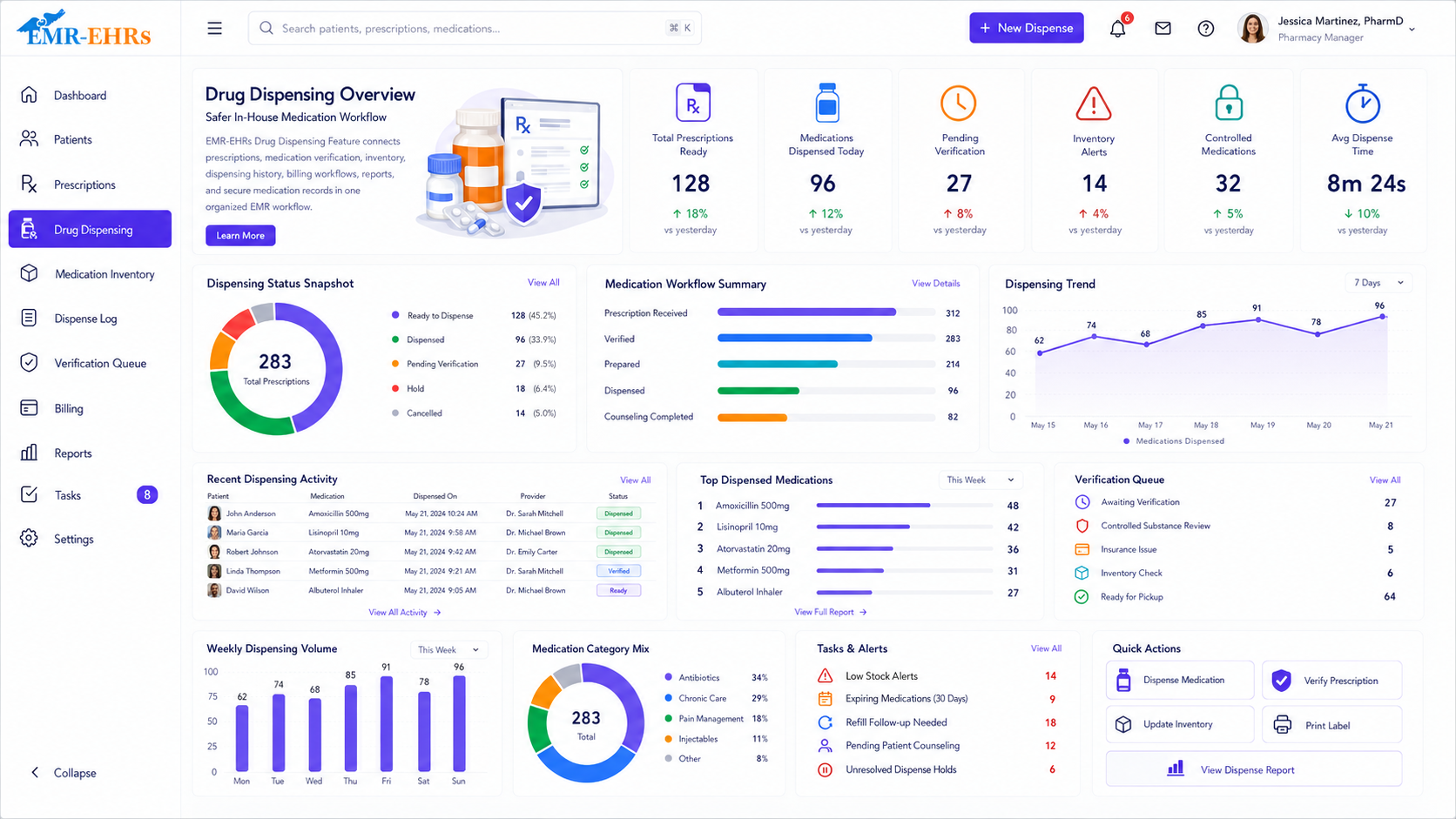
EMR Drug Dispensing dashboard for prescriptions ready, medications dispensed, verification queue, inventory alerts, dispensing trends, and quick actions
Prescription WorkflowMedication VerificationInventory TrackingBarcode SupportSafety AlertsBillingReportsAudit Records
Quick answer

What Is EMR Drug Dispensing Feature?

EMR drug dispensing Feature is a clinical safety module that helps healthcare practices manage in-house medication dispensing by connecting prescriptions, patient records, medication inventory, medication verification, dispensing records, billing workflows, reports, and audit-friendly medication history.

EMR-EHRs Drug Dispensing Feature helps practices connect prescriptions, medication inventory, patient medication records, barcode verification if supported, dispensing history, billing charges if supported, and reports in one connected medication workflow.

Why Practices Need Integrated Drug Dispensing Feature

Healthcare practices need more than a manual medication log. They need a connected clinical safety workflow that links prescriptions, patient charts, medication inventory, dispensing records, billing workflows, safety checks, reports, and secure medication records.

Medication Dispensing Requires Strong Safety Checks

Practices need a workflow that helps staff verify the patient, medication, strength, dosage form, quantity, instructions, allergy risk, interaction risk, and duplicate medication risk where supported.

Manual Dispensing Can Create Duplicate Data Entry

Separate prescription, inventory, billing, and patient record workflows can create repeated entry, missed updates, and documentation gaps.

Disconnected Prescription and Inventory Workflows Create Gaps

If prescribing and inventory are separate, staff may not know whether the medication is available, low in stock, expired, or already dispensed.

Medication Selection Errors Can Happen Without Verification Steps

Medication name, strength, form, quantity, and patient matching need a clear review workflow before dispensing.

Inventory Visibility Is Difficult Without Connected Stock Tracking

Practices need current stock, dispensed quantity, received quantity, adjusted quantity, low-stock visibility, and transaction history.

Expiration, Lot and Batch Tracking May Be Missed Manually

Manual stock tracking can make it harder to review expiration dates, batch numbers, lot numbers, near-expiry items, and recalled stock if supported.

Dispensing Records Need to Connect to the Patient Chart

Dispensed medications should be connected to the patient medication history and chart where supported.

Billing Teams Need Accurate Medication Charge Transfer

Medication charges should move into billing workflows where supported so staff do not need to enter the same charge again.

Administrators Need Dispensing, Inventory and Transaction Reports

Practice leaders need visibility into dispensing volume, stock activity, inventory adjustments, transactions, user activity if supported, and reports.

Medication Records Must Stay Secure and Audit-Friendly

Drug dispensing workflows should support role-based access, transaction history, medication history, dispensing records, and secure patient medication records.

Multi-Provider Practices Need Consistent Dispensing Workflows

Different providers and clinical staff need a consistent process for medication review, verification, dispensing, inventory update, and documentation.

Multi-Location Practices Need Location-Level Inventory Visibility If Supported

Practices with multiple locations need location-based stock lists, location-level dispensing activity, and inventory reports where supported.

How EMR-EHRs Drug Dispensing feature Works

1

Provider Creates or Selects a Prescription

The workflow begins from an active prescription, medication order, patient chart, or dispensing request.

2

Staff Opens the Patient Chart and Medication Profile

Staff review patient demographics, patient chart, medication profile, medication history if available, and current medications if available.

3

Patient Medication History Is Reviewed If Available

Clinical staff review current medications, past medications, dispensed medication history, prescription history if supported, and refill history if supported.

4

Allergy and Safety Alerts Are Reviewed If Supported

Staff review allergy alerts, drug-drug interaction alerts, duplicate medication alerts, contraindication alerts, drug-condition alerts, or missing information alerts where available.

5

Medication Is Selected From In-House Inventory

The dispensing team selects the medication from available medication inventory.

6

Drug, Strength, Form, Quantity and Instructions Are Confirmed

Staff confirm medication name, drug strength, dosage form, route if applicable, dispense quantity, directions, provider, location, and date.

7

Barcode Verification Is Completed If Supported

Staff scan or verify medication barcode to confirm the correct drug, inventory item, and dispense item where supported.

8

Lot, Batch and Expiration Details Are Reviewed If Supported

Staff review lot number, batch number, expiration date, near-expiry status, or expired medication alerts where supported.

9

Dispensing Quantity Is Confirmed

The final dispensing quantity is confirmed before completion.

10

Medication Is Dispensed by Authorized Staff

Authorized staff dispense medication according to practice workflow and applicable internal policy.

11

Inventory Quantity Is Updated Where Supported

Dispensed quantity is deducted from inventory, and medication transaction history is updated where supported.

12

Dispensing Record Is Saved to Patient History Where Supported

The medication dispensing record is connected to the patient chart, medication history, or dispensing timeline where supported.

13

Medication Charge Is Transferred to Billing If Supported

Medication charge, supply charge, procedure/supply mapping, or billing transfer status is sent to billing workflows where configured.

14

Dispensing Transaction and Audit Record Are Stored

Medication details, user activity if supported, quantity, date, location, provider, inventory movement, and transaction record are stored for review.

15

Inventory, Dispensing, Billing and Safety Reports Are Reviewed

Teams review inventory reports, dispensing reports, billing transfer reports, safety alert reports if supported, and audit-friendly medication records.

Connect Prescriptions With In-House Medication Dispensing

Prescription connection
Patient chart connection
Medication order review
Ordering provider
Medication name
Drug strength
Dosage form
Route if applicable
Quantity
Directions / sig
Refill details if supported
Dispensing status
Dispensing notes
Medication history update if supported
Staff review before dispensing

Support Safer Dispensing With Medication Verification and Alerts

Medication safety alerts should support staff review, but providers and authorized clinical staff remain responsible for final medication decisions, dispensing approval, patient counseling, and clinical judgment.

Patient identity review
Medication selection review
Medication strength review
Quantity review
Dosage instruction review
Allergy alerts if supported
Drug-drug interaction alerts if supported
Drug-condition alerts if supported
Duplicate medication alerts if supported
Contraindication alerts if supported
Missing information alerts if supported
Provider review workflow if needed
Staff confirmation before dispensing

Barcode Verification for Medication Selection and Inventory Accuracy If Supported

Only claim barcode scanning or barcode verification when EMR-EHRs supports this workflow.

Barcode scanning if supported
Medication barcode verification
Inventory item verification
Dispense item confirmation
Quantity confirmation
Wrong-medication warning if supported
Inventory transaction update
Dispensing accuracy support
Staff confirmation step
Barcode-based audit record if supported

Track Medication Inventory, Stock Levels and Dispensing Activity

Medication stock list
Medication name
Strength
Dosage form
Current quantity
Dispensed quantity
Received quantity
Adjusted quantity
Low-stock alerts if supported
Out-of-stock alerts if supported
Reorder level if supported
Supplier details if supported
Inventory movement history
Medication transaction log
Stock by provider if supported
Stock by location if supported
Inventory reports

Track Medication Lots, Batches and Expiration Dates If Supported

Only claim lot tracking, batch tracking, expiration alerts, recall support, or batch-based reporting when EMR-EHRs verifies support.

Lot number if supported
Batch number if supported
Expiration date if supported
Expired medication alerts if supported
Near-expiry alerts if supported
Batch-based inventory review if supported
Recall support if supported
Dispensing by lot / batch if supported
Inventory adjustment by lot if supported
Expiration reports if supported

Maintain Complete In-House Medication Dispensing Records

Patient name
Patient ID
Medication name
Strength
Dosage form
Quantity dispensed
Date dispensed
Dispensing provider or staff
Ordering provider
Location
Instructions
Refill details if supported
Dispensing notes
Inventory deduction record if supported
Billing transfer status if supported
Patient medication history update if supported
Audit-friendly transaction record

Controlled Medication Tracking and Restricted Drug Workflows If Supported

Only claim controlled substance tracking, restricted drug tracking, regulatory reporting, DEA-related workflows, or state reporting support when EMR-EHRs verifies support.

Controlled medication flag if supported
Restricted medication workflow if supported
Authorized user access
Dispensing approval step if supported
Quantity control
Transaction history
Adjustment notes
Audit trail
Reporting support
Policy-based review

Transfer Dispensed Medication Charges to Billing If Supported

Medication charge creation if supported
Charge transfer to billing if supported
Procedure / supply charge mapping if supported
Fee schedule connection if supported
Provider mapping
Location mapping
Patient balance connection if applicable
Insurance billing support if applicable
Charge review queue
Billing-ready status
Dispensing-to-claim visibility if supported

View Patient Medication History and Dispensing Timeline

Current medications if available
Past medications if available
Dispensed medication history
Prescription history if supported
Refill history if supported
Medication changes if documented
Allergy history if available
Dispensing notes
Provider review
Patient counseling notes if supported
Medication adherence notes if supported

Connect Drug Dispensing With Providers, Clinical Staff and Billing Teams

Provider prescription workflow
Clinical staff dispensing workflow
Dispensary task list if supported
Medication verification workflow
Inventory team workflow
Billing team workflow
Administrator reporting workflow
Role-based access
Multi-user workflow
Task status if supported
Dispensing notes and internal communication if supported

Drug Dispensing for Specialty, Multi-Provider and Multi-Location Practices

Specialty clinic dispensing workflows
Multi-provider medication dispensing
Multi-location medication inventory if supported
Location-specific stock lists
Provider-specific dispensing reports
Medication transaction reports by location
Centralized inventory visibility if supported
Specialty-specific medication lists if supported
Procedure-related medication dispensing if applicable
Pain management dispensing if applicable
Dermatology medication dispensing if applicable
Podiatry medication dispensing if applicable
Urgent care medication dispensing if applicable
Multi-specialty medication workflow

HIPAA-Focused Drug Dispensing Feature for Secure Medication Records

HIPAA-focused medication workflows, designed to support secure dispensing documentation, audit-friendly medication records, and secure patient medication records.

Role-based access
User permissions
Password protection
Access logs if supported
Change logs if supported
Dispensing history
Medication transaction history
Inventory adjustment history
Billing transfer history if supported
Secure patient medication records
Audit-friendly dispensing records
Privacy-focused medication workflows

Connect Drug Dispensing With EMR, E-Prescribing, Inventory and Billing Workflows

Only list specific pharmacies, networks, drug databases, barcode devices, suppliers, payers, APIs, or integrations when EMR-EHRs verifies support.

EMR patient record connection
Prescription module connection
E-prescribing workflow if supported
Medication history workflow
Inventory workflow
Barcode workflow if supported
Billing workflow
Reports workflow
Patient portal medication information if supported
Document management workflow if supported
Data migration if applicable
Secure data exchange if supported

Medication Dispensing Reports, Inventory Reports and Safety Visibility

Dispensing Reports

  • Medications dispensed
  • Dispensing by patient
  • Dispensing by provider
  • Dispensing by location
  • Dispensing by staff if supported
  • Dispensing date range
  • Quantity dispensed
  • Dispensing transaction history

Inventory Reports

  • Current stock
  • Low-stock items if supported
  • Out-of-stock items if supported
  • Expired items if supported
  • Near-expiry items if supported
  • Inventory adjustment reports
  • Received medication reports
  • Dispensed medication reports
  • Stock movement history

Billing Reports

  • Dispensed medication charges if supported
  • Billing transfer status if supported
  • Unbilled dispensed items if supported
  • Medication revenue if supported
  • Patient balance connection if applicable

Safety and Audit Reports

  • Drug interaction alert reports if supported
  • Allergy alert reports if supported
  • Barcode verification history if supported
  • User activity if supported
  • Transaction history
  • Medication adjustment history
  • Audit-friendly dispensing records

AI-Powered Tools to Support Medication Dispensing and Inventory Workflows

AI-powered tools should support medication workflow efficiency while providers and authorized clinical staff remain responsible for final medication review, dispensing approval, patient counseling, clinical judgment, and compliance review.

AI missing information alerts if available

Flag missing medication, patient, inventory, or billing details before dispensing work moves forward.

AI medication safety alert summaries if available

Summarize safety alerts for staff review while keeping final decisions with providers and authorized clinical staff.

AI inventory shortage alerts if available

Help surface stock risks, low inventory patterns, and dispensing workflow tasks where available.

AI expiration risk alerts if available

Support review of near-expiry or expired medication inventory where those data points are configured.

AI dispensing report summaries if available

Summarize dispensing activity, inventory movement, billing transfer status, and audit-friendly reports.

AI workflow task suggestions if available

Suggest follow-up tasks for inventory, billing transfer, safety review, or administrative work where available.

Built for Providers, Clinical Staff, Dispensary Teams and Practice Administrators

Providers

Review prescriptions, patient medication history, allergy alerts if supported, interaction alerts if supported, and dispensing records.

Clinical Staff

Verify medication, confirm quantity, document dispensing activity, review safety alerts if supported, and support patient medication workflows.

Dispensary Teams

Manage medication stock, dispensing queues, barcode verification if supported, inventory movement, transaction history, and reports.

Billing Teams

Track dispensed medication charges, billing transfer status, patient balance connection, and medication charge review where supported.

Practice Administrators

Monitor inventory, dispensing activity, medication reports, staff activity if supported, audit-friendly records, and practice-level medication visibility.

Multi-Provider Practices

Support consistent medication workflows across providers, staff, departments, and service lines.

Multi-Location Practices

Track medication stock, location-level inventory, dispensing activity, and reports across locations where supported.

Specialty Practices

Support specialty-specific medication dispensing workflows where applicable.

EMR-EHRs Drug Dispensing vs Manual Dispensing Workflow

Workflow AreaManual Dispensing WorkflowEMR-EHRs Drug Dispensing
Prescription connectionSeparate paper or disconnected processConnected prescription and EMR workflow where supported
Patient medication reviewManual chart lookupPatient medication history and chart connection where supported
Medication verificationManual visual checkBarcode verification and safety checks if supported
Inventory trackingManual count or spreadsheetMedication stock and transaction tracking
Lot/batch visibilityManual trackingLot and batch tracking if supported
Expiration trackingManual reviewExpiration and near-expiry tracking if supported
Dispensing recordPaper log or separate entryPatient-linked dispensing history
Billing chargesManual charge entryCharge transfer to billing if supported
Safety alertsManual reviewAllergy and interaction alerts if supported
ReportsManual reportingDispensing, inventory, billing and audit reports
SecurityDecentralized recordsRole-based and audit-friendly medication records where supported

What to Look for in the Best EMR Drug Dispensing Feature

Prescription-to-dispense workflow
EMR patient chart connection
Prescription module connection
Medication inventory tracking
Medication verification workflow
Barcode verification if supported
Allergy alerts if supported
Drug interaction alerts if supported
Duplicate medication alerts if supported
Patient medication history
Dispensing history
Quantity tracking
Low-stock alerts if supported
Out-of-stock alerts if supported
Lot / batch tracking if supported
Expiration tracking if supported
Controlled medication workflow if supported
Billing charge transfer if supported
Transaction history
Dispensing reports
Inventory reports
Safety and audit reports
Audit-friendly records
Role-based access
AI dispensing assistance if available
Implementation, training and support

See the Drug Dispensing Workflow in Action

Prescription QueueMedication verification status
Selected patient chart
Medication order details
Allergy and interaction review
Duplicate medication alert
Inventory availability
Lot / batch and expiration
Barcode verification status
Dispense quantity
Dispensing confirmation
Billing transfer status
Inventory movement
Dispensing reports
Medication historySafety alertsTransaction logAudit recordsInventory reports

Why Choose EMR-EHRs for Drug Dispensing Feature?

Connected EMR and Prescription Workflow

EMR-EHRs connects patient records, prescriptions, medication history, dispensing activity, inventory, and reports.

Medication Verification Support

EMR-EHRs supports safer dispensing workflows with medication review, barcode verification if supported, and safety alerts where available.

Inventory and Stock Visibility

EMR-EHRs helps practices monitor stock levels, medication transactions, dispensing history, inventory movement, and inventory reports.

Billing Workflow Connection

EMR-EHRs supports charge transfer from dispensed medications to billing workflows where supported.

Audit-Friendly Medication Records

EMR-EHRs helps practices maintain dispensing history, medication transaction records, inventory movement, and secure patient medication records.

Implementation, Training and Support

EMR-EHRs helps configure medication lists, inventory workflows, dispensing workflows, billing connections, reports, users, and staff training. Phone: (480) 782-1116. Email: info@emr-ehrs.com.

Implementation, Setup and Training for Drug Dispensing Workflows

1

Dispensing Workflow Review

Review current prescription, medication dispensing, inventory, billing, reporting, staff role, and security workflows.

2

Medication Inventory Setup

Configure medication lists, stock levels, inventory fields, medication categories, quantities, suppliers if supported, and locations where supported.

3

Safety and Verification Setup

Configure medication verification workflow, barcode workflow if supported, allergy alerts if supported, drug interaction alerts if supported, and staff review steps.

4

Billing and Reporting Setup

Configure charge transfer if supported, transaction reports, inventory reports, dispensing reports, safety reports if supported, and audit-friendly records.

5

Role and Permission Setup

Configure user roles, access permissions, dispensing rights, inventory adjustment permissions, reporting access, and administrative access.

6

Staff Training

Train providers, clinical staff, dispensary teams, billing teams, inventory teams, and administrators.

7

Go-Live and Optimization

Monitor dispensing activity, inventory accuracy, safety alert workflows if supported, billing transfer status, reporting needs, and staff adoption.

Current prescription workflow review
Current medication dispensing workflow review
Medication list setup
Inventory setup
Stock level setup
Location setup if supported
Barcode setup if supported
Safety alert setup if supported
Billing charge transfer setup if supported
Report setup
Role and permission setup
Staff training
Ongoing optimization

EMR Drug Dispensing Feature FAQs

EMR drug dispensing Feature is a clinical safety module that helps healthcare practices manage in-house medication dispensing by connecting prescriptions, patient charts, medication inventory, medication verification, dispensing records, billing workflows if supported, reports, and audit-friendly medication history. EMR-EHRs Drug Dispensing Feature helps practices manage prescription-to-dispense workflows in one connected EMR system.
EMR drug dispensing feature supports medication safety by helping staff review the patient medication profile, current medications if available, allergy alerts if supported, drug interaction alerts if supported, duplicate medication alerts if supported, medication strength, dosage form, quantity, and dispensing instructions before medication is dispensed. Barcode verification, if supported, can also help confirm the selected medication and inventory item. Providers and authorized clinical staff remain responsible for final medication review, dispensing approval, patient counseling, and clinical judgment.
EMR-EHRs Drug Dispensing feature can support prescription review, patient chart connection, medication selection, inventory availability check, medication verification, barcode verification if supported, quantity confirmation, lot/batch review if supported, expiration review if supported, dispensing record creation, inventory update, medication history update if supported, billing charge transfer if supported, and dispensing reports.
Yes. EMR-EHRs Drug Dispensing feature can help practices track medication stock lists, current quantity, dispensed quantity, received quantity, adjusted quantity, inventory movement, medication transaction history, stock by location if supported, low-stock alerts if supported, out-of-stock alerts if supported, lot/batch tracking if supported, expiration tracking if supported, and inventory reports.
Practices should use integrated drug dispensing feature because manual dispensing logs can create duplicate entry, inventory gaps, missed documentation, delayed billing updates, and limited visibility. EMR-EHRs Drug Dispensing Feature helps connect prescriptions, patient records, inventory, medication verification, dispensing history, billing charge transfer if supported, reports, and secure medication records in one workflow.

Ready to Improve Medication Dispensing, Inventory and Safety Visibility?

Simplify prescription-to-dispense workflows, medication verification, inventory tracking, barcode verification if supported, safety alerts if supported, dispensing records, billing charge transfer if supported, reports, and secure medication records with EMR-EHRs Drug Dispensing Feature.

Phone: (480) 782-1116   Email: info@emr-ehrs.com