Paper Charts Slow Clinical Work
Paper records make it harder to find patient history, review past notes, track documents, and support provider workflow.
EMR-EHRs Electronic Medical Records Software helps medical practices manage digital patient charts, clinical documentation, medications, allergies, vitals, documents, scheduling, billing, reports, secure access, and AI-supported workflows where available.
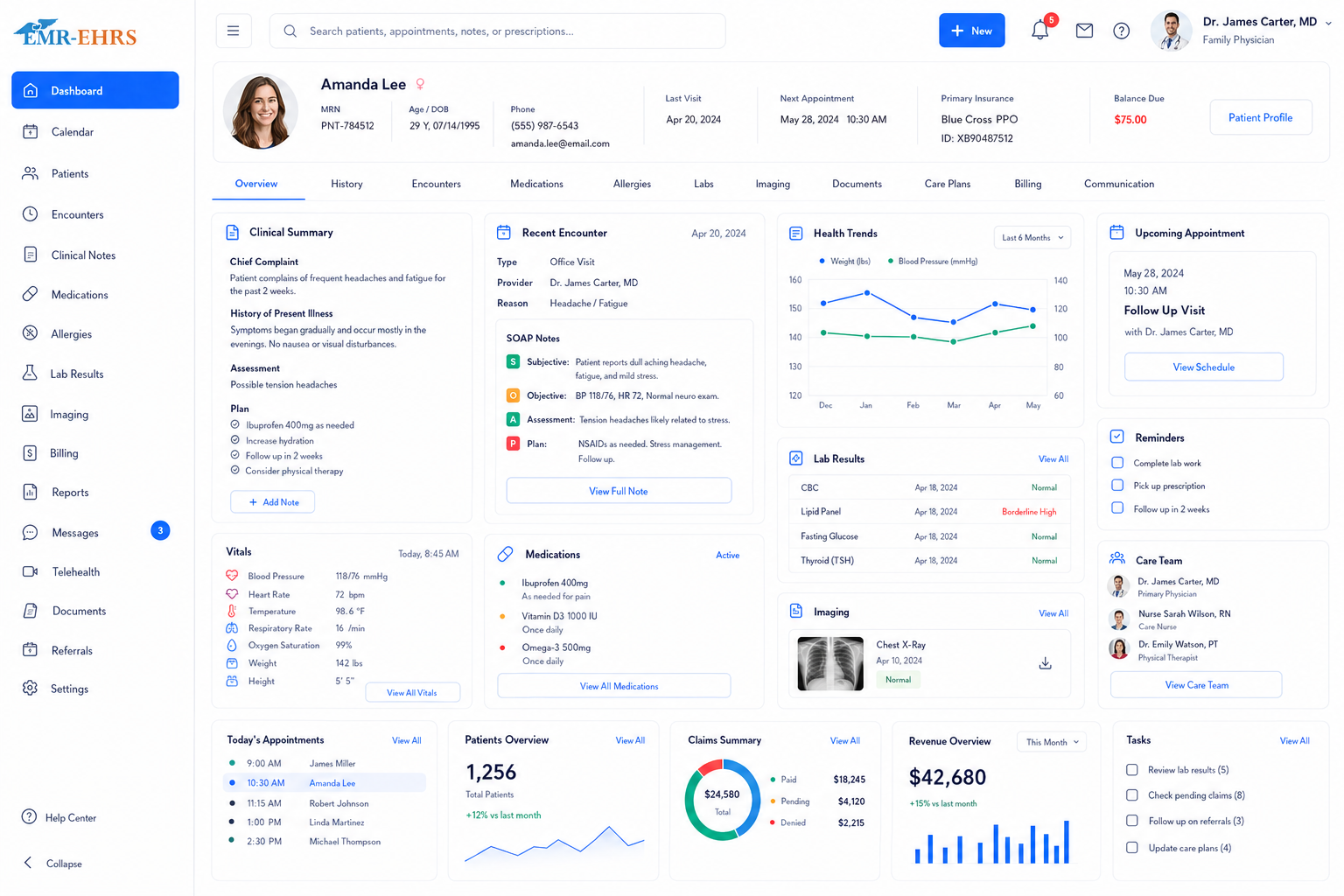
Electronic medical records software is a digital system that helps healthcare practices create, store, update, and manage patient medical records. It can include patient demographics, medical history, medications, allergies, vitals, visit notes, clinical documents, orders, results, prescriptions, scheduling, billing, reports, and secure provider access where supported.
EMR-EHRs Electronic Medical Records Software helps providers, clinical teams, billing teams, and practice managers manage patient charts, clinical documentation, care workflows, practice operations, reporting, and secure patient record access where supported.
EMR and EHR are often used together by healthcare buyers. An EMR usually refers to a digital patient chart used inside a medical practice. An EHR is often broader and may support patient health information across care settings where available. EMR-EHRs helps practices manage patient charts, documentation, billing, reporting, and secure clinical workflows where supported.
| Term | Meaning | Best Use |
|---|---|---|
| EMR | Digital patient chart used by a medical practice | Clinical notes, medications, allergies, vitals, documents |
| EHR | Broader electronic health record | Patient health data and care coordination where supported |
| EMR-EHRs | Practice-focused record and workflow system | Patient charts, documentation, billing, reporting, secure access |
Healthcare practices need better electronic medical records software because patient charts, clinical documentation, scheduling, billing, reporting, and communication can become slow or disconnected without one organized system.
Paper records make it harder to find patient history, review past notes, track documents, and support provider workflow.
Demographics, medications, allergies, vitals, documents, orders, results, and billing information should be easier to access in one connected workflow.
Providers need faster charting, reusable templates, structured notes, and specialty workflows where supported.
Medication lists, allergy records, reactions, prescription history, and updates should stay easy to review inside the chart where supported.
Practices need organized access to lab results, imaging reports, referrals, scanned documents, clinical attachments, and outside records where supported.
Patient portal, forms, appointment reminders, messages, and patient access workflows should connect with the patient record where supported.
Documentation should connect with diagnosis, CPT/HCPCS, charge entry, claim readiness, billing, and reports where supported.
Different specialties need different templates, workflows, procedure documentation, clinical fields, and reporting needs.
Providers, clinical staff, front desk teams, billing teams, managers, and administrators need access based on workflow and responsibility.
Managers need visibility into appointments, documentation, provider productivity, patient volume, billing readiness, and practice performance.
AI can support summaries, drafts, reminders, and workflow assistance where available, but providers remain responsible for final clinical decisions.
Staff creates or updates demographics, contact details, insurance details, responsible party, preferred pharmacy, and patient profile data where supported.
Providers review medical history, surgical history, family history, social history, medications, allergies, problems, immunizations, and past encounters where supported.
The visit connects with scheduling, check-in, intake forms, eligibility details, prior notes, and the patient chart where supported.
Staff enters vitals, chief complaint, reason for visit, screening details, forms, and pre-visit information where supported.
Providers document subjective notes, objective findings, assessment, plan, diagnosis, orders, procedures, follow-up instructions, and specialty details where supported.
Medication list, allergy list, allergy reactions, problem list, prescription history, and related chart details are updated where supported.
Labs, imaging, referrals, scanned records, attachments, clinical correspondence, and result review tasks are managed where supported.
Patient portal, messages, forms, appointment reminders, visit summaries, education material, and patient access workflows connect where supported.
Diagnosis, procedures, CPT/HCPCS, modifiers, documentation, charge entry, pre-claim checks, claims, and billing workflows connect where supported.
Managers review clinical activity, documentation status, appointments, provider productivity, billing readiness, claims, and reports where supported.
Role-based access, user activity, chart history, document history, note changes, and audit-friendly records are maintained where supported.
AI may support chart summaries, documentation drafts, visit preparation, task prioritization, coding support, or report summaries where available.
Confirm support for voice dictation, AI scribe, specialty templates, note locking, addendums, or structured templates, including configuration and implementation requirements, during evaluation.
Confirm support for ePrescribing, EPCS, drug interaction checks, pharmacy network, refill automation, or medication alert functionality, including configuration and implementation requirements, during evaluation.
Confirm support for lab interfaces, imaging integrations, result imports, abnormal flags, or electronic ordering, including configuration and implementation requirements, during evaluation.
Confirm support for patient portal, secure messaging, online forms, reminders, online payments, or result access, including configuration and implementation requirements, during evaluation.
Confirm support for coding advisor, claim scrubbing, billing automation, payment posting, eligibility, or claims submission, including configuration and implementation requirements, during evaluation.
Confirm support for interoperability, HL7, FHIR, HIE connection, APIs, or specific integrations, including configuration and implementation requirements, during evaluation.
HIPAA-focused EMR workflow, designed to support secure patient record access, audit-friendly patient record activity, and role-based clinical and billing permissions.
Confirm support for cloud, mobile, tablet, remote access, real-time sync, or backup, including configuration and implementation requirements, during evaluation.
AI-powered EMR tools should support workflow efficiency while providers, clinical teams, billing teams and practice managers remain responsible for final documentation, diagnosis, treatment, coding, billing, and patient communication decisions.
Support patient history summaries, visit preparation, and chart review where available.
Assist with documentation drafts, note summaries, and clinical workflow context where available.
Help summarize tasks, coding context, claim readiness, reports, or patient communication drafts where available.
Document visits, review patient charts, update diagnoses, manage medications, order services, review results, and complete clinical notes where supported.
Capture vitals, update histories, manage intake details, assist with documentation, and support care workflows.
Manage scheduling, patient demographics, check-in, forms, eligibility, and patient communication where supported.
Connect documentation with charges, coding, claims, payment posting, and collections where supported.
Track productivity, documentation status, patient volume, operational performance, billing readiness, and reporting.
Use specialty-specific workflows, templates, documentation fields, billing needs, and reports where supported.
Manage patient records, staff access, schedules, reports, and workflows across locations where supported.
Manage permissions, users, workflow settings, reporting access, templates, and secure activity history.
| Workflow Area | Paper Charts | EMR-EHRs Electronic Medical Records Software |
|---|---|---|
| Patient records | Physical files | Digital patient charts |
| Chart access | Manual file search | Secure chart access where supported |
| Visit notes | Handwritten or printed notes | Clinical documentation tools |
| Medications/allergies | Manual updates | Medication and allergy tracking where supported |
| Lab results | Filed manually | Result management where supported |
| Documents | Paper folders | Digital document storage where supported |
| Scheduling | Separate system | Scheduling connection where supported |
| Billing | Manual handoff | Billing workflow connection where supported |
| Reports | Manual tracking | Clinical and practice reports |
| Security | Physical file control | Role-based access and audit-friendly history |
This conceptual workflow preview illustrates a EMR dashboard mockup.
Patient chart, visit notes and timelines.
Orders, results, documents and follow-ups.
Scheduling, check-in, portal and billing connections.
AI chart summary where available.
EMR-EHRs helps practices manage patient charts, histories, documents, notes, medications, allergies, vitals, and clinical workflows where supported.
EMR-EHRs can support templates, visit notes, specialty documentation, provider workflows, and secure chart history where available.
EMR-EHRs connects clinical workflows with scheduling, billing, claims, reports, and patient communication where supported.
EMR-EHRs can support patient portal workflows, forms, reminders, communication, and patient access features where available.
EMR-EHRs supports permission-based chart access, secure patient records, staff activity history, and audit-friendly workflows where supported.
EMR-EHRs can support chart summaries, documentation assistance, task prioritization, and workflow summaries where available.
EMR-EHRs helps configure templates, users, permissions, workflows, reports, and staff training.
Review existing documentation, patient charting, scheduling, billing, forms, documents, reports, and specialty workflows.
Configure demographics, medical history, allergies, medications, problems, vitals, documents, and chart summary fields.
Configure visit note templates, specialty templates where supported, note workflows, provider signatures, and documentation rules.
Configure appointment workflows, check-in/check-out, intake forms, patient demographics, and eligibility workflows where supported.
Configure preferred pharmacies, medication workflows, refill workflows, medication alerts, and ePrescribing where supported.
Configure lab workflows, imaging workflows, result review tasks, document categories, and attachment workflows where supported.
Configure diagnosis connection, charge entry, CPT/HCPCS workflows, pre-claim checks, claims connection, and billing readiness where supported.
Configure portal access, patient forms, secure messaging, appointment reminders, statements, and patient record access where supported.
Configure clinical reports, operational reports, billing reports, provider productivity reports, and practice dashboards.
Configure provider access, staff access, billing permissions, admin permissions, role-based chart access, and audit-friendly activity.
Configure AI chart summaries, documentation assistance, report summaries, task prioritization, and workflow support where available.
Train providers, clinical staff, front desk teams, billing teams, practice managers, administrators, and specialty teams.
Monitor charting adoption, documentation completion, scheduling flow, billing readiness, report accuracy, and workflow efficiency.
Electronic medical records software is a digital system used to create, store, update, and manage patient medical records. EMR-EHRs Electronic Medical Records Software can help practices manage patient charts, clinical notes, demographics, medical history, medications, allergies, vitals, documents, scheduling, billing, reports, and secure record access where supported.
EMR-EHRs helps practices organize patient records in one digital chart where supported, including demographics, contact details, insurance information, medical history, problem lists, medications, allergies, vitals, visit notes, scanned documents, attachments, chart history, and secure role-based access.
Practices should look for EMR software with digital patient charts, clinical documentation, visit notes, templates, medication and allergy tracking, vitals, document management, ePrescribing where supported, patient portal where supported, scheduling, billing connection, reports, secure access, AI support where available, and implementation training.
Yes, where supported. EMR-EHRs can connect clinical documentation with diagnosis details, CPT/HCPCS workflows, procedure code billing, coding advisor tools, pre-claim checks, electronic claims, payment posting, patient collections, billing readiness, claim readiness, and reporting.
Practices should use EMR software because paper charts can slow chart access, documentation, billing handoffs, reporting, and patient record organization. EMR-EHRs Electronic Medical Records Software supports digital patient charts, secure access, documentation history, connected workflows, reports, and better visibility across clinical and administrative tasks where supported.
Manage patient charts, clinical documentation, medications, allergies, vitals, documents, scheduling, billing, reports, secure access, and AI-supported workflows with EMR-EHRs Electronic Medical Records Software where supported.
Phone: (480) 782-1116 | Email: jason@1stproviderschoice.com