Letter Generation Module

EMR Integrated Letter Writing Feature for Faster Medical Correspondence

EMR-EHRs Integrated Letter Writing Feature helps healthcare practices create, review, send, and store patient-specific medical correspondence using reusable templates and connected EMR data.
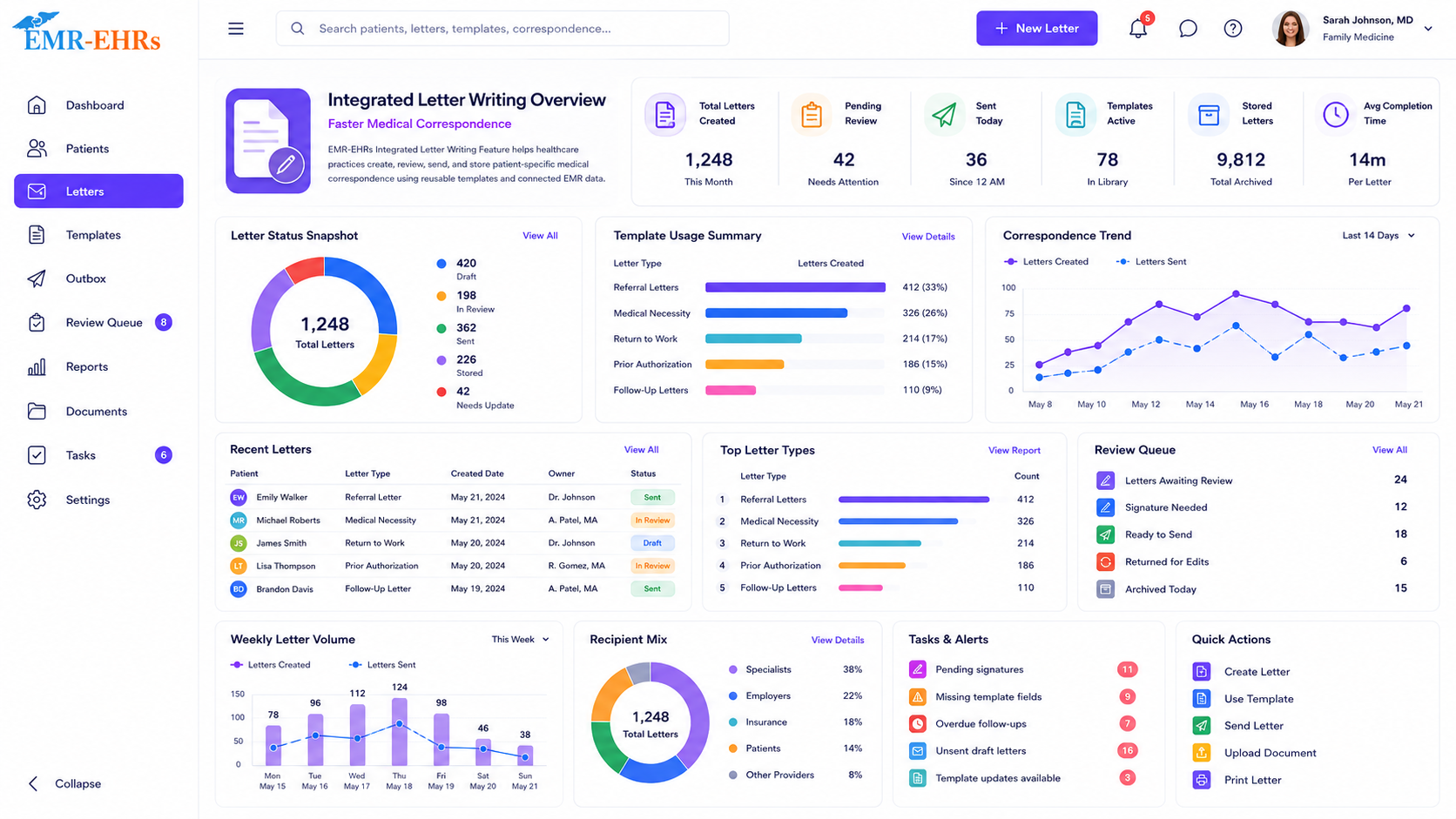
Integrated Letter Writing dashboard for medical correspondence, templates, review queues, sent letters, stored letters, trends, and quick actions
TemplatesPatient Data MergeReferral LettersInsurance LettersReview QueueSave to ChartReportsSecure Records
Quick answer

What Is EMR Integrated Letter Writing Feature?

EMR integrated letter writing Feature is a document generation module that helps healthcare practices create medical letters using reusable templates and patient-specific information from the EMR. It can support patient letters, referral letters, insurance letters, provider correspondence, medical necessity letters if supported, authorization letters if supported, letter queues, review workflows, document storage, and correspondence history.

EMR-EHRs Integrated Letter Writing Feature helps practices create, pre-fill, review, manage, send, and store medical letters using templates and connected patient, insurance, claim, and clinical data inside one EMR workflow.

Why Healthcare Practices Need Integrated Letter Writing Feature

Healthcare practices need more than manual letter templates. They need a connected medical correspondence workflow that links patient charts, reusable templates, patient data merge, provider review, billing support, referral workflows, delivery options if supported, letter history, reports, and secure documentation.

Manual Medical Letters Take Too Much Staff Time

Typing patient details, provider information, insurance details, claim details, clinical context, and repeated language manually slows down providers and staff.

Staff Repeatedly Copy Patient Details From the Chart

Without integrated data merge, teams may copy demographics, insurance, claim, provider, and medical information from multiple places.

Letter Quality Can Vary Across Providers and Teams

Without standardized templates, letters may use inconsistent language, missing details, or different formatting across providers and locations.

Referral Letters Need Accurate Clinical Context

Referral letters need patient information, reason for referral, relevant clinical summary, provider details, and supporting documentation.

Insurance Letters Need Patient, Claim and Supporting Medical Details

Insurance letters often need patient demographics, policy details if supported, claim information if supported, diagnosis information if supported, and supporting clinical details.

Medical Necessity Letters Require Clear Documentation If Supported

Medical necessity letters need structured clinical reasoning, diagnosis details if supported, procedure/service details if supported, and provider statements.

Authorization and Appeal Letters Need Structured Payer-Ready Content If Supported

Authorization letters and appeal letters may require payer details, claim/service information, clinical support, documentation history, and provider review.

Letter Queues Need Better Visibility

Practices need visibility into draft letters, pending review letters, approved letters, completed letters, overdue letters if supported, and assigned staff.

Provider Review and Approval Can Slow Down Correspondence

A connected review workflow helps providers and staff review, edit, approve, and finalize letters more efficiently where supported.

Completed Letters Must Be Stored With the Patient Chart

Letters should stay connected to the patient record so teams can review correspondence history later.

Delivery Status and Correspondence History Need Tracking If Supported

Practices need to know whether letters were printed, saved, faxed, sent, delivered, failed, or require follow-up where supported.

Letter Records Must Stay Secure and Audit-Friendly

Medical correspondence contains patient information and should be managed with secure, role-based, audit-friendly workflows.

Multi-Provider Practices Need Standardized Templates

Practices need consistent letter templates, language, formatting, and review workflows across providers.

Multi-Location Practices Need Consistent Letter Workflows If Supported

Multi-location organizations need consistent templates, queue visibility, letterhead if supported, and reporting across locations.

How EMR-EHRs Integrated Letter Writing feature Works

1

User Opens the Patient Chart

The letter workflow begins from the patient record so relevant patient-specific information can be used where supported.

2

Letter Type Is Selected

The user selects the letter type, such as patient letter, referral letter, provider correspondence, insurance letter, authorization letter if supported, medical necessity letter if supported, appeal letter if supported, or follow-up letter.

3

Letter Template Is Selected

The user selects a reusable template created for the chosen correspondence workflow.

4

Patient Demographics Are Pulled Into the Letter Where Supported

Patient name, date of birth, address, contact details, and other demographic fields can be pre-filled where supported.

5

Insurance Information Is Pulled Into the Letter Where Supported

Insurance details, policy information, payer details, or coverage information can be added where supported.

6

Claim Details Are Pulled Into the Letter If Supported

Claim number, claim status, service information, payer details, or billing-related details can be merged where supported.

7

Medical Details Are Added or Merged Where Supported

Diagnosis, visit details, medical history, medications, allergies, lab/test details, procedures, referral reason, or clinical summary can be added where supported.

8

User Edits and Customizes the Letter

Staff or provider reviews the draft and adds missing context, custom notes, instructions, recipient information, or supporting details.

9

Missing Details Are Completed

The user completes required fields, payer-specific information, referral details, provider statement, patient instructions, or medical necessity details where applicable.

10

Letter Is Routed for Provider or Staff Review If Supported

The letter can be routed to a provider, clinical staff, billing team, authorization team, or administrator for review where supported.

11

Letter Is Approved or Finalized

The letter is finalized, approved, signed if supported, locked if supported, or marked ready for delivery.

12

Letter Is Printed, Saved, Faxed, Emailed, Sent Through Portal or Exported Where Supported

The completed letter is delivered or saved using the supported workflow.

13

Completed Letter Is Stored in the Patient Chart Where Supported

The final letter is saved in the patient chart, document management area, or correspondence history where supported.

14

Letter Status and Correspondence History Are Tracked

Draft, pending review, approved, printed, sent, faxed, delivered, failed, completed, or follow-up required status can be tracked where supported.

15

Reports Are Reviewed

Teams review pending letters, completed letters, letter queues, template usage, provider approvals, delivery status if supported, and correspondence history.

Create Reusable Medical Letter Templates for Common Practice Workflows

User-created letter templates
Practice-level templates
Provider-specific templates if supported
Specialty-specific templates if supported
Patient letter templates
Referral letter templates
Insurance letter templates
Medical necessity letter templates if supported
Authorization letter templates if supported
Appeal letter templates if supported
Follow-up letter templates
Provider correspondence templates
Custom sections
Standardized language
Editable letter content
Template library
Template permissions if supported
Template version history if supported

Pre-Fill Letters With Patient, Insurance, Claim and Medical Information

Only claim specific merge fields when EMR-EHRs verifies support.

Patient name
Date of birth
Patient address
Patient contact details
Insurance information
Policy information if supported
Claim information if supported
Provider information
Practice information
Diagnosis information if supported
Medication information if supported
Allergy information if supported
Visit details if supported
Procedure details if supported
Medical history if supported
Lab/test details if supported
Referral reason if supported
Custom merge fields if supported

Create Patient Letters From the Patient Chart

Patient notification letters
Follow-up letters
Test follow-up letters if supported
Appointment instruction letters if supported
Treatment instruction letters if supported
Education letters
Recall letters if supported
Care plan letters if supported
Form completion letters if supported
Patient-specific content
Staff review
Provider review if needed
Save to patient chart where supported
Print workflow
Portal workflow if supported
Email workflow if supported
Fax workflow if supported
Mail workflow if supported

Generate Referral Letters for Specialists and Outside Providers

Referral letter template
Referring provider details
Receiving provider details
Patient demographics
Reason for referral
Clinical summary
Diagnosis information if supported
Current medications if supported
Allergies if supported
Relevant medical history
Recent visit notes if supported
Test or lab summary if supported
Requested consultation
Urgency / priority if supported
Attach supporting documents if supported
Referral status if supported
Save referral letter to patient chart where supported

Create Insurance, Authorization and Medical Necessity Letters If Supported

Only claim prior authorization, appeal letters, claim follow-up letters, medical necessity letters, or payer-specific workflows when EMR-EHRs verifies support.

Insurance letter templates
Authorization letter templates if supported
Medical necessity letter templates if supported
Claim follow-up letters if supported
Denial appeal letter templates if supported
Patient insurance details
Policy details if supported
Claim details if supported
Diagnosis information if supported
Procedure or service details if supported
Supporting clinical details
Provider statement
Payer recipient information
Letter review workflow
Save to patient record where supported
Billing workflow connection if supported

Manage Provider-to-Provider and Care Team Correspondence

Provider correspondence templates
Specialist communication
Primary care communication
Care team letters
Consultation summary letters if supported
Progress update letters if supported
Transition of care letters if supported
Discharge communication if applicable
Patient summary if supported
Recipient details
Clinical context
Attachments if supported
Letter history
Save to chart where supported

Queue, Review and Manage Multiple Medical Letters

Letter queue
Multiple letter generation
Batch letters if supported
Draft letters
Pending review letters
Approved letters
Completed letters
Returned for edits if supported
Assigned staff
Assigned provider
Letter priority
Due date if supported
Recipient details
Letter category
Queue filters
Bulk print if supported
Bulk save if supported
Batch delivery if supported

Review, Edit and Approve Letters Before Delivery

Only claim digital signatures, locking, version history, approval routing, or e-signature when EMR-EHRs verifies support.

Draft review
Staff editing
Provider review
Approval workflow if supported
Return for correction if supported
Lock finalized letter if supported
Digital signature if supported
Provider signature if supported
Edit history if supported
Review status
Approval status
Finalized letter record

Send, Save or Print Medical Letters From One Workflow

Only claim fax, portal delivery, email, secure messaging, delivery tracking, or automated sending when EMR-EHRs verifies support.

Print letter workflow
Save to patient chart
Fax letter if supported
Portal delivery if supported
Email delivery if supported
Secure message delivery if supported
Download/export if supported
Mail-ready letter format if supported
Delivery status if supported
Failed delivery status if supported
Recipient confirmation if supported
Communication notes

Store Completed Letters in the Patient Chart

Letter history
Completed letter record
Draft history if supported
Template used
Date created
User who created letter
Provider who approved letter if supported
Recipient details
Delivery status if supported
Communication notes
Letter attachment if supported
Patient chart storage
Document management connection
Searchable letter history if supported

Track Letter Status, Correspondence History and Follow-Up Tasks

Draft status
Pending review status
Approved status
Sent status if supported
Printed status if supported
Faxed status if supported
Delivered status if supported
Failed status if supported
Follow-up required status
Assigned user
Due date if supported
Correspondence notes
Letter category filters
Staff worklist
Provider worklist
Administrator view

Integrated Letter Writing for Specialty, Multi-Provider and Multi-Location Practices

Specialty-specific letter templates
Multi-provider letter workflows
Multi-location correspondence workflows
Provider-specific letter templates if supported
Location-specific letterhead if supported
Referral letters by specialty
Procedure letters if applicable
Therapy progress letters if applicable
Pain management letters if applicable
Podiatry letters if applicable
Primary care letters if applicable
Multi-specialty correspondence workflow

HIPAA-Focused Letter Writing Feature for Secure Medical Correspondence

HIPAA-focused letter writing workflows, designed to support secure medical correspondence, audit-friendly letter records, and secure patient correspondence documentation.

Role-based access
User permissions
Secure patient correspondence records
Letter history
Staff action history if supported
Provider approval history if supported
Delivery history if supported
Change logs if supported
Audit-friendly letter records
Privacy-focused correspondence workflow
Secure document storage
Document management connection if supported

Connect Letter Writing With EMR, Patient Records, Billing, Referrals and Document Management

Only list specific fax vendors, portal tools, document systems, payer systems, APIs, or integrations when EMR-EHRs verifies support.

EMR patient record connection
Patient demographics connection
Insurance data connection
Claim data connection if supported
Provider notes connection
Billing workflow connection if supported
Referral workflow connection if supported
Authorization workflow connection if supported
Document management connection
Patient portal connection if supported
Fax workflow connection if supported
Reports workflow
Secure data exchange if supported

Letter Writing Reports, Queue Visibility and Correspondence Analytics

Letter Volume Reports

  • Letters created
  • Letters completed
  • Letters pending review
  • Letters by template
  • Letters by provider
  • Letters by location
  • Letters by category

Queue Reports

  • Draft letters
  • Pending approval letters
  • Overdue letters if supported
  • Assigned staff
  • Assigned provider
  • Letter aging if supported

Delivery Reports If Supported

  • Printed letters
  • Faxed letters
  • Portal-sent letters
  • Emailed letters
  • Failed delivery
  • Delivery status
  • Recipient status if supported

Correspondence History Reports

  • Patient letter history
  • Referral letter history
  • Insurance letter history
  • Provider correspondence history
  • User activity if supported

AI-Powered Tools to Support Medical Letter Drafting and Review

AI-powered tools should support letter drafting and administrative efficiency while providers and staff remain responsible for final review, clinical accuracy, patient information, signature, approval, and delivery decisions.

AI letter draft suggestions if available

Support first-draft letter creation while keeping final review, clinical accuracy, signature, and delivery decisions with staff and providers.

AI referral letter summary if available

Summarize referral context, clinical details, and recipient information for review where available.

AI medical necessity draft support if available

Help draft medical necessity language from available context where supported and verified.

AI missing detail alerts if available

Flag missing patient, insurance, claim, recipient, or clinical details before letters move forward.

AI tone and clarity suggestions if available

Support clearer correspondence while keeping final wording under staff or provider review.

AI correspondence summary if available

Summarize letter history, queue status, and correspondence activity for review.

Built for Providers, Clinical Staff, Billing Teams and Practice Administrators

Providers

Review, edit, approve, and finalize patient letters, referral letters, provider correspondence, and clinical summaries.

Clinical Staff

Prepare letters, pull patient information, manage templates, route drafts, and save correspondence to the patient chart.

Front Desk Teams

Print, mail, fax if supported, send, or track patient letters and routine correspondence.

Referral Coordinators If Applicable

Generate referral letters, specialist correspondence, supporting documentation, and referral follow-up letters.

Billing Teams If Applicable

Create insurance letters, claim follow-up letters, medical necessity letters if supported, appeal letters if supported, and payer correspondence.

Authorization Teams If Applicable

Prepare authorization letters, medical necessity support, payer correspondence, and approval-related documentation where supported.

Practice Administrators

Monitor letter queues, template usage, staff worklists, approval status, correspondence reports, and workflow consistency.

Multi-Provider Practices

Standardize letter formats, template language, approval workflows, and patient correspondence across providers.

Multi-Location Practices

Manage location-specific correspondence, letterhead if supported, queues, reports, and provider workflows across locations.

Specialty Practices

Create specialty-specific referral letters, procedure letters, patient instructions, therapy progress letters, medical necessity letters if supported, and payer communication letters.

EMR-EHRs Integrated Letter Writing vs Manual Letter Writing

Workflow AreaManual Letter WritingEMR-EHRs Integrated Letter Writing
Letter creationTyped from scratchTemplate-based letter creation
Patient dataManual copy-pastePatient data pre-fill where supported
Insurance dataManual lookupInsurance data merge where supported
Claim dataManual lookupClaim data merge if supported
Medical detailsCopied from chartMedical data merge where supported
TemplatesInconsistent documentsStandardized user-created templates
Review workflowManual handoffLetter queue and review workflow where supported
DeliverySeparate print/fax/send processPrint, save, fax, portal, or email workflow where supported
HistoryStored separatelyPatient-linked letter history where supported
SecurityDecentralized filesRole-based and audit-friendly records where supported

What to Look for in the Best EMR Letter Writing Feature

Patient chart connection
User-created letter templates
Patient demographics merge
Insurance data merge
Claim data merge if supported
Medical information merge
Referral letter templates
Patient letter templates
Provider correspondence templates
Insurance letter templates
Medical necessity letters if supported
Authorization letters if supported
Appeal letters if supported
Letter queue management
Batch letter creation if supported
Review and approval workflow if supported
Print workflow
Fax workflow if supported
Portal / email workflow if supported
Save to patient chart
Letter history
Correspondence status tracking
Reports and analytics
Role-based access
AI letter drafting support if available
Implementation, training, and support

See the Integrated Letter Writing Workflow in Action

Letter Template LibraryCorrespondence workflow
Patient chart
Letter type selection
Patient demographics merge
Insurance and claim fields
Medical details merge fields
Referral letter template
Draft editor
Pending review status
Provider approval status
Print / save / fax / send
Letter history
Correspondence report panel
Insurance lettersSave to chartReview queueSecure recordsReports

Why Choose EMR-EHRs for Integrated Letter Writing?

Connected Patient Chart Letter Writing

EMR-EHRs connects letter writing with patient records, demographics, insurance information, claim information if supported, medical details, and correspondence history.

User-Created Letter Templates

EMR-EHRs helps practices create reusable templates for patient letters, referral letters, insurance letters, follow-up letters, and provider correspondence.

Faster Letter Generation With Data Merge

EMR-EHRs helps reduce repetitive typing by pre-filling letters with patient-specific information where supported.

Letter Queue and Review Visibility

EMR-EHRs supports organized letter queues, draft review, provider approval workflows where supported, and completion tracking.

Patient-Linked Correspondence History

EMR-EHRs helps practices store completed letters, letter notes, correspondence history, and audit-friendly letter records.

Secure and Audit-Friendly Letter Records

EMR-EHRs supports secure patient correspondence records, role-based access, and audit-friendly documentation workflows where supported.

Implementation, Training and Support

EMR-EHRs helps configure templates, merge fields, letter workflows, user roles, reports, and staff training. Phone: (480) 782-1116. Email: info@emr-ehrs.com.

Implementation, Setup and Training for Integrated Letter Writing Workflows

1

Letter Workflow Review

Review current patient letter, referral letter, insurance letter, provider correspondence, billing letter, authorization letter if applicable, and document storage workflows.

2

Template Category Setup

Configure letter categories such as patient letters, referral letters, insurance letters, authorization letters if supported, medical necessity letters if supported, appeal letters if supported, provider correspondence, and follow-up letters.

3

Merge Field Setup

Configure patient demographics, insurance fields, claim fields if supported, provider details, practice details, and medical information fields where supported.

4

Review and Approval Workflow Setup

Configure draft review, provider approval if supported, staff roles, template permissions, queue visibility, and finalization workflows.

5

Delivery and Storage Workflow Setup

Configure print, save-to-chart, fax if supported, portal if supported, email if supported, export if supported, and document management workflows.

6

Reports and Queue Setup

Configure draft letters, pending letters, completed letters, provider queues, staff queues, overdue letters if supported, letter categories, and correspondence reports.

7

Staff Training

Train providers, clinical staff, front desk teams, referral coordinators, billing teams, authorization teams, and administrators.

8

Go-Live and Optimization

Monitor letter queues, template usage, merge field accuracy, review workflows, delivery status if supported, staff adoption, and report usage.

Current letter workflow review
Current referral letter workflow review
Current insurance letter workflow review
Template setup
Merge field setup
Staff role setup
Provider review setup if supported
Letter queue setup
Delivery workflow setup if supported
Save-to-chart workflow setup
Report setup
Staff training
Ongoing optimization

EMR Integrated Letter Writing Feature FAQs

EMR integrated letter writing Feature is a medical letter generation module that helps healthcare practices create letters from the patient chart using reusable templates and patient-specific EMR data. EMR-EHRs Integrated Letter Writing feature can support patient letters, referral letters, provider correspondence, insurance letters, letter queues, review workflows, save-to-chart workflows, correspondence history, and secure medical letter records.
Integrated letter writing feature reduces manual documentation work by helping staff use reusable letter templates and pre-fill letters with patient demographics, insurance information, provider details, claim data if supported, medical information if supported, and other chart details where available. EMR-EHRs helps reduce repeated typing, manual copy-paste, inconsistent formatting, and disconnected letter storage.
EMR-EHRs Integrated Letter Writing feature can support patient letters, referral letters, provider-to-provider correspondence, follow-up letters, patient notification letters, insurance letters, medical necessity letters if supported, authorization letters if supported, appeal letters if supported, and specialty-specific letter templates where available.
Yes. EMR-EHRs Integrated Letter Writing feature can pre-fill letters with patient demographics, patient contact details, insurance information, provider details, practice details, claim data if supported, diagnosis information if supported, visit details if supported, procedure details if supported, medical history if supported, and custom merge fields if supported.
Practices should use integrated letter writing because manual templates often require copy-paste, repeated typing, separate file storage, inconsistent formatting, and limited tracking. EMR-EHRs Integrated Letter Writing Feature helps connect letter templates, patient records, data merge, review workflow, delivery options if supported, letter history, reports, and secure correspondence records in one EMR workflow.

Ready to Simplify Medical Letter Writing and Correspondence Workflows?

Simplify patient letters, referral letters, insurance letters, provider correspondence, medical necessity letters if supported, authorization letters if supported, appeal letters if supported, template creation, patient data merge, letter queues, review workflows, save-to-chart workflows, and secure letter history with EMR-EHRs Integrated Letter Writing Feature.

Phone: (480) 782-1116   Email: info@emr-ehrs.com
