Manual Insurance Calls Slow Down Front Desk Teams
Calling payer phone lines or checking separate payer portals can delay check-in and increase staff workload.
EMR-EHRs Insurance Benefits Verification Software helps practices review patient, payer, coverage, benefit, copay, deductible, authorization, referral, visit-readiness, and billing-readiness details where supported.
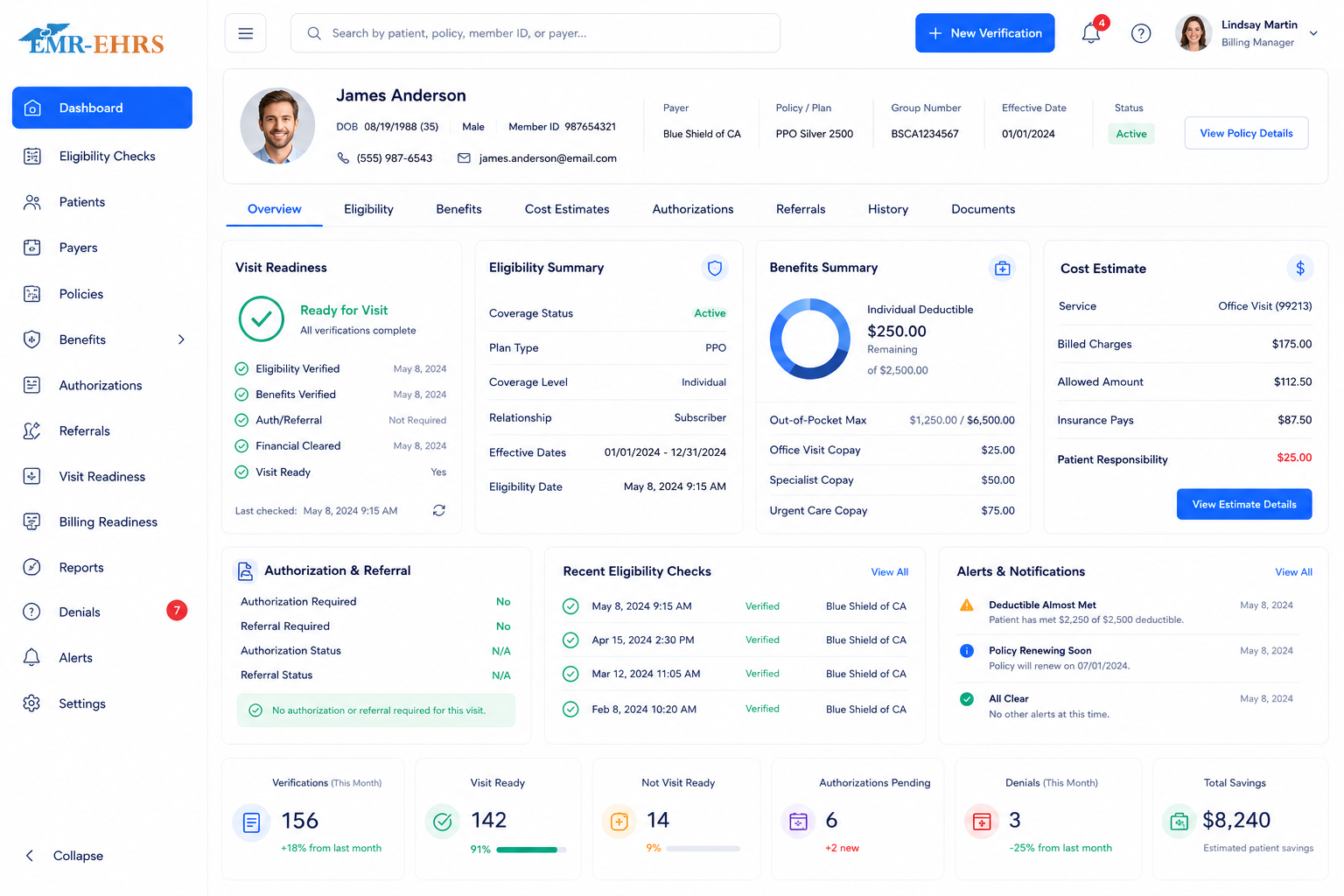
Insurance eligibility verification software helps healthcare practices confirm whether a patient's insurance is active and whether benefits may apply before the visit or service. It can support patient demographic review, subscriber verification, payer review, benefits checks, copay and deductible review, authorization or referral flags, visit readiness, billing readiness, exception worklists, and verification history where supported.
EMR-EHRs Electronic Verification Insurance Benefits Software helps practices review patient demographics, subscriber details, payer information, insurance coverage, benefit details, authorization flags, referral needs, visit readiness, billing readiness, and secure verification history where supported.
Healthcare practices need a connected eligibility workflow before the visit so front desk and billing teams can reduce manual insurance checks, catch missing information, support patient financial conversations, and prepare claims more accurately where supported.
Calling payer phone lines or checking separate payer portals can delay check-in and increase staff workload.
Coverage, plan type, subscriber details, member ID, employer, secondary insurance, and benefit levels can change before the next visit.
Wrong subscriber name, date of birth, relationship, member ID, policy number, or group number can prevent successful verification.
Incorrect payer name, payer ID, plan type, or insurance sequence can create claim delays and manual rework.
If coverage is inactive on the service date, billing teams may face preventable claim rejections, denials, or patient balance issues.
Staff need accurate benefit details where supported to support patient financial conversations before or during check-in.
Some visits, procedures, imaging, therapy, or specialty services may require authorization where supported.
Specialist visits and payer-specific plans may require referrals before the appointment where supported.
Practices need clear primary, secondary, and tertiary insurance order where supported to support billing readiness.
Eligibility should be checked before the appointment when possible, not only when the patient arrives.
Inactive coverage, no payer response, invalid member ID, payer mismatch, or missing insurance should route to a clear worklist.
Front desk teams need simple statuses such as verified, needs review, inactive, missing insurance, authorization required, or ready for visit.
Billing teams need verification date, payer response, staff notes, coverage status, and benefit details where supported.
Administrators need reports for verified appointments, failed checks, missing insurance, inactive coverage, authorization flags, and staff worklists.
Eligibility workflows include patient demographics, subscriber data, payer responses, insurance details, and financial responsibility information.
Staff selects a scheduled appointment, patient record, encounter, or check-in workflow where supported.
Staff reviews patient name, date of birth, address, gender if required, phone number if supported, and patient identifiers.
Staff reviews subscriber name, subscriber date of birth, relationship to subscriber, member ID, policy number, and group number.
Staff confirms payer name, payer ID if supported, insurance plan, plan type, primary payer, secondary payer, and tertiary payer where supported.
The eligibility check is run for the selected payer, patient, provider, visit date, location, or service type where supported.
The response may show active coverage, inactive coverage, pending, no response, failed, payer mismatch, or needs manual review where supported.
Staff reviews copay, deductible, coinsurance, out-of-pocket amount, service-type benefits, covered services, and patient responsibility where supported.
Staff reviews authorization requirements, referral requirements, PCP requirement, visit limits, service limits, and documentation needs where supported.
The workflow supports payer sequencing, coordination of benefits, secondary benefits, tertiary coverage, and billing readiness where supported.
Missing insurance, invalid member ID, inactive coverage, demographic mismatch, subscriber mismatch, payer mismatch, no response, or benefits unavailable are routed for review.
Staff creates recheck tasks, manual verification notes, patient communication tasks, authorization tasks, referral tasks, or billing review notes where supported.
The visit can be marked verified, needs review, missing insurance, inactive coverage, authorization required, referral required, failed check, or ready for visit where supported.
Billing readiness can be updated before claim creation where supported.
Verification date, time if supported, payer response, staff action, coverage status, benefit details, notes, and exceptions are stored where supported.
Managers review eligibility checks, failed verifications, inactive coverage, missing insurance, authorization flags, referral flags, readiness status, and staff performance.
Confirm support for automatic appointment-based verification, scheduled batch checks, real-time appointment checks, or same-day verification, including configuration and implementation requirements, during evaluation.
Confirm support for payer directory, payer lookup, insurance card scan, OCR, automatic payer detection, or payer mismatch detection, including configuration and implementation requirements, during evaluation.
Confirm support for real-time eligibility, batch verification, payer response automation, or schedule-based automation, including configuration and implementation requirements, during evaluation.
Confirm support for authorization detection, referral detection, visit limit tracking, or medical necessity flags, including configuration and implementation requirements, during evaluation.
Confirm support for patient responsibility estimation, portal balance, payment collection, financial consent, or patient statement workflows, including configuration and implementation requirements, during evaluation.
HIPAA-focused eligibility workflow, designed to support secure insurance data access, audit-friendly eligibility verification records, and role-based insurance verification permissions.
Confirm support for specific payer networks, clearinghouses, EDI 270/271, APIs, HL7/FHIR, insurance card OCR, patient portal update, or payment integrations, including connection method and implementation scope, during evaluation.
AI-powered eligibility tools should support staff review and workflow efficiency while front desk and billing teams remain responsible for final insurance verification, payer review, patient communication, authorization follow-up, billing readiness, and documentation.
Summarize coverage status, benefits, payer response, and readiness details for staff review.
Surface missing insurance, payer mismatch, failed checks, authorization flags, and referral flags where available.
Help prioritize rechecks, manual verification tasks, visit readiness, and billing readiness queues.
Review insurance information, verify eligibility, confirm benefits, flag missing coverage, and update visit readiness where supported.
Use eligibility details to support claim readiness, payer review, patient responsibility, authorization follow-up, and billing documentation.
View visit readiness, authorization flags, referral requirements, or coverage limitations where supported.
Monitor verification volume, failed checks, missing insurance, inactive coverage, authorization flags, referral flags, and staff worklists.
Review failed verification queues, billing readiness, payer response issues, missing insurance, and coverage-related claim risks.
Check eligibility across provider schedules, staff worklists, payer types, and visit readiness statuses where supported.
Track eligibility status, payer issues, missing insurance, and authorization flags across locations where supported.
Manage specialty-specific benefit checks, authorization requirements, referral needs, visit limits, and payer-specific verification workflows where supported.
| Workflow Area | Manual Insurance Checks | EMR-EHRs Eligibility Verification |
|---|---|---|
| Insurance review | Phone calls and payer portals | Connected insurance review workflow |
| Appointment checks | Manual schedule review | Appointment-based checks where supported |
| Patient details | Manual lookup | Demographic and subscriber review |
| Payer details | Manual payer search | Payer and plan review where supported |
| Benefits review | Manual payer lookup | Benefits response review where supported |
| Copay and deductible | Staff must search manually | Copay and deductible details where supported |
| Authorization flags | Easy to miss | Authorization alerts where supported |
| Referral requirements | Manual tracking | Referral alerts where supported |
| Failed checks | Notes or spreadsheets | Exception worklists where supported |
| Visit readiness | Manual staff judgment | Visit readiness status where supported |
| Billing readiness | Disconnected from claim prep | Billing readiness support where supported |
| Reports | Manual tracking | Eligibility and verification reports |
| Security | Paper notes or shared files | Role-based access and audit-friendly history |
This conceptual workflow preview illustrates a eligibility verification dashboard mockup.
Active/inactive coverage and payer response.
Copay, deductible and coinsurance where supported.
Authorization and referral needs where supported.
Visit readiness and billing readiness indicators.
EMR-EHRs helps practices connect eligibility verification with scheduling, check-in, billing readiness, and claims workflow where supported.
EMR-EHRs supports review of demographics, subscriber details, payer information, plan details, and insurance fields.
EMR-EHRs can support coverage status, benefits, copays, deductibles, coinsurance, out-of-pocket details, and service-specific information where available.
EMR-EHRs can support authorization flags, referral requirements, visit limits, and follow-up worklists where available.
EMR-EHRs helps teams manage missing insurance, inactive coverage, payer mismatch, invalid member ID, failed checks, and manual review tasks where supported.
EMR-EHRs supports visit readiness, check-in readiness, billing readiness, and staff review statuses where supported.
EMR-EHRs supports role-based access, secure insurance data, and audit-friendly eligibility verification history where supported.
EMR-EHRs can support eligibility summaries, benefits summaries, exception prioritization, and front desk worklist summaries where available.
EMR-EHRs helps configure verification workflows, payer fields, insurance data, status rules, worklists, reports, user roles, and staff training.
Review insurance capture, payer review, eligibility checks, benefits review, authorization follow-up, referral workflow, check-in readiness, billing readiness, and reports.
Configure patient demographics, subscriber fields, policy fields, insurance fields, payer details, plan details, and insurance sequence.
Configure payer names, payer IDs if supported, plan types, insurance sequence, plan effective dates, and plan termination dates where supported.
Configure single-patient checks, appointment-based checks, batch checks, service-type checks, provider checks, location checks, and response statuses where supported.
Configure benefit display, copay details, deductible details, coinsurance, out-of-pocket details, service-level benefits, and patient responsibility fields where supported.
Configure authorization alerts, referral alerts, visit limits, documentation flags, staff follow-up tasks, and worklist routing where supported.
Configure payer sequencing, coordination of benefits, secondary insurance fields, tertiary insurance fields, and billing readiness where supported.
Configure missing insurance, inactive coverage, payer mismatch, failed check, no response, invalid subscriber, manual verification, recheck tasks, and resolution statuses.
Configure verified, needs review, authorization required, referral required, inactive, failed check, missing insurance, ready for visit, and ready for billing statuses.
Configure eligibility reports, failed verification reports, missing insurance reports, authorization/referral reports, front desk worklists, billing readiness reports, and staff task reports.
Configure front desk access, billing access, insurance edit permissions, eligibility check permissions, financial data permissions, report access, and audit-friendly history.
Train front desk teams, billing teams, RCM teams, practice managers, providers, and administrators.
Monitor verification volume, failed checks, inactive coverage, missing insurance, authorization flags, referral flags, staff adoption, billing readiness, and report accuracy.
Insurance eligibility verification software helps healthcare practices confirm whether a patient's insurance is active before the visit or service. It can support patient demographic review, subscriber detail review, payer and plan verification, benefits checks, copay and deductible review, authorization or referral flags, visit readiness, billing readiness, and secure verification history where supported.
EMR-EHRs Electronic Verification Insurance Benefits Software helps practices review patient demographics, subscriber information, payer details, plan information, coverage status, and benefits before the appointment where supported. It can also help front desk and billing teams manage failed checks, missing insurance, inactive coverage, payer mismatch, visit readiness, and billing readiness.
Yes, where supported. EMR-EHRs can help practices review copay amounts, deductible details, deductible remaining, coinsurance, out-of-pocket information, benefit details, and patient responsibility before the visit. This helps front desk teams support clearer patient financial conversations and billing readiness.
EMR-EHRs can help identify authorization or referral requirements where supported, including prior authorization needs, referral requirements, PCP requirements, service limitations, visit limits, documentation requirements, and staff follow-up tasks. These flags help teams address visit or billing issues before the appointment.
Integrated eligibility verification helps reduce manual payer calls, separate portal checks, missed coverage issues, inactive insurance surprises, and disconnected staff notes. EMR-EHRs supports connected insurance review, eligibility status, benefits visibility, exception worklists, visit readiness, billing readiness, reports, and audit-friendly verification history where supported.
Verify patient insurance benefits, review coverage status, identify copays and deductibles, flag authorization or referral needs, prepare check-in teams, support billing readiness, and track verification history with EMR-EHRs Electronic Verification Insurance Benefits Software where supported.
Phone: (480) 782-1116 | Email: jason@1stproviderschoice.com
